
Emmanuel,
I'm glad to report that the problems I reported don't exist anymore. Of course I don't understand what caused them, it's as if half of my computer was asleep.
Hans
Sweet Home 3D 3.4
This topic has been viewed 193318 times and has 51 replies

Re: Sweet Home 3D 3.4
Great to read it now works for you Hans. [:)]
Tonight, Beta 6 fixes a few bugs found in level management, while trying to build the attached file, built from the house plan available on this site. For your information, it took me more than 6 hours to reproduce the plan and the roof of this quite complicated house with 2 levels.
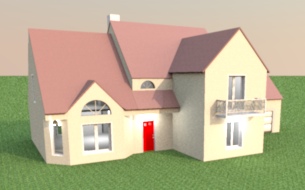
Tonight, Beta 6 fixes a few bugs found in level management, while trying to build the attached file, built from the house plan available on this site. For your information, it took me more than 6 hours to reproduce the plan and the roof of this quite complicated house with 2 levels.
- Attachments
-
- House89.sh3d
- (243.62 KiB) Downloaded 11488 times
Emmanuel Puybaret, Sweet Home 3D creator
Re: Sweet Home 3D 3.4
Hello all,
If you're using Ubuntu 11.10, 64 bits, you may have difficulties using the newest beta.
Install the original Sun Java and your problem will be solved.
Here is a help page for easy installation. These are the commands I used:
Hans
If you're using Ubuntu 11.10, 64 bits, you may have difficulties using the newest beta.
Install the original Sun Java and your problem will be solved.
Here is a help page for easy installation. These are the commands I used:
Code: Select all
sudo add-apt-repository "deb http://archive.canonical.com/ lucid partner"
sudo apt-get update
sudo apt-get install sun-java6-jre sun-java6-bin sun-java6-jdk sun-java6-plugin sun-java6-fontsRe: Sweet Home 3D 3.4
Today's Beta 7 brought 3D view > Display all levels and 3D view > Display selected level menu items, and improved magnetism during rooms drawing (you should have much less problem to draw a simple rectangle).
I also increased a little the sensitivity of magnetism.
I also increased a little the sensitivity of magnetism.
Emmanuel Puybaret, Sweet Home 3D creator
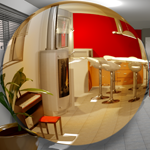
Re: Sweet Home 3D 3.4
And now beta 8 ! 
Tanks a lot for that pretty good job Emmanuel !
Tanks a lot for that pretty good job Emmanuel !
----------------------
Pierre
Pierre
Re: Sweet Home 3D 3.4
Tonight's Beta 9 adds support for levels at a negative elevation. Hope you like it. [:)]
As soon as you place an object, a room or a surface surrounded by walls at a level with a negative elevation, Sweet Home 3D will compute a hole that will surround the added item. Multiple underground levels containing items of different sizes are supported.
Note that the virtual visitor can't go below elevation 0, and I'm not sure I'll add that in the next update (keeping the visitor location in the home when underground isn't so easy).
As soon as you place an object, a room or a surface surrounded by walls at a level with a negative elevation, Sweet Home 3D will compute a hole that will surround the added item. Multiple underground levels containing items of different sizes are supported.
Note that the virtual visitor can't go below elevation 0, and I'm not sure I'll add that in the next update (keeping the visitor location in the home when underground isn't so easy).
Emmanuel Puybaret, Sweet Home 3D creator
Re: Sweet Home 3D 3.4
And here's a Beta 10 because I forgot to make the required changes to the photo creation tool.
Which swimming pool will you prefer? [;)]
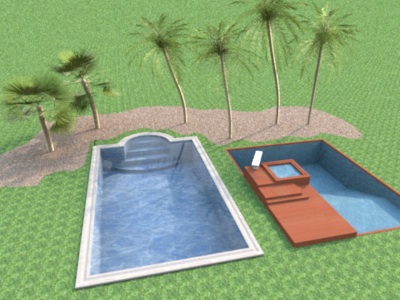
Which swimming pool will you prefer? [;)]
Emmanuel Puybaret, Sweet Home 3D creator
Re: Sweet Home 3D 3.4
I prefer the left one.
Though "underground elevation" sounds a bit strange [:D] ,
anyway it's a huge step upgrade. Great job !
How can you make it so quickly ?
Though "underground elevation" sounds a bit strange [:D] ,
anyway it's a huge step upgrade. Great job !
How can you make it so quickly ?
----------------------
Pierre
Pierre
Re: Sweet Home 3D 3.4
The Beta 11 brings a few new small features and improvements:
- Added New floors thickness field in preferences pane,
- Added a button to import language libraries in preferences pane to make it easier to install SH3L files when file association doesn't work (there are now 3 SH3L available files: Traditional Chinese , Korean and Finnish),
- Added some tooltips to show the current angle on rotation axis in the 2nd step of the Import furniture wizard,
- Added a table in the Level modification dialog to help users compare the values of the edited level with the ones of other levels.
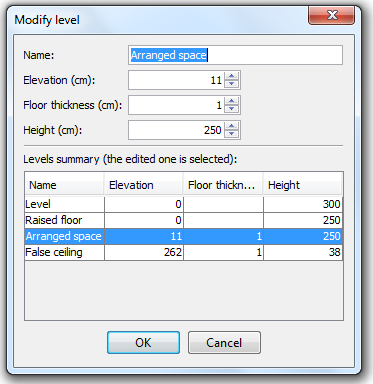
And as showed in the previous dialog, I checked that the new level feature was able to handle correctly raised floor and false ceiling. This test was made on the attached example that shows the 4 following levels when 3D view > Display selected level menu item is checked (the outer level isn't mandatory but still nice to have).
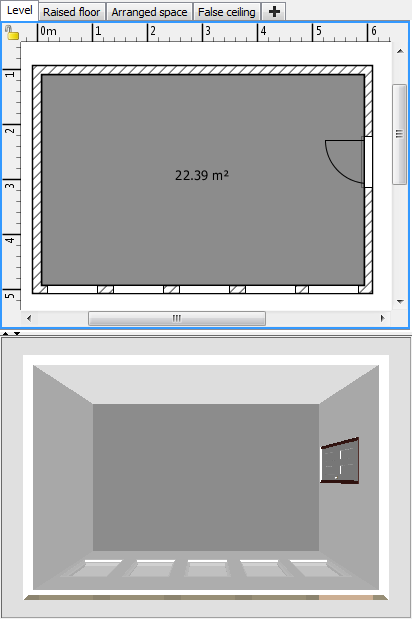
Raised floor:
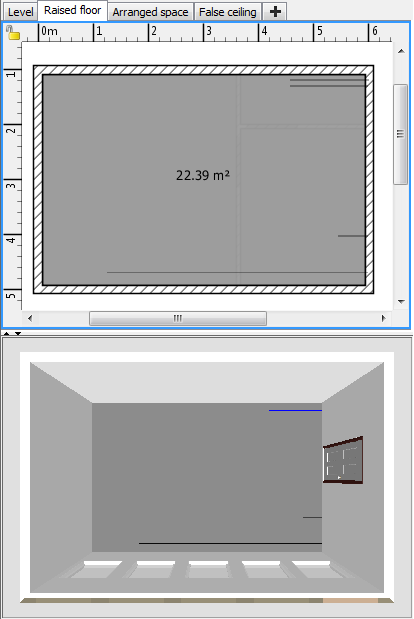
Arranged space:
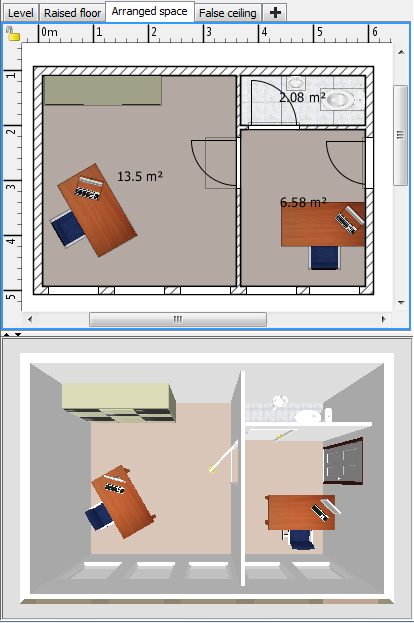
False ceiling:
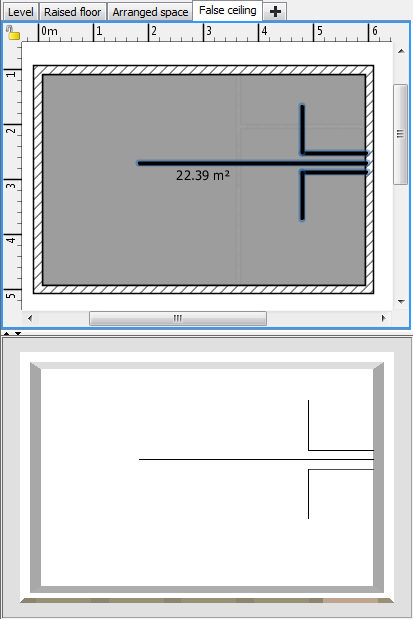
I guess that a few ones among you are going to be happy because levels actually behave like layers when they are at the same elevation, excepted that walls are always displayed when they are at the same elevation as a level elevation, but I don't feel it's annoying for a software like Sweet Home 3D.
Like always your comments will be appreciated. [:)]
- Added New floors thickness field in preferences pane,
- Added a button to import language libraries in preferences pane to make it easier to install SH3L files when file association doesn't work (there are now 3 SH3L available files: Traditional Chinese , Korean and Finnish),
- Added some tooltips to show the current angle on rotation axis in the 2nd step of the Import furniture wizard,
- Added a table in the Level modification dialog to help users compare the values of the edited level with the ones of other levels.
And as showed in the previous dialog, I checked that the new level feature was able to handle correctly raised floor and false ceiling. This test was made on the attached example that shows the 4 following levels when 3D view > Display selected level menu item is checked (the outer level isn't mandatory but still nice to have).
Raised floor:
Arranged space:
False ceiling:
I guess that a few ones among you are going to be happy because levels actually behave like layers when they are at the same elevation, excepted that walls are always displayed when they are at the same elevation as a level elevation, but I don't feel it's annoying for a software like Sweet Home 3D.
Like always your comments will be appreciated. [:)]
- Attachments
-
- OfficeWithRaisedFloorAndFalseCeiling.sh3d
- (946.33 KiB) Downloaded 200884 times
Emmanuel Puybaret, Sweet Home 3D creator
Re: Sweet Home 3D 3.4
Emmanuel,
I think I found a small bug in v3.4 b11 that concerns creating a room.
In the attached file the outline of a building is drawn. You will find that it is impossible to create a room by double-clicking inside this shape.
If you inspect the connection of the two wall segments marked with a red circle, you will see that this connection isn't at a 90 degree angle, but is slanted or skewed. It looks a bit like a problem you fixed earlier.
Now, if you bisect the room, you will find that you can create a room by double-clicking in the part without the red circle, but NOT in the part where the slanted connection is.
Hans
I think I found a small bug in v3.4 b11 that concerns creating a room.
In the attached file the outline of a building is drawn. You will find that it is impossible to create a room by double-clicking inside this shape.
If you inspect the connection of the two wall segments marked with a red circle, you will see that this connection isn't at a 90 degree angle, but is slanted or skewed. It looks a bit like a problem you fixed earlier.
Now, if you bisect the room, you will find that you can create a room by double-clicking in the part without the red circle, but NOT in the part where the slanted connection is.
Hans
- Attachments
-
- bug in Draw Room.sh3d
- (58.79 KiB) Downloaded 1022 times
Who is online
Users browsing this forum: No registered users and 1 guest