Lots of noise on shadows in photo and video

This topic has been viewed 8447 times and has 9 replies
Thread status: Active
Still a problem with your graphic card? [img]http://www.sweethome3d.com/images/flags/en_small.gif[/img]
Post Reply New Topic
Ash187
Posts: 4
Joined: Tue Jan 08, 2013 5:07 pm
Country: United Kingdom

Lots of noise on shadows in photo and video

Post by Ash187 »

hey guys,

I have been playing with the software for a few days now and i absolutely love it.

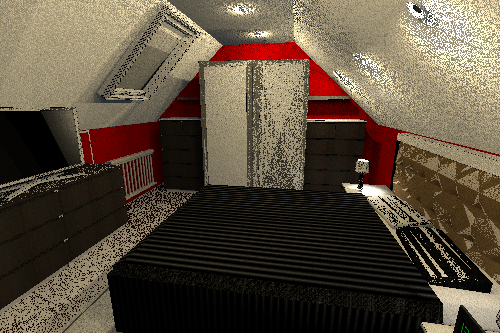
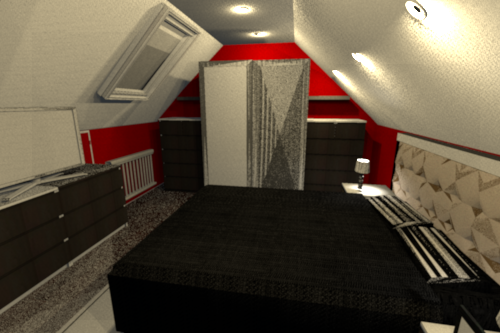
the problem i am having though which i cannot find any guides on or previous mention of any fix is that after i have designed the loft bedroom and i try to do a good quality photo or video i cant seem to get a clear image. there is always either white or black specs all over the floor or tops of drawers and on the wardrobe.
i have played with various options to no avail.
i dont know if it helps but i am using a new 2012 Macbook pro with i5 processor and 8GB ram, I saw a guide of how to allocate more ram to the program so i have increased it to 2GB.

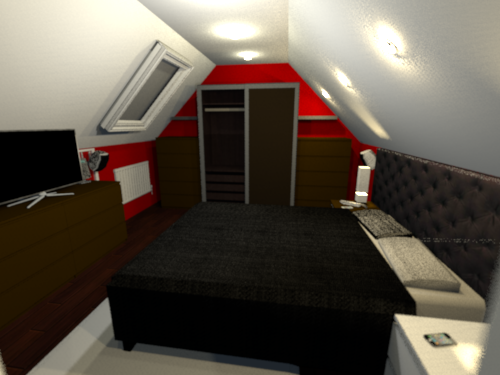
i am also attaching 3 images of the room to show the issue... the pictures are of how the room looks like in the same position with the quality turned up each time.
as you can see the wardrobe,TV, and headboard dont show up well as with the flooring.

please help me figure out what i have done wrong.

Thanks
Ash
Image

Image

Image
User avatar
Puybaret
Posts: 9440
Joined: Mon Nov 07, 2005 12:00 pm
Country: Paris, France
Contact:

Re: Lots of noise on shadows in photo and video

Post by Puybaret »

The easiest way to get less noise is to generate a larger image and down scale it with an image processing application. Under Mac OS X, you can use Preview application and its Tools > Adjust size menu item.
In the next version, there will be also the ability to request better quality setting for SunFlow, at least by changing some program parameters (it's already programed with -Dproperty=value Java parameters but not sure I will show these advanced parameters with a nicer user interface immediately).
Emmanuel Puybaret, Sweet Home 3D creator
User avatar
m@
Posts: 33
Joined: Sun Dec 16, 2012 10:21 pm

Re: Lots of noise on shadows in photo and video

Post by m@ »

In the next version, there will be also the ability to request better quality setting for SunFlow,
Yes please, that would be great! [=D>]


I used to get noisy renderings too, but since I use the Light Set found here
http://www.sweethome3d.com/models/basicLights.sh3f

and follow the advice from Hans found here
http://www.sweethome3d.com/support/foru ... hread,3668

the results are getting better. But it still takes time and patience to get a good pic.

Using spots and dimmed lights always resulted in very noisy renderings for me til'now.

Here's an example of a pretty noiseless rendering, only the reflection of the light on the red front generates some wired noise:
Image
User avatar
Puybaret
Posts: 9440
Joined: Mon Nov 07, 2005 12:00 pm
Country: Paris, France
Contact:

Re: Lots of noise on shadows in photo and video

Post by Puybaret »

For your information, I don't see any advantage to use the lights available in basicLights.sh3f, compared to the white light source provided with Sweet Home 3D since version 3.0. The size of these lights don't influence their effect and they are not visible in the 3D view when selected.
Emmanuel Puybaret, Sweet Home 3D creator
User avatar
m@
Posts: 33
Joined: Sun Dec 16, 2012 10:21 pm

Re: Lots of noise on shadows in photo and video

Post by m@ »

Well, lightning is still a big mistery for me... [:-?]
Besides; can you give me an advice how to get rid of the reflections on the red front? The material is not shiny, so what else can I do to avoid?
User avatar
Puybaret
Posts: 9440
Joined: Mon Nov 07, 2005 12:00 pm
Country: Paris, France
Contact:

Re: Lots of noise on shadows in photo and video

Post by Puybaret »

Are you really sure that the material is not shiny? Did you check the Matt option in the furniture panel of that cabinet?
Emmanuel Puybaret, Sweet Home 3D creator
User avatar
m@
Posts: 33
Joined: Sun Dec 16, 2012 10:21 pm

Re: Lots of noise on shadows in photo and video

Post by m@ »

OK, I just realized that in v.3.8., I can set the "shininess" for each material separately. The shininess ruler for the red front of the cabinet was not set to zero. Now I'm waiting to get the picture newly rendered, I'm gonna post it in the gallery maybe.

But back to the main topic of the thread; would you agree if I say using less different light sources but using just a few brighter ones reduces the noise?
User avatar
hansmex
Posts: 4027
Joined: Sat Sep 26, 2009 11:36 am
Country: Netherlands

Re: Lots of noise on shadows in photo and video

Post by hansmex »

The other way to make the large white spots less conspicuous, is to use a much larger light, or two, or three, and place it lower, so that the "camera" can't see the reflection in the red cabinet door. That would also make the large white spot on the ceiling less visible.

Hans
Hans

new website - under constuction
hansdirkse.info
Ash187
Posts: 4
Joined: Tue Jan 08, 2013 5:07 pm
Country: United Kingdom

Re: Lots of noise on shadows in photo and video

Post by Ash187 »

Ok so i fixed the problem.

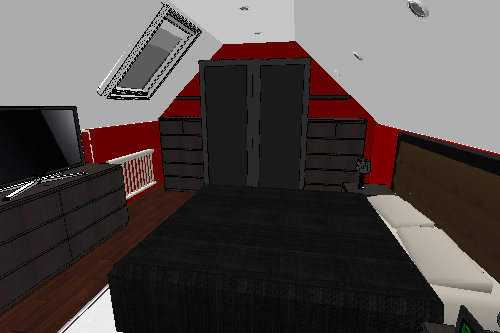
Turned out the floor that i created was wrong as i had sloped walls i had to break up the flooring to match the segments of the walls so that the ceiling slopes would be created properly. I also changed some of the furniture i was using as for some reason the software just did not render it nicely.

no all that is done and after playing with the lighting i have now managed to get this :)

Image


m@, how have you got 3.8? i have just checked and current download release is 3.7
User avatar
m@
Posts: 33
Joined: Sun Dec 16, 2012 10:21 pm

Re: Lots of noise on shadows in photo and video

Post by m@ »


m@, how have you got 3.8? i have just checked and current download release is 3.7

Hi Ash187

Your room looks pretty cool now [:D]

You're right, the official release is 3.7, but there's a 3.8 aka 4.0 Beta, you'll find the infos and download path in this thread:
http://www.sweethome3d.com/support/foru ... hread,3662

For me, the OS X Version of 3.8 works fine except that one of the new features ("create photos at point of view" ) produces an error. For me, the best change between 3.7 and 3.8 is the possibility to modify the different materials in an object.
Post Reply New Topic

Who is online

Users browsing this forum: No registered users and 2 guests