First, thank you for the program. For the most part, it's been very easy to and enjoyable to use.
I've run into a frustrating issue with the furniture library. There are items which I imported from the SH3D website which I would like to delete - I imported ones that ended up being clutter to my needs. I have not been able to do so. I would be happy to go back to the smaller library which comes with the program and choose what I import more carefully, but no matter what I do I can't get it to let go of any of my imports (I can individually delete ones which I imported from external sites, which are in italics). I'm using Windows 7 and have downloaded the program (again) this morning.
Here's what I've tried:
- Completely uninstalling the program, restarting my computer, and reinstalling. It still has my modified library.
- Deleting the furniture and texture libraries from C:\Program Files (x86)\Sweet Home 3D\lib. This had no impact on the furniture and textures I could access.
- I downloaded the Furniture Library Editor. It does not recognize any furniture libraries as being in the SH3D program files.
- I tried clicking on the Furniture jarfile - it comes up as invalid or corrupt. I've tried downloading it again both through the Sourceforge link and the Java Web Start and had the same alert both times.
I'm not sure what to do. I'm confused about where the furniture files are stored on my computer, since deleting the SH3D program and associated files had no impact on the libraries. As another example, I created a new furniture library, imported it and found it imported as "Unknown" rather than the file name. I deleted it, but it's still there with files intact. I have no idea where it is, but it's obviously somewhere!
Thank you for your help.
Deleting items in furniture library
This topic has been viewed 3700 times and has 5 replies
Re: Deleting items in furniture library
Huh. So, after ransacking my files, I found it here:
C:\Users\TEST\AppData\Roaming\eTeks\Sweet Home 3D\furniture
Which is way the heck away from where the program is (which is why it took me days to find it). Now I can open it in the furniture library editor and have been able to successfully make changes! Problem solved! [:)]
C:\Users\TEST\AppData\Roaming\eTeks\Sweet Home 3D\furniture
Which is way the heck away from where the program is (which is why it took me days to find it). Now I can open it in the furniture library editor and have been able to successfully make changes! Problem solved! [:)]

Re: Deleting items in furniture library
It's great you found out by yourself. An other way to find the SH3F files and other plug-ins files is to click on the Libraries button you'll find in the About dialog,
This will display a dialog box like the following one:
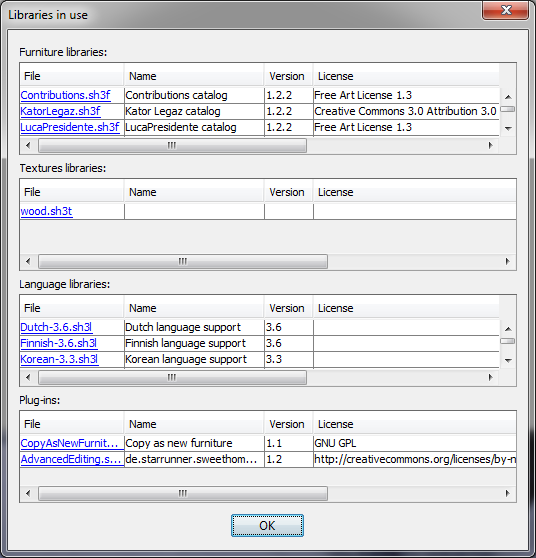
and when you click on a file, it opens a system window of the folder where the file can be found.
This will display a dialog box like the following one:
and when you click on a file, it opens a system window of the folder where the file can be found.
Emmanuel Puybaret, Sweet Home 3D creator

Re: Deleting items in furniture library
Emmanuel, I have no "libraries" button on my "about" dialog. I'm using version 4.0 in Spanish and the only button I have is "accept" ("aceptar") to close the dialog.An other way to find the SH3F files and other plug-ins files is to click on the Libraries button you'll find in the About dialog
If a long walk every day were healthy, mailmen would be immortal. [:p]
Re: Deleting items in furniture library
This means you have no sh3f, sh3t, sh3l or sh3p installed.
Emmanuel Puybaret, Sweet Home 3D creator
Re: Deleting items in furniture library
You're right. If I had no libraries, what did I expect? Ha, ha...
I was looking on a fresh install of SH3D. Now with a plugin installed the button appears. May I suggest to leave the button all the time, but disabled when there are no libraries?
I was looking on a fresh install of SH3D. Now with a plugin installed the button appears. May I suggest to leave the button all the time, but disabled when there are no libraries?
If a long walk every day were healthy, mailmen would be immortal. [:p]
Who is online
Users browsing this forum: No registered users and 1 guest