Noisy reflection

This topic has been viewed 4233 times and has 4 replies
Thread status: Active
How can I do this? [img]http://www.sweethome3d.com/images/flags/en_small.gif[/img]
Post Reply New Topic
Eo
Posts: 2
Joined: Thu May 30, 2013 12:04 pm

Noisy reflection

Post by Eo »

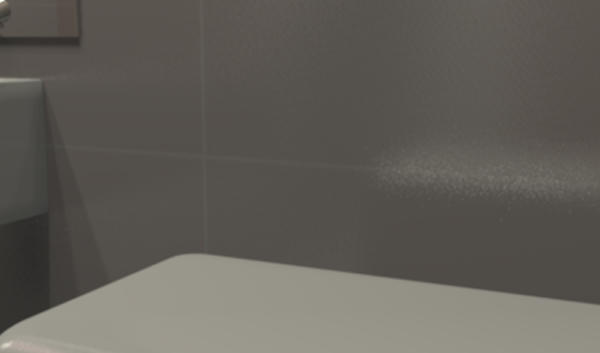
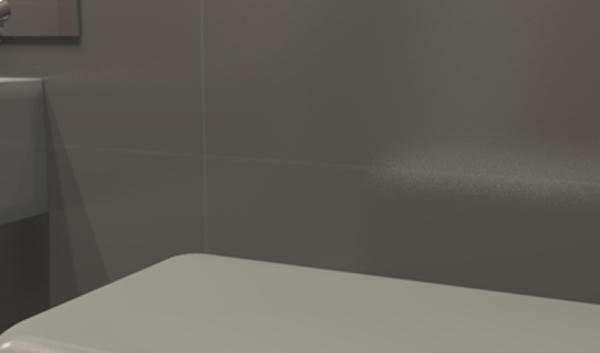
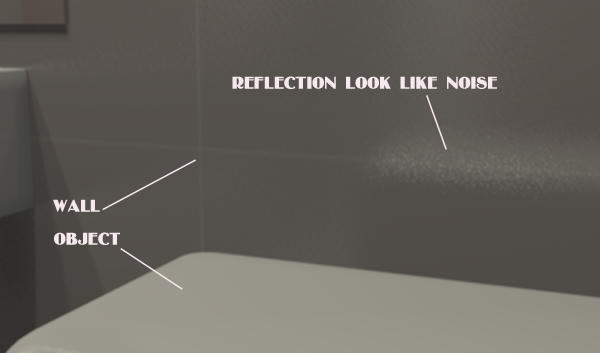
I have a question about the reflection on the wall. There is a wall and an object. Wall - glossy colored ceramic tile, without figures. Tiles should be self-colored and smooth, but a reflection on the wall looks like a single points of light, or as noise. I want to get a smooth reflection. How do I make a reflection without noise? Sorry for my English.
Example:
Image
http://www.mediafire.com/view/sp7rc8azzx7aed6/03_copy.png

Used texture:
Image
http://www.mediafire.com/view/6i16iuwuz1jojbo/3.png
User avatar
Puybaret
Posts: 9440
Joined: Mon Nov 07, 2005 12:00 pm
Country: Paris, France
Contact:

Re: Noisy reflection

Post by Puybaret »

The easiest way to reduce noise is to create a twice (or more) larger image and reduced it once the image is computed with an image software.
Emmanuel Puybaret, Sweet Home 3D creator
Eo
Posts: 2
Joined: Thu May 30, 2013 12:04 pm

Re: Noisy reflection

Post by Eo »

The twice larger image and then reduced looks much better. Thank you.
For comparison - original:
Image

a twice larger image and reduced:
Image
User avatar
hal9000
Posts: 152
Joined: Wed May 09, 2012 10:27 am
Country: Spain

Re: Noisy reflection

Post by hal9000 »

Hmm... that may serve as a workaround, but when you're rendering an HD image which takes several hours to complete, the last thing you want is to multiply the rendering time by 4. [:-s]
If a long walk every day were healthy, mailmen would be immortal. [:p]
User avatar
Puybaret
Posts: 9440
Joined: Mon Nov 07, 2005 12:00 pm
Country: Paris, France
Contact:

Re: Noisy reflection

Post by Puybaret »

As said before, it was the easiest way.
The other way would be to increase antialiasing with the following parameter passed to the JVM (see also this message):

Code: Select all

-Dcom.eteks.sweethome3d.j3d.PhotoRenderer.highQuality.antiAliasing.max=3
Rendering will go slower but not as much as computing a larger image.
Emmanuel Puybaret, Sweet Home 3D creator
Post Reply New Topic

Who is online

Users browsing this forum: No registered users and 1 guest