
Great!! thank you so much!
I will try that.
AOI - colored objects?
This topic has been viewed 69361 times and has 28 replies
Re: AOI - colored objects?
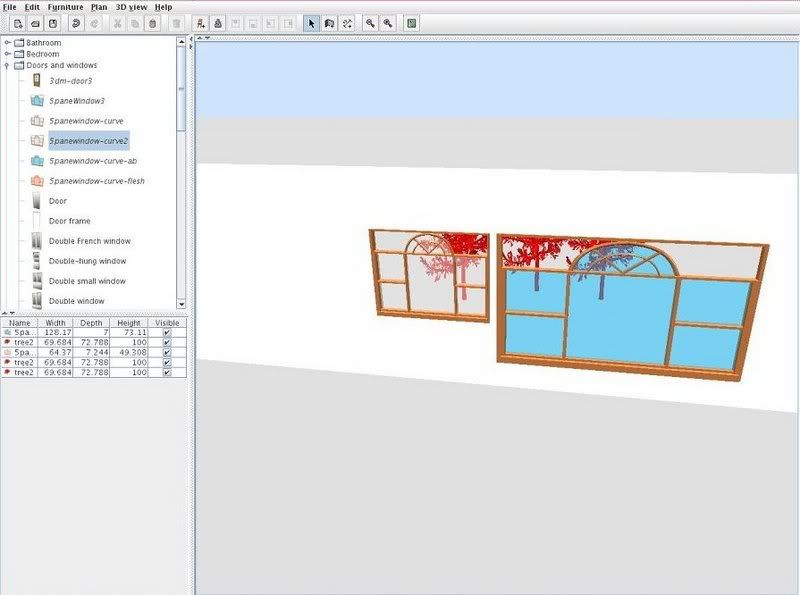
ok, I tried it and this is a snapshot of the result:
http://i64.photobucket.com/albums/h186/gymnart/spst-wndows-trees.jpg
At least there's a frame around the whole thing and I can live with that.
Anyway, if you like it, I can submit it for the repository.
http://i64.photobucket.com/albums/h186/gymnart/spst-wndows-trees.jpg
At least there's a frame around the whole thing and I can live with that.
Anyway, if you like it, I can submit it for the repository.

Re: AOI - colored objects?
It looks very nice. Submit it for the repository if you want.
Emmanuel Puybaret, Sweet Home 3D creator

Re: AOI - colored objects?
Please, where can i download this:
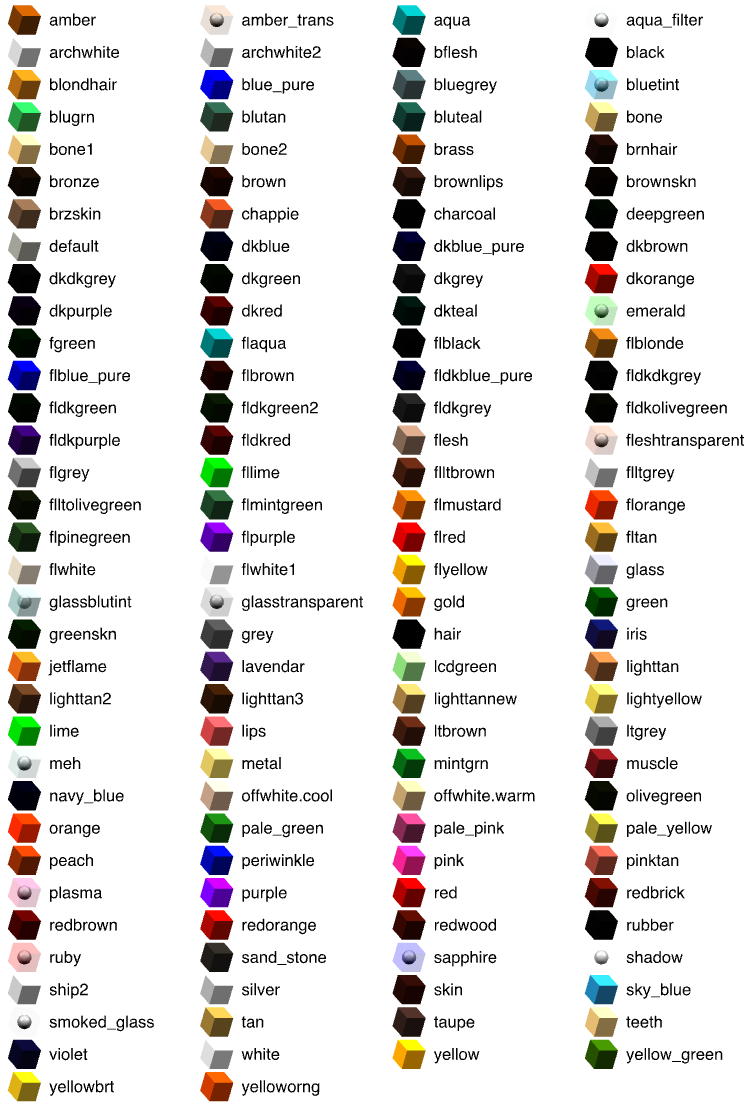
To help you choose a color, please download the image http://sweethome3d.sourceforge.net/Java ... arency.png : it shows all the colors listed above.
404 Not found!
Thanks,
To help you choose a color, please download the image http://sweethome3d.sourceforge.net/Java ... arency.png : it shows all the colors listed above.
404 Not found!
Thanks,

Re: AOI - colored objects?
Ok, thanks!!
Re: AOI - colored objects?
When making models, I have so far tended to use material names that match the part of the furniture, e.g. This made more sense if I later wanted to apply different colours. Then the original colour names are meaningless (while, say, 'desktop' still describes the part of the object). However, this also means relying on an .mtl file to define the material colours. So now I wonder...
Does anyone have an opinion on which approach is better? Does using the predefined colours have advantages in terms of performance (no .mtl file for SH3D to worry about)? Other good reasons for sticking to the defaults instead of named furniture parts?
ok
Code: Select all
usemtl desktop
...
usemtl legs
....
usemtl handle
...Does anyone have an opinion on which approach is better? Does using the predefined colours have advantages in terms of performance (no .mtl file for SH3D to worry about)? Other good reasons for sticking to the defaults instead of named furniture parts?
ok
Re: AOI - colored objects?
Predefined colors were mandatory when Sweet Home 3D wasn't able to import .mtl files (before version 1.3).
As from version 4.0, it's also possible to modify the materials of a piece of furniture from Sweet Home 3D user interface, I guess your idea to name materials from their function rather from their color is a good idea. I did it myself for a few 3D models last summer, and in the bunk beds model (and a few other ones), I even used different names for the materials of the two beds even if their colors are the same. This way the user have more choice of customization.
I wouldn't worry for the performance loss, it's probably not significant.
As from version 4.0, it's also possible to modify the materials of a piece of furniture from Sweet Home 3D user interface, I guess your idea to name materials from their function rather from their color is a good idea. I did it myself for a few 3D models last summer, and in the bunk beds model (and a few other ones), I even used different names for the materials of the two beds even if their colors are the same. This way the user have more choice of customization.
I wouldn't worry for the performance loss, it's probably not significant.
Emmanuel Puybaret, Sweet Home 3D creator
Re: AOI - colored objects?
Thanks. Then I will stick to my "named parts" approach (and not change existing models). And yes, I also use different names for the same colours, for instance back and front of a door-frame, in case I need to repaint on the orders of she who must be obeyed
ok
ok


Re: AOI - colored objects?
Hello all
I am very proud for having created my own window with a trapeze shape [:D] ...
But I still have a minor issue : I opened a .obj SH3D window to find the colour used for the glass. I found : flltgrey.
But when using this colour for my glass, it is finally much more transparent than the SH3D's library windows... why ? Did I use an incorrect color ? Must my glass be thicker in order to have another colour aspect ?
I am very proud for having created my own window with a trapeze shape [:D] ...
But I still have a minor issue : I opened a .obj SH3D window to find the colour used for the glass. I found : flltgrey.
But when using this colour for my glass, it is finally much more transparent than the SH3D's library windows... why ? Did I use an incorrect color ? Must my glass be thicker in order to have another colour aspect ?
Who is online
Users browsing this forum: No registered users and 1 guest