
If you mean a version that would let the user set com.eteks.sweethome3d.j3d.checkOffScreenSupport property, it already exists with this Java Web Start link. Sorry but I don't think I'll go further.Is it possible to have the No Offscreen Images version
Sweet Home 3D 4.4
This topic has been viewed 363228 times and has 95 replies
Re: Sweet Home 3D 4.4
Emmanuel Puybaret, Sweet Home 3D creator
Re: Sweet Home 3D 4.4
Hi,
just tested 4.4.
I also experienced problems with deciding which texture I was editing, and blinking helps to solve the problem.
Nonetheless, I am not in favor of blinking - as it is implemented now. It seems that the speed of blinking changes over time, maybe depends on rotating the preview (sometimes blinking is too fast), and new color sometimes doesn't match underlying texture (I get sharp blue).
Would be great if blinking was more gentle.
Szymon
just tested 4.4.
I also experienced problems with deciding which texture I was editing, and blinking helps to solve the problem.
Nonetheless, I am not in favor of blinking - as it is implemented now. It seems that the speed of blinking changes over time, maybe depends on rotating the preview (sometimes blinking is too fast), and new color sometimes doesn't match underlying texture (I get sharp blue).
Would be great if blinking was more gentle.
Szymon
Re: Sweet Home 3D 4.4
It's probably due to some race conditions when the 3D preview is displayed, but then I didn't notice any variation. The blink is very short to give users enough time to see how will be the model.It seems that the speed of blinking changes over time
Colored material are brighter or darker when they blink according to the color, and textured material blinks with the selection color used in the system. What would you suggest?new color sometimes doesn't match underlying texture (I get sharp blue)
Emmanuel Puybaret, Sweet Home 3D creator

Re: Sweet Home 3D 4.4
Thanx Mr Puybaret, the texture option is great and the levels selection was the thing I've asked for some time ago.
Thx again.
rgds
Joseph
Thx again.
rgds
Joseph
Re: Sweet Home 3D 4.4
Hi,
Here's a new Beta of version 4.4 (if you can't run it because certificate is outdated, please reduce security level in Java). This update brings two new features:
- support for sideways moves in the 3D view with the keyboard using Alt + left arrow and Alt + right arrow
- new option to repair partially damaged .sh3d files with the ability to remove damaged 3D models and textures or to display them in red, as proposed in this thread.
When you try to open a corrupted file, the following message will appear:
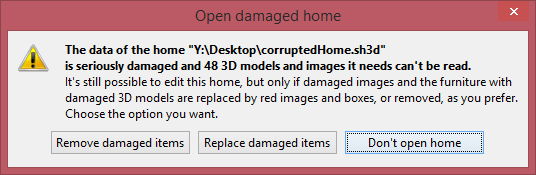
If you chose to remove or replace the damaged items, the (partially) repaired home will be opened showing the suffix [Repaired] in window title bar. Here's how it could look like when the user chose to replace damaged items:

If you don't have any corrupted file to test this feature on your side (in a way, I hope you don't have any), it's not difficult to create some with a binary editor by changing some bytes in a .sh3d file, or by truncating the file.
Hope this new feature will help desperate users and… will give me less support work too! Keep in mind that hard disks fail sooner or later (years after years, I must have replaced around 5 hard disks here), so always keep great care of your data.
Here's a new Beta of version 4.4 (if you can't run it because certificate is outdated, please reduce security level in Java). This update brings two new features:
- support for sideways moves in the 3D view with the keyboard using Alt + left arrow and Alt + right arrow
- new option to repair partially damaged .sh3d files with the ability to remove damaged 3D models and textures or to display them in red, as proposed in this thread.
When you try to open a corrupted file, the following message will appear:
If you chose to remove or replace the damaged items, the (partially) repaired home will be opened showing the suffix [Repaired] in window title bar. Here's how it could look like when the user chose to replace damaged items:
If you don't have any corrupted file to test this feature on your side (in a way, I hope you don't have any), it's not difficult to create some with a binary editor by changing some bytes in a .sh3d file, or by truncating the file.
Hope this new feature will help desperate users and… will give me less support work too! Keep in mind that hard disks fail sooner or later (years after years, I must have replaced around 5 hard disks here), so always keep great care of your data.
Emmanuel Puybaret, Sweet Home 3D creator
Re: Sweet Home 3D 4.4
Hi,
I am really excited about sideways move. It is great! Wow For me it works only with Virtual Visitor View. Please consider a shortcut that enabled sideways move also with mouse (instead of arrows).
btw. despite of my criticism of blinking I do not have an idea how to program this mechanism in a better way (maybe just selected material could disappear for a while)
I am really excited about sideways move. It is great! Wow
For me it works only with Virtual Visitor View. Please consider a shortcut that enabled sideways move also with mouse (instead of arrows).btw. despite of my criticism of blinking I do not have an idea how to program this mechanism in a better way (maybe just selected material could disappear for a while)
Re: Sweet Home 3D 4.4
And a stacktrace:
java.lang.NullPointerException
at sun.awt.SunToolkit.getSystemEventQueueImplPP(Unknown Source)
at sun.awt.SunToolkit.getSystemEventQueueImplPP(Unknown Source)
at sun.awt.SunToolkit.getSystemEventQueueImpl(Unknown Source)
at java.awt.Toolkit.getEventQueue(Unknown Source)
at java.awt.EventQueue.invokeLater(Unknown Source)
at sun.awt.windows.WToolkit.windowsSettingChange(Unknown Source)
at sun.awt.windows.WToolkit.eventLoop(Native Method)
at sun.awt.windows.WToolkit.run(Unknown Source)
java.lang.NullPointerException
at sun.awt.SunToolkit.getSystemEventQueueImplPP(Unknown Source)
at sun.awt.SunToolkit.getSystemEventQueueImplPP(Unknown Source)
at sun.awt.SunToolkit.getSystemEventQueueImpl(Unknown Source)
at java.awt.Toolkit.getEventQueue(Unknown Source)
at java.awt.EventQueue.invokeLater(Unknown Source)
at sun.awt.windows.WToolkit.windowsSettingChange(Unknown Source)
at sun.awt.windows.WToolkit.eventLoop(Native Method)
at sun.awt.windows.WToolkit.run(Unknown Source)
java.lang.NullPointerException
at sun.awt.SunToolkit.getSystemEventQueueImplPP(Unknown Source)
at sun.awt.SunToolkit.getSystemEventQueueImplPP(Unknown Source)
at sun.awt.SunToolkit.getSystemEventQueueImpl(Unknown Source)
at java.awt.Toolkit.getEventQueue(Unknown Source)
at java.awt.EventQueue.invokeLater(Unknown Source)
at sun.awt.windows.WToolkit.windowsSettingChange(Unknown Source)
at sun.awt.windows.WToolkit.eventLoop(Native Method)
at sun.awt.windows.WToolkit.run(Unknown Source)
java.lang.NullPointerException
at sun.awt.SunToolkit.getSystemEventQueueImplPP(Unknown Source)
at sun.awt.SunToolkit.getSystemEventQueueImplPP(Unknown Source)
at sun.awt.SunToolkit.getSystemEventQueueImpl(Unknown Source)
at java.awt.Toolkit.getEventQueue(Unknown Source)
at java.awt.EventQueue.invokeLater(Unknown Source)
at sun.awt.windows.WToolkit.windowsSettingChange(Unknown Source)
at sun.awt.windows.WToolkit.eventLoop(Native Method)
at sun.awt.windows.WToolkit.run(Unknown Source)
Re: Sweet Home 3D 4.4
Thanks for your feedback.
It will work only in Virtual visit mode. It doesn't have sense in Aerial view mode since in the latter case, the point of view always turns around a center of rotation.I am really excited about sideways move. It is great! Wow
I was thinking about this too, but didn't have any idea of a good gesture. How does it work in FPS games?Please consider a shortcut that enabled sideways move also with mouse (instead of arrows).
How did you get it? What version of Java do you use?And a stacktrace:
Emmanuel Puybaret, Sweet Home 3D creator
Re: Sweet Home 3D 4.4
The Beta 3 of version 4.4 are signed with a new certificate issued by Certum that gently granted me a free one as an open source developer. [:)]
This should avoid the security problems coming from the certificate that I was using until now and that expired recently.
This version fixes also a rendering issue on texture coordinates at doors and windows intersection for some walls drawn with an angle different of 0° or 90° on the plan.
This should avoid the security problems coming from the certificate that I was using until now and that expired recently.
This version fixes also a rendering issue on texture coordinates at doors and windows intersection for some walls drawn with an angle different of 0° or 90° on the plan.
Emmanuel Puybaret, Sweet Home 3D creator
Re: Sweet Home 3D 4.4
So far I was unable to reproduce the Stack.
Sideway move in Aerial View was my silly idea
I recorded a video with blinking - it shows the variable speed of blinking:
http://reterio.home.pl/inweb/blinking/blinking.html
Three more observations related to sideway move:
1. When I click ALT in windows7 OS, it selects upper-menu (so when I try to navigate in a room by holding and releasing ALT many times I sometimes navigate unintentionally among menu items).
2. When I hold ALT and use up/down arrows nothing happens, maybe move forward/backward should work as without ALT
3. When I detach 3d view and change focus from app main screen to 3d-view screen I observe probably unintentional behaviour. Eg. sideway move is active without ALT, or move is not possible at all.
Sideway move in Aerial View was my silly idea
I recorded a video with blinking - it shows the variable speed of blinking:
http://reterio.home.pl/inweb/blinking/blinking.html
Three more observations related to sideway move:
1. When I click ALT in windows7 OS, it selects upper-menu (so when I try to navigate in a room by holding and releasing ALT many times I sometimes navigate unintentionally among menu items).
2. When I hold ALT and use up/down arrows nothing happens, maybe move forward/backward should work as without ALT
3. When I detach 3d view and change focus from app main screen to 3d-view screen I observe probably unintentional behaviour. Eg. sideway move is active without ALT, or move is not possible at all.
Who is online
Users browsing this forum: No registered users and 1 guest