
I need to track down if this problem is in SweetHome 3D or AOI 3.0:
1) In AOI (3.0) make a cylinder (or any other shape)
2) assign a transparent texture to it (all else is default)
3) export it as .obj
4) import it into SweetHome 3D
Notice the transparency is NOT transparent.
This all used to work for me in the past with no problems with transparency exports.
I have contacted the coders of Art Of Illusion too to see if the problem is there, but I just want to track this down.
P.S. I am on Windows 8.1 using SH3D 4.3 and Java 7 update 55
 obj Transparency?
This topic has been viewed 29733 times and has 20 replies
Re: obj Transparency?
Hi Pencilart, I have not noticed any wrong interpretation of transparency values in sh3d. Not obj/mtl interpretation, not texture interpretation.
1) did you check the .mtl file that accompanies the .obj file? Correct transparency should be set as d value under the transparent material. Eg.
2) did you check the texture file (if you use one - png/gif) to see whether it still has transparency after export?
ok
1) did you check the .mtl file that accompanies the .obj file? Correct transparency should be set as d value under the transparent material. Eg.
Code: Select all
d 0.0  (=fully transparent - invisible)
or
d 0.5 (=semi transparent 50%)ok
Re: obj Transparency?
the mtl says:
#Produced by Art of Illusion 3.0, Wed May 21 16:44:58 EDT 2014
newmtl Default_Texture
Kd 0.23 0.23 0.23
Ks 0 0 0
Ka 0 0 0
illum 1
Still no joy.
Hopefully I will be able to attach a screenshot:
#Produced by Art of Illusion 3.0, Wed May 21 16:44:58 EDT 2014
newmtl Default_Texture
Kd 0.23 0.23 0.23
Ks 0 0 0
Ka 0 0 0
illum 1
Still no joy.
Hopefully I will be able to attach a screenshot:
- Attachments
-
- Screenshot (92).png (174.74 KiB) Viewed 4985973 times
-
- Screenshot (91).png (70.39 KiB) Viewed 5003948 times
Re: obj Transparency?
Your .mtl file (the material: Default_Texture) does not seem to contain reference to a texture graphics file. e.g:
or transparency, e.g:
Therefore I guess there must be something in how AoI exports. I have practically no experience with AoI, but can the settings be changed to include the texture file in the export - or something?
Failing that, you could try to add transparency (e.g. d 0.5) to the .mtl file yourself, like this:
ok
Code: Select all
map_Kd xxxx.pngCode: Select all
d 0.5Failing that, you could try to add transparency (e.g. d 0.5) to the .mtl file yourself, like this:
Code: Select all
#Produced by Art of Illusion 3.0, Wed May 21 16:44:58 EDT 2014
newmtl Default_Texture
Kd 0.23 0.23 0.23
Ks 0 0 0
Ka 0 0 0
illum 1
d 0.5Re: obj Transparency?
ok, n/m. I figured it out. chalk that up to not making models for many months.
Re: obj Transparency?
I just saw your reply after I had posted saying, never mind.Therefore I guess there must be something in how AoI exports. I have practically no experience with AoI, but can the settings be changed to include the texture file in the export - or something?
I might try to edit the mtl file as you said. But one thing with Windows 8, which is very annoying: Once you edit a file in an app, Windows 8 automatically assigns that app to open as the default for that file. Then to correct the problem, you have to take quite a few steps, which is the annoying part.
In AOI, this is in the exported .obj:
Code: Select all
#Produced by Art of Illusion 3.0, Mon May 26 12:54:18 EDT 2014
mtllib Chanlight.mtl
g sweethome3d_window_pane
usemtl test
Code: Select all
#Produced by Art of Illusion 3.0, Mon May 26 12:54:18 EDT 2014
newmtl test
Kd 0.15 0.12042 0.063
Ks 0 0 0
Ka 0.92 0.76286 0.3588
illum 1
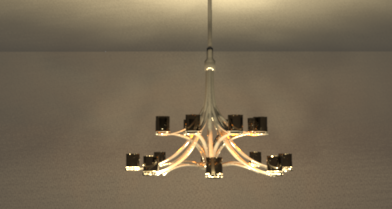
And this is the chandelier as rendered by Art Of Illusion:
http://www.storm-artists.net/view/136785
(I know that sh3d's renderer won't give the same results)
P.S. I tried to edit the .mtl but that did not make a difference...That's ok.
Re: obj Transparency?
Nice chandelier. Glad it worked. But now you have me confused [:)]. It seems transparency can be achieved in two ways. Either
- d value in the .mtl file (and I assume AoI should be able to handle that directly?).
- using g sweethome3d_window_pane_xxx in the .obj file. This I did not know. Does it add anything to the mtl d value? Legacy approach from before full .mtl support?
[/list=1] But then I am wondering whether sweethome3d_window_mirror_xxx (reflection) can also be achieved with .mtl. Only reference I could find, was the Constant Field Values, but alas, I am none the wiser.
ok
PS. Win is a strange beast. If it weren't for some vital software, I ditch it in a sec. However, if you open-with / drag-drop your .mtl files into an editor (Notepad/PSPad), surely the default doesn't change (?)
Re: obj Transparency?
I had forgotten that transparency only works if the item is named sweethome3d_window_pane
I'm not sure about the mtl file, I've never looked at it to compare.
Editing the mtl file for transparency does not work for some reason. Dunno if that has something to do with what software was used to create the item or not.
Right now, the mtl files and obj files are not assigned to any software on Windows 8, and as far as I know it should stay that way. But when you edit such files, Win8 will assign that app as default. SO annoying.
So, Okh, have you ever done any 3d modeling yourself? If you haven't, try it!
I'm not sure about the mtl file, I've never looked at it to compare.
Editing the mtl file for transparency does not work for some reason. Dunno if that has something to do with what software was used to create the item or not.
Right now, the mtl files and obj files are not assigned to any software on Windows 8, and as far as I know it should stay that way. But when you edit such files, Win8 will assign that app as default. SO annoying.
So, Okh, have you ever done any 3d modeling yourself? If you haven't, try it!

Re: obj Transparency?
sweethome3d_window_pane is just a way to set a shape as transparent. It was introduced in an old version of Sweet Home 3D before the MTL file and d parameter were supported. In the current version, its main drawback compared to d parameter in a MTL file is that it's fixed to 0.5 and that you can't change its appearance in the furniture Furniture materials dialog box. When changing individual materials wasn't available, it was handy because when you changed the color of the window, only its frame was changed and the pane remained uncolored. But in version 4.3, changing the material of a window pane won't have any effect, something that looks more buggy because it's not necessary for backward compatibility. I just fixed it in the Beta 15 of the version 4.4.
Conclusion: pencilart, using d parameter works, but mixing it with sweethome3d_window_pane name won't change transparency value. Hum, maybe I should fix that too! [;)]
It seems that "illum 3" in MTL file format could match the mirror effect, but I didn't investigate further when I programed the first mirror effect. The good thing with introducing special names for shapes, is that it can be easily supported in file formats afterwards.I am wondering whether sweethome3d_window_mirror_xxx (reflection) can also be achieved with .mtl.
Conclusion: pencilart, using d parameter works, but mixing it with sweethome3d_window_pane name won't change transparency value. Hum, maybe I should fix that too! [;)]
Emmanuel Puybaret, Sweet Home 3D creator
-
sree.arun.kr
- Posts: 137
- Joined: Mon Oct 28, 2013 6:30 pm
- Country: Kerala, Kerala, INDIA
Re: obj Transparency?
Some times transparency need to be assigned manually in Sweet home 3D
Try these steps,
1. Make/design your model at any 3d-modeling software
2. Apply transparency texture(color=black&white) to it( use *.png only to work with SweetHome3D).
3. Align UVW mapping.
4. Export as .obj(wavefrot OBJ) or .3ds (check Transparency texture must be added in the same folder ).
5. Import exported obj/3ds file in sketch-up/any other 3d model viewing application to check transparency map working or not.If transparency does not load you failed to create model correctly(Need re creation).
6. If transparency working correctly then Import 3d model as furniture in Sweet-home-3D.
7. Select imported furniture, go to Furniture -> Modify in main menu
8. Select materials radio button in color& texture, then click Modify
9. Select model material(your transparent object material) then select Texture radio button and click browse button.
10. In the new window click Import button & browse, open your texture map and click OK for all windows.

*10. If object don't have a texture file, fully transparent like glass
then select color radio button and select white color in modify Furniture material window.
11. Now render your image.
TIP.
If you want to hide(invisible in render) a particular part of an object then use my texture.

(This file consist zero color pixel). [:))]
Try these steps,
1. Make/design your model at any 3d-modeling software
2. Apply transparency texture(color=black&white) to it( use *.png only to work with SweetHome3D).
3. Align UVW mapping.
4. Export as .obj(wavefrot OBJ) or .3ds (check Transparency texture must be added in the same folder ).
5. Import exported obj/3ds file in sketch-up/any other 3d model viewing application to check transparency map working or not.If transparency does not load you failed to create model correctly(Need re creation).
6. If transparency working correctly then Import 3d model as furniture in Sweet-home-3D.
7. Select imported furniture, go to Furniture -> Modify in main menu
8. Select materials radio button in color& texture, then click Modify
9. Select model material(your transparent object material) then select Texture radio button and click browse button.
10. In the new window click Import button & browse, open your texture map and click OK for all windows.
*10. If object don't have a texture file, fully transparent like glass
then select color radio button and select white color in modify Furniture material window.
11. Now render your image.
TIP.
If you want to hide(invisible in render) a particular part of an object then use my texture.

(This file consist zero color pixel). [:))]

Who is online
Users browsing this forum: No registered users and 2 guests