confused Invisible triangle as window

This topic has been viewed 4104 times and has 2 replies
Thread status: Active
How can I do this? [img]http://www.sweethome3d.com/images/flags/en_small.gif[/img]
Post Reply New Topic
Thierry785
Posts: 3
Joined: Fri May 09, 2014 1:25 pm

Invisible triangle as window

Post by Thierry785 »

Dear All,
I've checked through the thread to find an answer to my question, but I couldn't find an helpfull one. Therefore I come back to you with the question.
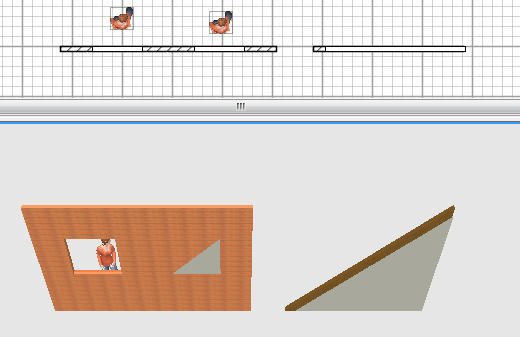
Inserting an invisible box from the file box_invisible.zip works fine for rectangular windows, but when I use a triangle from the file triangle-invisible.zip, the hole remains opaque, not allowing to see through the wall as expected (see picture hereafter).
I want to use this to represent a wood beam under the roof starting from a wall.
Could you please show me a way to realize this.
Thanks a lot for your help and congratulations for your remarkable program.
Image
[:-/]
User avatar
Puybaret
Posts: 9440
Joined: Mon Nov 07, 2005 12:00 pm
Country: Paris, France
Contact:

Re: Invisible triangle as window

Post by Puybaret »

I just updated the triangle-invisible.zip file that Hans proposed. Still very small but really transparent now! [;)]
Emmanuel Puybaret, Sweet Home 3D creator
Thierry785
Posts: 3
Joined: Fri May 09, 2014 1:25 pm

Re: Invisible triangle as window

Post by Thierry785 »

Thanks a lot, it's now orking fine.
Thierry
Post Reply New Topic

Who is online

Users browsing this forum: No registered users and 2 guests