
Great replies!
Well, I have been playing around with this and found that I had to go into the .obj and edit it like I used to when I got started with sh3d, so I did that for my chandelier.
I will check out the newest version of sh3d soon.
@sree: I didn't know that all that could be done. I will try it soon!
 obj Transparency?
This topic has been viewed 29771 times and has 20 replies
Re: obj Transparency?
- Attachments
-
- CorrectChandelier.png (47.56 KiB) Viewed 8066 times
-
sree.arun.kr
- Posts: 137
- Joined: Mon Oct 28, 2013 6:30 pm
- Country: Kerala, Kerala, INDIA
Re: obj Transparency?
I had to go into the .obj and edit it like I used to when I got started with sh3d,
Its exactly that what I means. [:-$] (I am not good in English)
SH3D failed to pick transparency(a bug) so we need to do manually, by assigning with a color or texture to it.

Re: obj Transparency?
I just tried out the 4.4 beta.
The glass looks nice, but not as transparent as I wanted. The glass in the chandelier should have a peach hue.
The comparison set up...
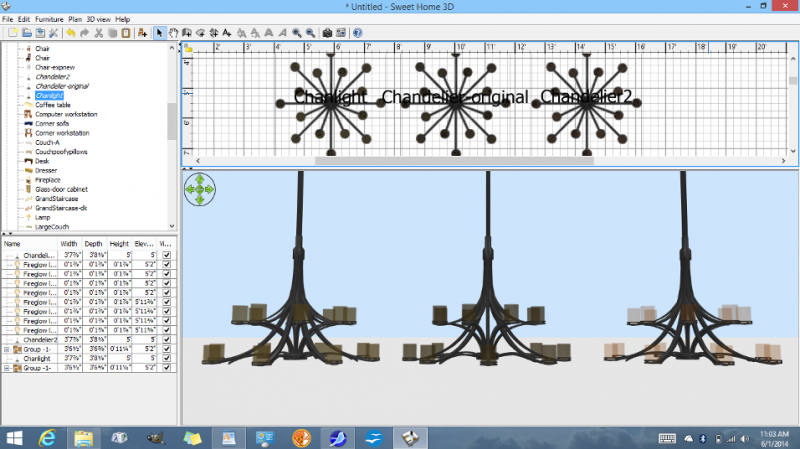
How it rendered in sh3d...
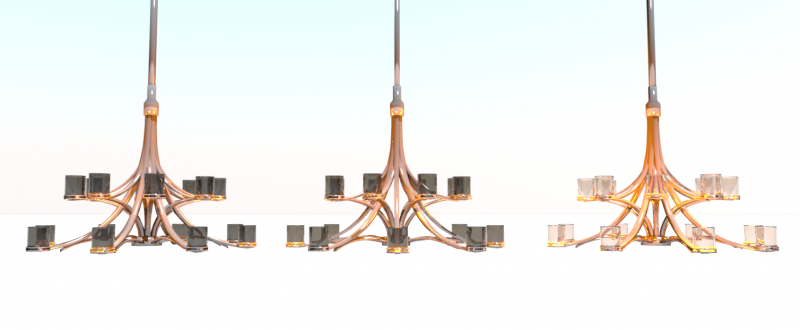
Chandelier2 is the one that I went into the .obj and edited the color (usemtl amber_trans)
ChandelierOriginal is the one I sent to Emmanuel
Chanlight is the one I tried making the glass more transparent in Art Of Illusion (and a light, peachy color)
The glass looks nice, but not as transparent as I wanted. The glass in the chandelier should have a peach hue.
The comparison set up...
How it rendered in sh3d...
Chandelier2 is the one that I went into the .obj and edited the color (usemtl amber_trans)
ChandelierOriginal is the one I sent to Emmanuel
Chanlight is the one I tried making the glass more transparent in Art Of Illusion (and a light, peachy color)

Re: obj Transparency?
The Chandelier2 version looks very nice. [:)]
Emmanuel Puybaret, Sweet Home 3D creator
Re: obj Transparency?
ok, Emmanuel, I will send you that one soon. (the file size is large, that is why I am sending it to you.)
-
sree.arun.kr
- Posts: 137
- Joined: Mon Oct 28, 2013 6:30 pm
- Country: Kerala, Kerala, INDIA
Re: obj Transparency?
Edit/replace your .mtl file with following settings only for Chandelier glass material (that you want to render).
Kd 0.784 0.337 0.368 (R G B: your wished peach colour )
Ka 0.784 0.337 0.368
Ni 2.5
d 0.86
save it.
open it in SH3D
Render it.
If Render fail
go modify furniture->material->modify color and change/pick glass color again to peach
If failed render then attach .mtl file on next post
Kd 0.784 0.337 0.368 (R G B: your wished peach colour )
Ka 0.784 0.337 0.368
Ni 2.5
d 0.86
save it.
open it in SH3D
Render it.
If Render fail
go modify furniture->material->modify color and change/pick glass color again to peach
If failed render then attach .mtl file on next post
Re: obj Transparency?
I did the editing and rendering.
I've noticed that:
Glass in SH3D looks good in the 3d pane, even the color modification.
For the (best and 2nd best) rendering, it's a different story: The glass named sweethome3d_window_pane looks like a proper glass (transparent) while the one that just had the mtl edited by adding:
d 0.15 looks more solid, not transparent.
Even with the mtl edited (as per sree's instructions) as:
Kd 0.784 0.337 0.368
Ka 0.784 0.337 0.368
Ni 2.5
d 0.86
also renders in the best and 2nd best setting as solid, no transparency, while in the fast and next to fast renders as transparent as it should (but, of course, not with realistic looking lighting).
I've noticed that:
Glass in SH3D looks good in the 3d pane, even the color modification.
For the (best and 2nd best) rendering, it's a different story: The glass named sweethome3d_window_pane looks like a proper glass (transparent) while the one that just had the mtl edited by adding:
d 0.15 looks more solid, not transparent.
Even with the mtl edited (as per sree's instructions) as:
Kd 0.784 0.337 0.368
Ka 0.784 0.337 0.368
Ni 2.5
d 0.86
also renders in the best and 2nd best setting as solid, no transparency, while in the fast and next to fast renders as transparent as it should (but, of course, not with realistic looking lighting).
- Attachments
-
- 3glass-EXP.png (49.59 KiB) Viewed 2048 times
-
- 3glass-bestsetting.png (133.24 KiB) Viewed 2047 times
-
sree.arun.kr
- Posts: 137
- Joined: Mon Oct 28, 2013 6:30 pm
- Country: Kerala, Kerala, INDIA
Re: obj Transparency?
Yes, I am talking about Glass transparency is working better only if you modify the color and this bug is fixed in version 4.4(Releasing soon).Glass in SH3D looks good in the 3d pane, even the color modification.
Re: obj Transparency?
Those recent render were done in 4.4 beta.
I am using 2 different glasses for my tests:
For one, I edited the mtl file (the polymesh has a normal, name: polymesh)
The other one is the one I renamed the object (in my 3d creation software) to "sweethome3d_window_pane"
When I modified the furniture texture to select the color of the glass in sh3d, that did work nicely in the 3d view, but when rendered in the best setting of the renderer, the glass that had the .mtl file edited was not colored the way I wanted and not as transparent, whereas the glass that had been renamed to "sweethome3d_window_pane" in my 3d creation software worked nicely as I had expected.
(I do not use image maps for simple color, I only use image maps for wood or marble texture and of course, I am not concerned about transparency with those)
The renderer, when in best or nearly best mode is what is giving me that behavior. So, I don't know if you have any control over that.
BTW, choosing a texture (such as the patterns) gives a cool, funky effect. I like that very much!
I am using 2 different glasses for my tests:
For one, I edited the mtl file (the polymesh has a normal, name: polymesh)
The other one is the one I renamed the object (in my 3d creation software) to "sweethome3d_window_pane"
When I modified the furniture texture to select the color of the glass in sh3d, that did work nicely in the 3d view, but when rendered in the best setting of the renderer, the glass that had the .mtl file edited was not colored the way I wanted and not as transparent, whereas the glass that had been renamed to "sweethome3d_window_pane" in my 3d creation software worked nicely as I had expected.
(I do not use image maps for simple color, I only use image maps for wood or marble texture and of course, I am not concerned about transparency with those)
The renderer, when in best or nearly best mode is what is giving me that behavior. So, I don't know if you have any control over that.
BTW, choosing a texture (such as the patterns) gives a cool, funky effect. I like that very much!
- Attachments
-
- coolglass.png (49.65 KiB) Viewed 5828 times
-
sree.arun.kr
- Posts: 137
- Joined: Mon Oct 28, 2013 6:30 pm
- Country: Kerala, Kerala, INDIA
Re: obj Transparency?
Do you get the result when rendering with v4.4b20 ?. [:-?]
Or your looking for a result like this ?(External Link), then it required a detailed modeling. [8-}]
You can achieve a good result with tweaking .mtl file here is some helpful resource. [:-$]
Or your looking for a result like this ?(External Link), then it required a detailed modeling. [8-}]
You can achieve a good result with tweaking .mtl file here is some helpful resource. [:-$]
Who is online
Users browsing this forum: No registered users and 1 guest