Please I have adding lights to my house but don't know how to put it on cause by default it's off I guess.
Maybe that is why I can't see the effects of lights in my house every where seems to have the same intensity of natural light. Not from the bulbs I added.
Can someone please explain to me how to put lights ON or tell me what am I not doing right?

 Adding lights to my house
This topic has been viewed 20610 times and has 7 replies

Re: Adding lights to my house
There are two types o f lamps in SH3D:
- lamps with light
- lamps without light.
When a lamp has light, do Modify furniture and at the bottom left you see a Light power (%).
There is a way to add light to a lamp, described by user OKH. You can read about it in this short manual (PDF).
Hans
- lamps with light
- lamps without light.
When a lamp has light, do Modify furniture and at the bottom left you see a Light power (%).
There is a way to add light to a lamp, described by user OKH. You can read about it in this short manual (PDF).
Hans
Re: Adding lights to my house
In addition to what hansmex correctly writes, you may want to consider:
- The easiest way of adding lights, is to use the included light-sources in the library and place them where the lamp is.
- Lights have a default power of 50%.
- Lights will only show in photo-rendering (highest qualities).
- Lights are not very visible if they compete with sunlight, try a time later in the evening.
- The "auto ceiling lights" checkbox may interfere with the effect of accurately placed light-sources.
- Pay attention to the colour of the light-source you choose.
ok
- The easiest way of adding lights, is to use the included light-sources in the library and place them where the lamp is.
- Lights have a default power of 50%.
- Lights will only show in photo-rendering (highest qualities).
- Lights are not very visible if they compete with sunlight, try a time later in the evening.
- The "auto ceiling lights" checkbox may interfere with the effect of accurately placed light-sources.
- Pay attention to the colour of the light-source you choose.
ok
Re: Adding lights to my house
Thanks hansmex I have tried but I get maybe I don't understand how to do it. Can someone direct me or have a toturial on the light issue
Re: Adding lights to my house
Depends what you want to do, the easiest is to combine your models with the light-sources included in SH3D. That is easy, and you can group lamp and light-source.
Adding light-sources to your own models in a library requires some more work, but you will find several threads in the forum discussing this, like this recent one.
ok
Adding light-sources to your own models in a library requires some more work, but you will find several threads in the forum discussing this, like this recent one.
ok
Re: Adding lights to my house
Thanks guys I have tried and seems to still have problems to render the bulbs glowing. Can someone mail to me a simple project with the light demonstration.Please its very important and kind of urgent. Thanks in advance
Re: Adding lights to my house
The light sources included with SH3D are invisible (just represented with bulbs in furniture list), so you need to add lamp/bulb.
Sent you a file - maybe that makes it clearer.
ok
Sent you a file - maybe that makes it clearer.
ok
Re: Adding lights to my house
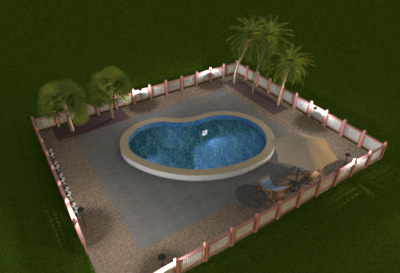
Hi choppyleo, the blog post on how to design a swimming pool, with an example .sh3d file, is a good demonstration on how to use light-sources too.
ok
How to design a swimming pool
 [/quote]
ok
How to design a swimming pool
[/quote]Who is online
Users browsing this forum: No registered users and 1 guest