Normal baseboards are, of course, rarely thicker than 2 cm, but now that this option is available, other uses are tempting. Wainscoting, panelling on the lower part of the floor, sometimes more. Wall foundations, sometimes more. But also stranger uses. Around our garden there is a thin wooden fence with a concrete foundation 15 cm thick. Would be perfect to make if baseboards (foundation) could be 10 cm. Another colour on top, well, could be nice, but not a must, and methinks not a reason to keep the 'baseboard' thin. Limit the height, well, yes, I guess, but not really a must either. Anyway, the feature really is nice and I have not found any misbehaviour. ok..don't see why a thickness of more than 2 cm should be necessary, and a higher thickness would require an "additional option to colour or texture the top of them"...
Sweet Home 3D 5.0
This topic has been viewed 1480137 times and has 115 replies
Re: Sweet Home 3D 5.0

Re: Sweet Home 3D 5.0
Message has been sent
I know the problem, and in the south wall of the room area and outside the open door think, it will be a problem

I know the problem, and in the south wall of the room area and outside the open door think, it will be a problem
Re: Sweet Home 3D 5.0
Strongly Agree
add a Ceiling plaster line function is better

add Elwvation,Depth,Height,can add multiple times
add a Ceiling plaster line function is better
add Elwvation,Depth,Height,can add multiple times
Re: Sweet Home 3D 5.0
VIDEO RENDERING
This may have nothing to do with SH3D or 5.0 Beta 2, but when rendering videos beyond a minute or two computing time, on a SH3D file opened from the 64 GB MicroSD, the MicroSD is unmounted and Win semi-hangs telling me to re-insert the disk.
Asus Transformer Book T100
SanDisk Ultra Micro SD XC
Win 8.1 32
Java version 1.8.0_45 / 32 bit / 0.6 GB max
ok
This may have nothing to do with SH3D or 5.0 Beta 2, but when rendering videos beyond a minute or two computing time, on a SH3D file opened from the 64 GB MicroSD, the MicroSD is unmounted and Win semi-hangs telling me to re-insert the disk.
Asus Transformer Book T100
SanDisk Ultra Micro SD XC
Win 8.1 32
Java version 1.8.0_45 / 32 bit / 0.6 GB max
ok

Re: Sweet Home 3D 5.0
Tonight, the Beta 3 brings a very long awaited feature: layers! [:)]
Actually, layers are levels at the same elevation, but I change the behavior of these special levels to make them behave more like layers:
- It's possible now to make the objets of a level not viewable with a new checkbox in the level dialog box. When a level is not viewable, the objects added to it are simply not displayed in the furniture list, the plan and the 3D view, and its tab is written with a disable color (i.e. grey in most cases). It's also impossible to add new objects to a not viewable level.
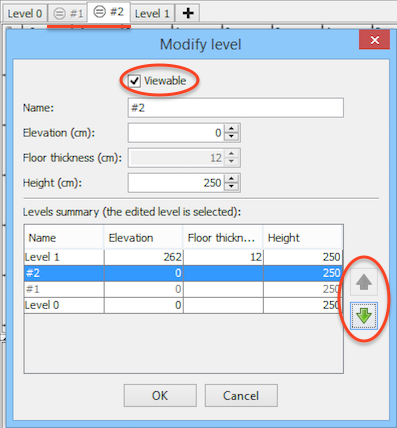
- Until now, levels were sorted in the order of their elevation, then in the reverse order of their height. This second criterion doesn't exist anymore (projects strongly based on this order should need only small changes), and now levels at the same elevation are ordered according to your wish using the new up and down arrows added at the right of levels list. This list is now displayed from top to bottom and is updated while you change values of the edited level.
- To distinguish a level at the same elevation as a previous one, its tab displays in front of its name a new icon showing an equal sign surrounded with a circle.
- To help you create faster a new level at the same elevation as the selected one, the Plan > Add level at same elevation menu item was added and I assigned to this menu the shortcut Ctrl+Shift+N (cmd+shift+N under Mac OS X) which is generally used for layers in other software, and changed the shortcut of Plan > Add level to Ctrl+Alt+N (cmd+alt+N under Mac OS X).
I hope you'll like the way I programmed this new feature. I ran many tests, but please, test this also on your side and don't hesitate to report your opinion about it.
By the way, I think I fixed the bug for some baseboards that weren't cut. Actually, this happened for walls at upper levels. Thanks for insisting.
Actually, layers are levels at the same elevation, but I change the behavior of these special levels to make them behave more like layers:
- It's possible now to make the objets of a level not viewable with a new checkbox in the level dialog box. When a level is not viewable, the objects added to it are simply not displayed in the furniture list, the plan and the 3D view, and its tab is written with a disable color (i.e. grey in most cases). It's also impossible to add new objects to a not viewable level.
- Until now, levels were sorted in the order of their elevation, then in the reverse order of their height. This second criterion doesn't exist anymore (projects strongly based on this order should need only small changes), and now levels at the same elevation are ordered according to your wish using the new up and down arrows added at the right of levels list. This list is now displayed from top to bottom and is updated while you change values of the edited level.
- To distinguish a level at the same elevation as a previous one, its tab displays in front of its name a new icon showing an equal sign surrounded with a circle.
- To help you create faster a new level at the same elevation as the selected one, the Plan > Add level at same elevation menu item was added and I assigned to this menu the shortcut Ctrl+Shift+N (cmd+shift+N under Mac OS X) which is generally used for layers in other software, and changed the shortcut of Plan > Add level to Ctrl+Alt+N (cmd+alt+N under Mac OS X).
I hope you'll like the way I programmed this new feature. I ran many tests, but please, test this also on your side and don't hesitate to report your opinion about it.
By the way, I think I fixed the bug for some baseboards that weren't cut. Actually, this happened for walls at upper levels. Thanks for insisting.
Sorry, it won't be this time, and just because of the shape of ceiling plasters, I don't think it will happen anytime soon.add a Ceiling plaster line function is better [...]
add Elwvation,Depth,Height,can add multiple times
Emmanuel Puybaret, Sweet Home 3D creator

Re: Sweet Home 3D 5.0
Tomorrow is test time!!!!!
Thanks and good night.
Thanks and good night.
Re: Sweet Home 3D 5.0
Now we can create walls as below:
||
||
||
||
Can you put a function by which we can create something like the below:
||
||
||
||
Can you put a function by which we can create something like the below:
Code: Select all
         \\                 //
         \\      and      //
  ________\\             //________
Re: Sweet Home 3D 5.0
I've test it and it's very useful for me.
I put dimensions on this layer and it show when I need.
Also is useful for different variants of furniture arrangement at the same level.
The option popup when 2click on layer tab name or right-click somewhere in the current layer.
I put dimensions on this layer and it show when I need.
Also is useful for different variants of furniture arrangement at the same level.
The option popup when 2click on layer tab name or right-click somewhere in the current layer.
A computer program does what you tell it to do, not what you want it to do. Murphy's Law
When all else fails, read the instructions. Murphy's Law
If you don't like "AS IS", DIY. Dorin's law
When all else fails, read the instructions. Murphy's Law
If you don't like "AS IS", DIY. Dorin's law
Re: Sweet Home 3D 5.0
I'm very happy for the feature to color text and style.
It will be great to have this included also for the furniture name.
It's useful for additional information in 2DSymbols library.
Thanks for Your great work !
It will be great to have this included also for the furniture name.
It's useful for additional information in 2DSymbols library.
Thanks for Your great work !
A computer program does what you tell it to do, not what you want it to do. Murphy's Law
When all else fails, read the instructions. Murphy's Law
If you don't like "AS IS", DIY. Dorin's law
When all else fails, read the instructions. Murphy's Law
If you don't like "AS IS", DIY. Dorin's law
Re: Sweet Home 3D 5.0
Very nice. Congratulations. So far nothing wrong, but then I need to figure out different things to do with this feature. For now it seems a very cool way of toggling alternative layouts, but the process is (ever so slightly) disturbed by the three step process for hiding and showing the alternatives...not viewable with a new checkbox in the level dialog box. When a level is not viewable, the objects added to it are simply not displayed in the furniture list, the plan and the 3D view,
Would it be easier to use if a tab checkbox, right-clicking (or something) the tab toggles visibility? Maybe a context menu on the tabs with "Add level", "Modify level" "Delete level" "Show/hide level". This would de-clutter the 2D plan menu and be easy to use (but I guess following your stringent menu thought and concern about some users not being used to context menus could be an argument against.) Just a thought.
And don't get me wrong. I really like the feature the way you implemented it.
ok
Who is online
Users browsing this forum: No registered users and 1 guest