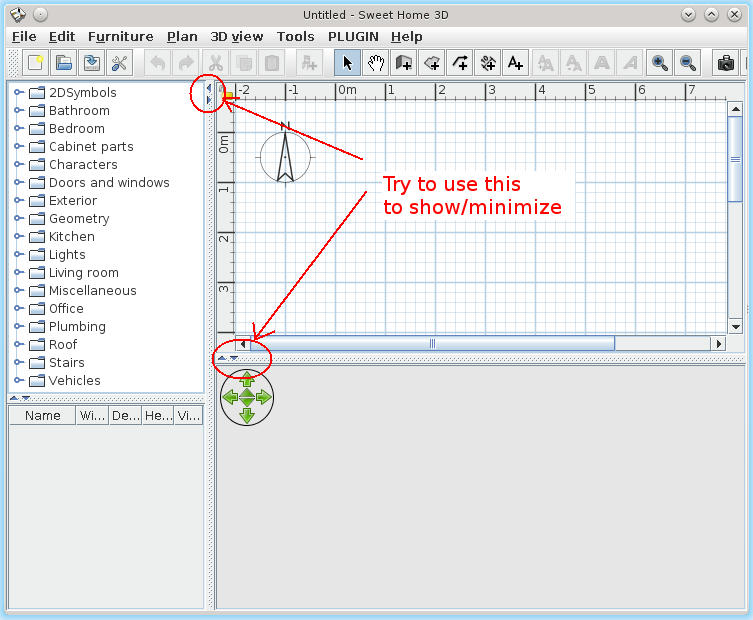
I like the fact that the 3D view can be moved to a separate window, however there is no way to minimize it. Given that it is often desirable to work with the plan view in fullscreen, it would be great to be able to hide the 3D view entirely with a toggle of some kind.
I've currently been launching Sweethome3d with the 3D view disabled, but I have to save and relaunch in order to bring it back, which is less than ideal.
Allow 3D window to be hidden, or at least minimized
This topic has been viewed 10305 times and has 4 replies
-
TwistedLincoln
- Posts: 29
- Joined: Tue Jan 18, 2011 3:11 pm
- Contact:

Re: Allow 3D window to be hidden, or at least minimized
A computer program does what you tell it to do, not what you want it to do. Murphy's Law
When all else fails, read the instructions. Murphy's Law
If you don't like "AS IS", DIY. Dorin's law
When all else fails, read the instructions. Murphy's Law
If you don't like "AS IS", DIY. Dorin's law
-
TwistedLincoln
- Posts: 29
- Joined: Tue Jan 18, 2011 3:11 pm
- Contact:
Re: Allow 3D window to be hidden, or at least minimized
I don't have those handles in my version (running on Linux using IceTea Java), however I have been manually dragging the window areas to the bottom and side as a workaround. It's hardly as quick and easy as a toggle though.

Re: Allow 3D window to be hidden, or at least minimized
I know this won't work for most folks but I have 3 monitors so I just set the 3D View to a separate window then move it to a different monitor.
Hawk

Re: Allow 3D window to be hidden, or at least minimized
I did that until 5.x; now, SH3D shuts down with a DirectX error if any of its component windows touches the third display. (Displays 1 and 2 are supported by one graphics adaptor, with Display 3 driven by either a second card or mobo video.
That 'or' should tell you how inconvenienced I've been by this issue: I know there's most likely an updated driver available for the secondary graphics that would fix the problem, but I still haven't gotten around to dealing with it.
However, until it dawned on me what was happening and how to bypass it, it *was* a PITA -- as all my plans in progress opened across all three monitors, any attempt to edit a plan resulted in the application shutting down. (Solution? Disable the third monitor in the OS and then open and re-save the desired plan.) I'd meant to post a quick note that would turn up for searches on 'DirectX error' in hopes of saving others some grief, but forgot until your post tweaked me.
That 'or' should tell you how inconvenienced I've been by this issue: I know there's most likely an updated driver available for the secondary graphics that would fix the problem, but I still haven't gotten around to dealing with it.
However, until it dawned on me what was happening and how to bypass it, it *was* a PITA -- as all my plans in progress opened across all three monitors, any attempt to edit a plan resulted in the application shutting down. (Solution? Disable the third monitor in the OS and then open and re-save the desired plan.) I'd meant to post a quick note that would turn up for searches on 'DirectX error' in hopes of saving others some grief, but forgot until your post tweaked me.
Who is online
Users browsing this forum: No registered users and 1 guest