
Other rendering quality levels
This topic has been viewed 122485 times and has 41 replies
Re: Other rendering quality levels
Version 1.3 of the plug-in incorporates 2 new rendering properties (filter and samplerAlgorithm) from SH3D-5.2 .
- Attachments
-
[The extension pdf has been deactivated and can no longer be displayed.]
EnkoNyito

Re: Other rendering quality levels
FYI, for anyone looking for detailed information on the SunFlow rendering engine, a PDF copy of the old SunFlow Wiki can be found here.
Re: Other rendering quality levels
A couple of interesting examples of use in thread 6462. ok

Re: Other rendering quality levels
Thank Enkonyito a lot,
this plug-in helped me solve my question: "how to put shininess on furniture without reflecting the lights". Now I can set "shiny" on object such as TV screen without lights on it. We can look at the TV screen and the wall behind to see the effect.
Here is my image:
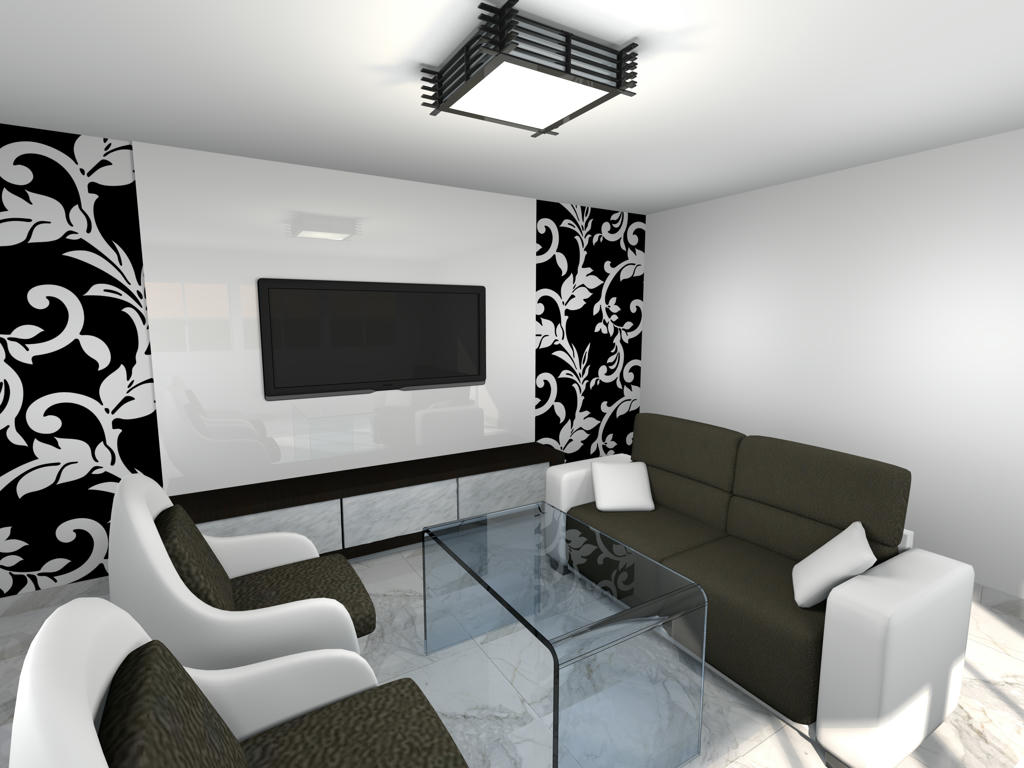
this plug-in helped me solve my question: "how to put shininess on furniture without reflecting the lights". Now I can set "shiny" on object such as TV screen without lights on it. We can look at the TV screen and the wall behind to see the effect.
Here is my image:
Re: Other rendering quality levels
Glad to know this plug-in is also useful to others. [;)]
EnkoNyito
Re: Other rendering quality levels
Version 1.3.1
- Settings backup when saving the project
Option also available for the photo plug-in .
- Settings backup when saving the project
Option also available for the photo plug-in .
EnkoNyito
Re: Other rendering quality levels
In case of problems with previous links (unavailability of sourceforge), use the one attached.
- Attachments
-
- AdvancedSettings_PhotoRendering-1.3.1.sh3p
- (22.5 KiB) Downloaded 1344 times
EnkoNyito
Re: Other rendering quality levels (Advanced settings of photo rendering plug-in)
Here is additional information on the interactions between parameters:
- For globalIllumination = default, no difference in rendering for diffusedBounces > 1
- For antiAliasing.max = 0 and samplerAlgorithm = multipass, anti-aliasing
- For antiAliasing.max >= 1 and samplerAlgorithm = multipass, identical anti-aliasing regardless of the value of antiAliasing.max
- For antiAliasing.max >= 1 and samplerAlgorithm = ipr or fast, no anti-aliasing
- For filter = box, no anti-aliasing regardless of the value of antiAliasing.max
- For samplerAlgorithm = fast, ipr or multipass, same filter effect regardless of the chosen type
To avoid confusion, safeguards will be put.
According to the BucketRenderer.java file, antiAliasing.max is limited to 5.
- For globalIllumination = default, no difference in rendering for diffusedBounces > 1
- For antiAliasing.max = 0 and samplerAlgorithm = multipass, anti-aliasing
- For antiAliasing.max >= 1 and samplerAlgorithm = multipass, identical anti-aliasing regardless of the value of antiAliasing.max
- For antiAliasing.max >= 1 and samplerAlgorithm = ipr or fast, no anti-aliasing
- For filter = box, no anti-aliasing regardless of the value of antiAliasing.max
- For samplerAlgorithm = fast, ipr or multipass, same filter effect regardless of the chosen type
To avoid confusion, safeguards will be put.
According to the BucketRenderer.java file, antiAliasing.max is limited to 5.
EnkoNyito

Re: Other rendering quality levels (Advanced settings of photo rendering plug-in)
Disinterring this thread because i'm not finding the answers to a simple question: what do all the parameters mean both in definition and in application?
Can you provide the ranges for the values in each field and some examples of their effects?
I've done some reading in wikipedia (there are some dead-end links in this and other threads here), and gotten an idea of the theory, but i'm still not grasping how values used by this plugin will affect a rendering.
For example, i know what anti-aliasing is and i learned what photon mapping is and the definition of caustics, but what values do i put in the fields of this plugin? Is the 'caustics' value a Boolean, does it need a range between 0 and 1, are the effects linear or exponential (or something else)?
More examples and correct ranges would be very helpful. I would also like to know these parameters' effects on rendering times.
Can you provide the ranges for the values in each field and some examples of their effects?
I've done some reading in wikipedia (there are some dead-end links in this and other threads here), and gotten an idea of the theory, but i'm still not grasping how values used by this plugin will affect a rendering.
For example, i know what anti-aliasing is and i learned what photon mapping is and the definition of caustics, but what values do i put in the fields of this plugin? Is the 'caustics' value a Boolean, does it need a range between 0 and 1, are the effects linear or exponential (or something else)?
More examples and correct ranges would be very helpful. I would also like to know these parameters' effects on rendering times.
Re: Other rendering quality levels (Advanced settings of photo rendering plug-in)
@harbinger
For more information, you will find here the document "Configure the SunFlow rendering engine" detailing the definitions of each parameter.
(String or numeric values are editable from the arrows)
This old plug-in, although functional is no longer maintained, allows to modify the parameters of the Sunflow rendering engine directly in Sweet Home 3D from the PhotoRenderer.properties file.Disinterring this thread because i'm not finding the answers to a simple question: what do all the parameters mean both in definition and in application?
For more information, you will find here the document "Configure the SunFlow rendering engine" detailing the definitions of each parameter.
(String or numeric values are editable from the arrows)
EnkoNyito
Who is online
Users browsing this forum: No registered users and 2 guests