Treating cow skin disease: First of all, remove that horrid lipstick. While cow proportions are good, I doubt the designer ever had stick his hand in a cow's mouth.
What seems to work when exporting .dae from Sketchup, is to:
- Select all and explode all groups/components,
- Repeat until there are no groups/components,
- Use Materials (In model) dialogue to select one material at the time,
- Use Entity Info dialogue and apply same material to both surfaces (in the case off the cows, the reverse side is unassigned).
- Repeat for each material (Model Info, Statistics, Purge unused, makes this easier).
Export the model (without checking option Export Two Sided Faces) and import to SH3D. As far as I can tell, from a very quick rendering test, there is no bleed-through or skin disease. However, I have not checked whether the model contains wrongly oriented normals - and I have not experimented with orienting faces in Sketchup. But at least, it seems the model works reasonably well in SH3D.
ok
PS - there are other ways of selecting all surfaces with the same material in Sketchup too - which is more convenient depends on the model.
What am I doing wrong?
This topic has been viewed 32577 times and has 30 replies
-
DiabolikHinata

- Posts: 9
- Joined: Tue Feb 16, 2016 4:41 pm
- Country: San Pancrazio Sal, BR, Italia
Re: What am I doing wrong?
Hi to all, this is my first post, i'm new in this forum, and also using sh3d!
First of all.... NICE WORK ceciliabr! [=D>]
I think you're doing nothing wrong! of course i say that from the bottom of my knowledge...
just one question, for you or for someone who can help me (i think i can open a new thread by the way) : where did you find those spotllight??? i mean... how do you import an external 3d, object, with the light attributes? [:-/] when i import a new furniture, for example, a lamp downloaded from internet, how can i "say" to the program that there is a light source?
I've tried to solve this problem in other way, for example putting a light source into a cone and making it an almost-spotlight but... is possible that there isn't a way to import directly a lamp with light source? Thank you
First of all.... NICE WORK ceciliabr! [=D>]
I think you're doing nothing wrong! of course i say that from the bottom of my knowledge...
just one question, for you or for someone who can help me (i think i can open a new thread by the way) : where did you find those spotllight??? i mean... how do you import an external 3d, object, with the light attributes? [:-/] when i import a new furniture, for example, a lamp downloaded from internet, how can i "say" to the program that there is a light source?
I've tried to solve this problem in other way, for example putting a light source into a cone and making it an almost-spotlight but... is possible that there isn't a way to import directly a lamp with light source? Thank you

Re: What am I doing wrong?
Hi,
I make most of my models from scratch.
The downlights are real simple, tree elements: An open cylinder with a ring around the bottom and a closed cylinder to seal the top ( to prevent the light from hitting the ceiling). Export it as an obj-file, and import it using the import furniture option. If you tick the "Staircase"-box, you can elevate them into the ceiling. You have to place a light-source in it afterwards, since obj-files don't support lights. In use the incandescent light and scale it to 2cm. The higher you put the, the more focused the light beam becomes... obviously.
I make most of my models from scratch.
The downlights are real simple, tree elements: An open cylinder with a ring around the bottom and a closed cylinder to seal the top ( to prevent the light from hitting the ceiling). Export it as an obj-file, and import it using the import furniture option. If you tick the "Staircase"-box, you can elevate them into the ceiling. You have to place a light-source in it afterwards, since obj-files don't support lights. In use the incandescent light and scale it to 2cm. The higher you put the, the more focused the light beam becomes... obviously.
Re: What am I doing wrong?
In case U need it:
http://ceciliabr.com/UC/Cylinder open.mtl
http://ceciliabr.com/UC/Cylinder open.obj
Here is a transparent png-file. You will find it very usefull, I'm sure [:)]
http://ceciliabr.com/UC/Transparent.png
http://ceciliabr.com/UC/Cylinder open.mtl
http://ceciliabr.com/UC/Cylinder open.obj
Here is a transparent png-file. You will find it very usefull, I'm sure [:)]
http://ceciliabr.com/UC/Transparent.png
Re: What am I doing wrong?
Opp! Broken link
n case U need it:
http://ceciliabr.com/UC/Cylinder_open.mtl
http://ceciliabr.com/UC/Cylinder_open.obj
Here is a transparent png-file. You will find it very usefull, I'm sure smile
http://ceciliabr.com/UC/Transparent.png
n case U need it:
http://ceciliabr.com/UC/Cylinder_open.mtl
http://ceciliabr.com/UC/Cylinder_open.obj
Here is a transparent png-file. You will find it very usefull, I'm sure smile
http://ceciliabr.com/UC/Transparent.png
Re: What am I doing wrong?
Ceciliabr has got it right. This is of course a much more direct way of doing it than messing around with the .sh3f properties and the result is the same if you stick to normal light colours.
ok
ok
Re: What am I doing wrong?
Thanks for your such nice post, guys.

Re: What am I doing wrong?
Maz,
I decided to try this out. Indeed it works, but you have to be patient.
Even this small 400x300 pixels image took several hours to render with settings aa=55. Especially the glasses take VERY long. See below for results.
aa11
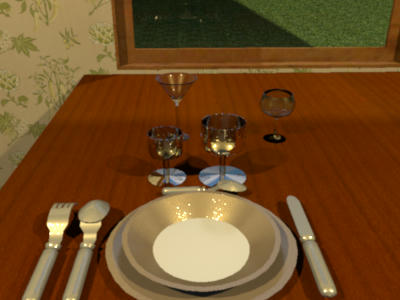
aa33
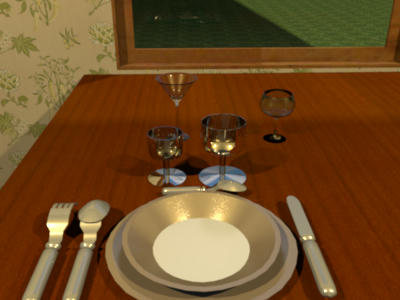
aa55
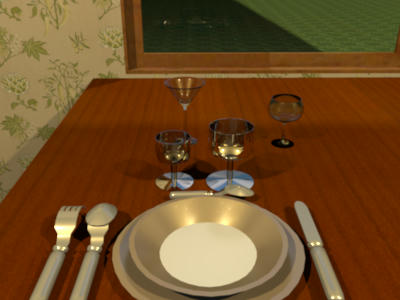
In theory, 1024x over-sampling using (aa = 5) should result in even additional improvement
I decided to try this out. Indeed it works, but you have to be patient.
Even this small 400x300 pixels image took several hours to render with settings aa=55. Especially the glasses take VERY long. See below for results.
aa11
aa33
aa55


Re: What am I doing wrong?
Hans -
Thanks for the tests! I suspect my problem is memory size; I'm still running 32-bit XP on this machine, and the one time I gave it several hours to process, the render routine simply returned the 'start' button active, which SH3D appears to do after some types of failure. (I have a garage door object I brutally hacked into size with Sketchup in the days before I knew how to use Sketchup, the mere presence of which anywhere in a home plan manages to kill any render of any scene in the plan.) As best I can tell -- and I've only looked at the stock SunFlow source, not the bugfixed version Emmanuel includes -- any value greater than 5 is set to 5, so that should be the maximum over-sample available.
I think I've identified where the potential problems with aa = 11 arise, but I'm up against my current understanding of vector math *and* Java syntax, so I need to study some more before I can move on.
Thanks,
maz
Thanks for the tests! I suspect my problem is memory size; I'm still running 32-bit XP on this machine, and the one time I gave it several hours to process, the render routine simply returned the 'start' button active, which SH3D appears to do after some types of failure. (I have a garage door object I brutally hacked into size with Sketchup in the days before I knew how to use Sketchup, the mere presence of which anywhere in a home plan manages to kill any render of any scene in the plan.) As best I can tell -- and I've only looked at the stock SunFlow source, not the bugfixed version Emmanuel includes -- any value greater than 5 is set to 5, so that should be the maximum over-sample available.
I think I've identified where the potential problems with aa = 11 arise, but I'm up against my current understanding of vector math *and* Java syntax, so I need to study some more before I can move on.
Thanks,
maz
Re: What am I doing wrong?
Maz,
A few stats...
- Image size was 400*300 pixels
- Render time estimated 3 hours on a six core machine, no other jobs running
- SH3D assigned 4.0 Gb of memory (but declares only 3.6), of which during rendering 2.5 Gb was used
Impressive stats for such a small image.
H
A few stats...
- Image size was 400*300 pixels
- Render time estimated 3 hours on a six core machine, no other jobs running
- SH3D assigned 4.0 Gb of memory (but declares only 3.6), of which during rendering 2.5 Gb was used
Impressive stats for such a small image.
H
Who is online
Users browsing this forum: No registered users and 1 guest