 high quality pictures at night - outside
This topic has been viewed 26984 times and has 39 replies
Re: high quality pictures at night - outside
@Ceciliabr Sounds very familiar [:)] - also CUT taking a long time occasionally. It may just be my imagination, but CUT (Ctrl-X) seems to take longer in the latest versions of SH3D (from around 4.0 or something). Which, btw, is one reason I avoid large models in general. ok

Re: high quality pictures at night - outside
Avoid large models?
How can I avoid large models with terrains that covers more than one square kilometer?
Here is a rendering from an 8GB file.
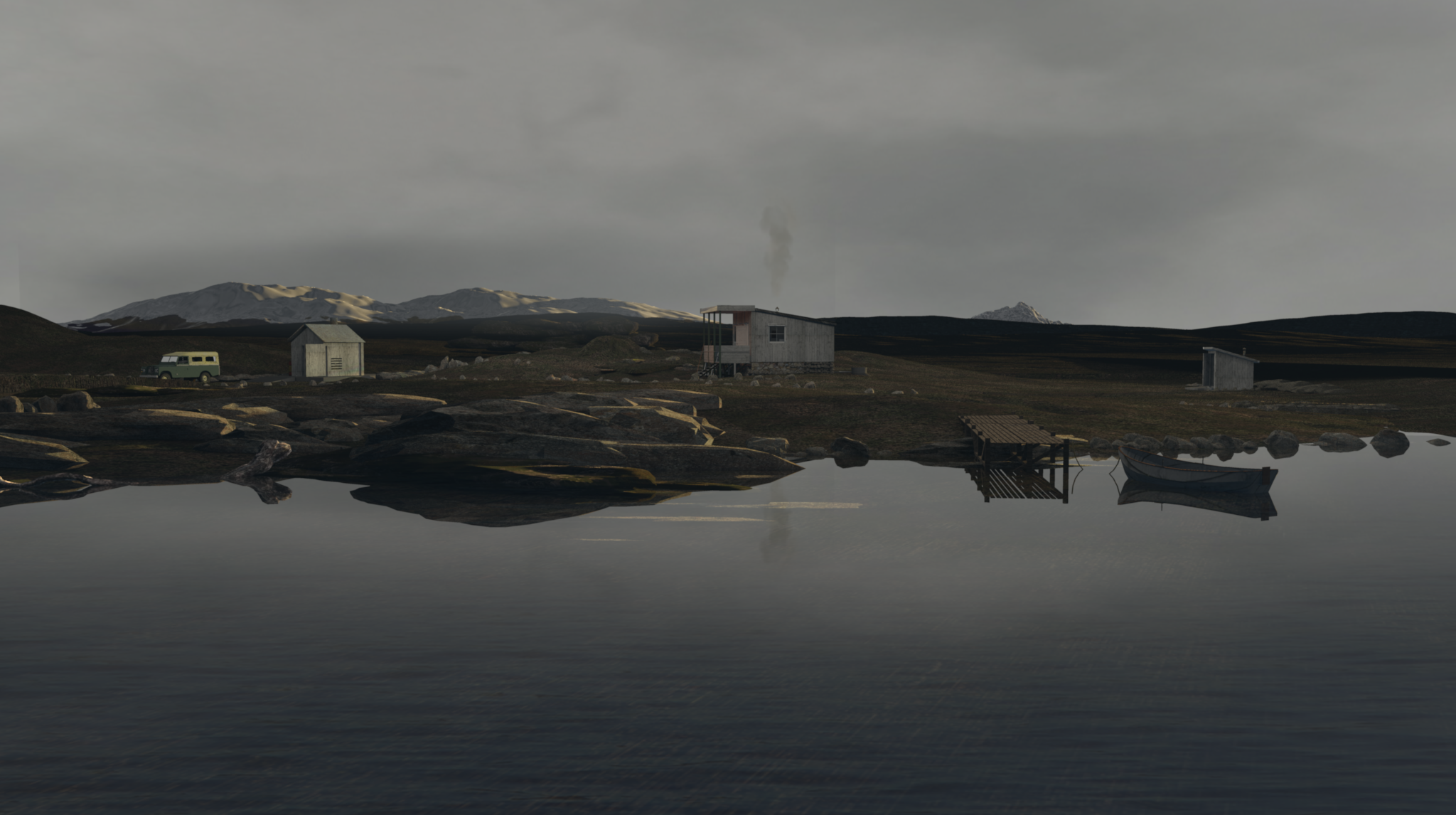
Sunflow is a powerful rendering engine, and SH3D is a great visualization program. I use it for what it's worth [:)]
How can I avoid large models with terrains that covers more than one square kilometer?
Here is a rendering from an 8GB file.
Sunflow is a powerful rendering engine, and SH3D is a great visualization program. I use it for what it's worth [:)]
Re: high quality pictures at night - outside
@okh
I have found a work-around for the problem with Cmd-x taking forever:
Reduce the size of the object to a minimum in the modyfier ( just remember to "keep proportions"), and then resize it back to normal after pasting it. I just tried it on a huge terrain, and it worked perfectly.
I have found a work-around for the problem with Cmd-x taking forever:
Reduce the size of the object to a minimum in the modyfier ( just remember to "keep proportions"), and then resize it back to normal after pasting it. I just tried it on a huge terrain, and it worked perfectly.

Re: high quality pictures at night - outside
Cecilia -
Am I correct to understand the exterior render you posted was generated by SH3D? What are you using to create the terrain model -- or are you using pre-made or procedurally generated (e.g., from DEMs or other topological data)?
Regardless of how you're doing it, you're doing it beautifully...
maz
Am I correct to understand the exterior render you posted was generated by SH3D? What are you using to create the terrain model -- or are you using pre-made or procedurally generated (e.g., from DEMs or other topological data)?
Regardless of how you're doing it, you're doing it beautifully...
maz
Re: high quality pictures at night - outside
Good morning, and thank you, Maz !
Yes, this is rendered with SH3D, with default settings, and no post-processing done. This is "straight out of the box".
I prefer to create my own models, and my terrains are no exception. They are, as you mention, high-poly procedurals, but I never let a program create a "random" terrain for me. The "randomness" offered is in fact not so random after all, and the terrains created at "random" are maybe good for games, but totally unusable for creating natural environments – as are the ones you find laying around the net for free. In a way that's quite understandable.
I think it's great that people are sharing, and I don't mind sharing at all – but, and there's always a but: Once you share a useful creation and it becomes poplar, suddenly everyone starts is using it – and suddenly your own creations, the originals, emerges as copies.
After having worked with a lot of different visualization programs since I fled from art-school some thirteen years ago, I can easily recognize the most popular CGI-effects used over and over again; in TV-series, commercials, even in big Hollywood productions. When you spot shortcuts like that, it takes a bit of the magic away.
I want my pictures to have a story in them. That's why I mostly create my own models.
Well...
The best way to create a usable terrain is to use Photoshop (or some other paint program) an create a height map in black and white, and then use a program like Verto Studio ( or World Machine on PC) to create a terrain from the image. Then you'll have some control over how your terrain will look, and after a little practice, you can easily draw roads, rivers, valleys, mountains and so on using only the height info in the grey-tones.
Normally I use a Wacom tablet, but I also draw terrains with coal and a soft pencil on aquarelle ( watercolour?) paper, and then scan it. It produces a terrain with a very natural, uneven surface, good for grassy fields and plateaus.
I don't think topological data is available for Denmark, and who needs it, really, for modelling Denmark? After all Denmark is not famous for it's stunning scenery, wild mountains and deep valleys. (But it's beautiful all the same.)
Myself, I use a program named Vue to create both terrains and textures. Good textures are hard to make, and something I need to experiment a lot more with.
Yes, this is rendered with SH3D, with default settings, and no post-processing done. This is "straight out of the box".
I prefer to create my own models, and my terrains are no exception. They are, as you mention, high-poly procedurals, but I never let a program create a "random" terrain for me. The "randomness" offered is in fact not so random after all, and the terrains created at "random" are maybe good for games, but totally unusable for creating natural environments – as are the ones you find laying around the net for free. In a way that's quite understandable.
I think it's great that people are sharing, and I don't mind sharing at all – but, and there's always a but: Once you share a useful creation and it becomes poplar, suddenly everyone starts is using it – and suddenly your own creations, the originals, emerges as copies.
After having worked with a lot of different visualization programs since I fled from art-school some thirteen years ago, I can easily recognize the most popular CGI-effects used over and over again; in TV-series, commercials, even in big Hollywood productions. When you spot shortcuts like that, it takes a bit of the magic away.
I want my pictures to have a story in them. That's why I mostly create my own models.
Well...
The best way to create a usable terrain is to use Photoshop (or some other paint program) an create a height map in black and white, and then use a program like Verto Studio ( or World Machine on PC) to create a terrain from the image. Then you'll have some control over how your terrain will look, and after a little practice, you can easily draw roads, rivers, valleys, mountains and so on using only the height info in the grey-tones.
Normally I use a Wacom tablet, but I also draw terrains with coal and a soft pencil on aquarelle ( watercolour?) paper, and then scan it. It produces a terrain with a very natural, uneven surface, good for grassy fields and plateaus.
I don't think topological data is available for Denmark, and who needs it, really, for modelling Denmark? After all Denmark is not famous for it's stunning scenery, wild mountains and deep valleys. (But it's beautiful all the same.)
Myself, I use a program named Vue to create both terrains and textures. Good textures are hard to make, and something I need to experiment a lot more with.

Re: high quality pictures at night - outside
Cecilia,
Maybe this link is interesting? http://terrain.party/
1 - place the blue square over your target area
2 - use the + and - buttons at top-right to select area size (8-18 km2)
3 - use green button to select data source
4 - use down button to download data.
As far as I know all data sets include a grayscale height map (of varying quality)
Have fun.
BTW: the landscape is stunning!
Hans
Maybe this link is interesting? http://terrain.party/
1 - place the blue square over your target area
2 - use the + and - buttons at top-right to select area size (8-18 km2)
3 - use green button to select data source
4 - use down button to download data.
As far as I know all data sets include a grayscale height map (of varying quality)
Have fun.
BTW: the landscape is stunning!
Hans
Re: high quality pictures at night - outside
And stunning it is. Obviously, yours is the elegant way of doing this. But just not to daunt the casual reader, there are simpler ways if all you need is a basic idea of what the view looks like. The blog post How to add a scenery around your home maybe the most straightforward.Avoid large models?
How can I avoid large models with terrains that covers more than one square kilometer?
Here is a rendering from an 8GB file.
Sunflow is a powerful rendering engine, and SH3D is a great visualization program. I use it for what it's worth [:)]
But it is also possible to use a sky texture with a panorama picture (to avoid those multi-Gig files) to get the general idea - especially for mountain sceneries - like discussed in thread 6362. This thread also links to a post which describes how sky textures are mapped on the horizon in SH3D (hint, the texture starts right in plan - due East if North is up in the plan).
True, the result will not be anywhere near as beautiful as Ceciliabr's pictures, but if you also add a bit of terrain underneath (elevating the building) and some objects around, this approach will produce the general idea.
As for sky textures, there are several possibilities. My preferred way, is to use a real 360 panorama made from my own pan photographs.
But you can also use 3D map viewers. Google Earth etc will not really give sufficient detail to look nice (but street view can be ok, provided you find a good vantage point). But there are other options too, like the Virtual Globe (with better imagery for Norway , btw - but I think there may be some Mac/Jave issues with the Virtual Globe).
Using panorama sky textures a is relatively easy cut-paste-scale job with some photo-editor the Gimp (or Photoshop, if you insist).
Even if the below pictures indeed look very plain compared to Ceciliabr's beautiful quality pictures, they have the advantage of being pretty small files (quick mock-ups with no ambition of producing something beautiful) where the extra 'scenery' is < 1 MB.
ok
Panoramic image as sky texture:

Curved object with image of trees, transparent at top (sky texture is just a gradient image seamless, 360°):
 [/quote]
Re: high quality pictures at night - outside
Thank you Hans, that's a VERY interesting link.
I was not aware of this at all when I modeled my imaginary mountain-terrain.
This opens a lot of new possibilities...
C
I was not aware of this at all when I modeled my imaginary mountain-terrain.
This opens a lot of new possibilities...
C
Re: high quality pictures at night - outside
If you look around, you can find vector based contour lines and other geo data freely available, some with very high resolution (1m). But conversion between formats (and datum) is a total pain. At least, I have not found an easy way of converting vector map data to a format supported by SH3D - but that could just be me. So if anyone has a good way of doing this, please share.Thank you Hans, that's a VERY interesting link.
I was not aware of this at all when I modeled my imaginary mountain-terrain.
Or, of course, I could play around with Hans' link - or even better - just wait for Ceciliabr to produce beautiful images...
ok
Re: high quality pictures at night - outside
Hans -
Terrain.Party is pretty amazing -- and after 20+ hours of grazing the web last fall for just this sort of site, I'd still never heard of it. I'm not sure what I'll use it for, but I'm definitely going to use it for something.
Thanks for the link!
maz
Terrain.Party is pretty amazing -- and after 20+ hours of grazing the web last fall for just this sort of site, I'd still never heard of it. I'm not sure what I'll use it for, but I'm definitely going to use it for something.
Thanks for the link!
maz
Who is online
Users browsing this forum: No registered users and 2 guests