Hello! (I am new here, and my english is terrible so bear with me)
I was looking at some 3d models like: http://imgur.com/a/08qB7
But I can't understand how to cut the windows and doors like that...
Thanks in advance for answers!
Best regards,
Lars

 Cut glass
This topic has been viewed 11037 times and has 4 replies

Re: Cut glass
If I understand your question correctly... you can't.
Or, at least not with stock SH3D models. Instead, you'd need custom 'half' doors and windows, to give the cut-through look. Set your wall height to 4 feet (122 cm), place the special door and window objects, and you're done.
I don't *think* such models exist here or in the Sourceforge database; please correct me if I'm wrong. If I get a chance, I may try my hand at these later today.
maz
Or, at least not with stock SH3D models. Instead, you'd need custom 'half' doors and windows, to give the cut-through look. Set your wall height to 4 feet (122 cm), place the special door and window objects, and you're done.
I don't *think* such models exist here or in the Sourceforge database; please correct me if I'm wrong. If I get a chance, I may try my hand at these later today.
maz
-
Skitzo0379
- Posts: 4
- Joined: Wed Aug 03, 2016 8:15 pm
- Country: Norway
Re: Cut glass
Thank you for answering!
I hope I will stumble across someone who have made something like that, would be awesome.
And If you could take a look at it aswell I would be more than greatful!
I hope I will stumble across someone who have made something like that, would be awesome.
And If you could take a look at it aswell I would be more than greatful!
Re: Cut glass
Hei Lars,
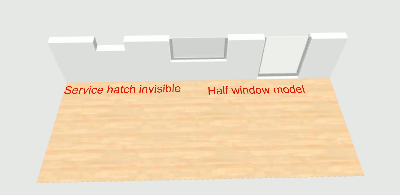
Seems many estate agents (here) tend to use these cut-off-wall presentations of properties. As Maz says, SH3D cannot cut the (window) models in half. A half window/door model is easy enough to make. Not sure how useful such models would be, though. If you want a similar cut-off presentation, you could:
1) set wall height to 150cm (or something),
2) use invisible windows that just cut the opening.
(to make a door/window invisible, use the service hatch or some other door/window and set the frame material to invisible with [font=courier new]Modify furniture > Modify materials[/font]). You will not see the frame or window-pane, but imho the effect is close enough. So close that there may not be a need for "half" windows in the collection.
That said, the 3D exporter/viewer will allow you a more detailed and accurate view online, for instance thread 6956 and the 3D view (using the Exported homes manager).
Nevertheless, here is a very quick mock-up of a half-window (toggle invisibility/colour of elements - you still need to adjust wall height, though):
SourceForge 3D models 399: Window cut half.
ok
PS - engelsken din er glimrende, den [:)], men det er mulig å spørre på norsk også i forum for fremmespråklige ...
Seems many estate agents (here) tend to use these cut-off-wall presentations of properties. As Maz says, SH3D cannot cut the (window) models in half. A half window/door model is easy enough to make. Not sure how useful such models would be, though. If you want a similar cut-off presentation, you could:
1) set wall height to 150cm (or something),
2) use invisible windows that just cut the opening.
(to make a door/window invisible, use the service hatch or some other door/window and set the frame material to invisible with [font=courier new]Modify furniture > Modify materials[/font]). You will not see the frame or window-pane, but imho the effect is close enough. So close that there may not be a need for "half" windows in the collection.
That said, the 3D exporter/viewer will allow you a more detailed and accurate view online, for instance thread 6956 and the 3D view (using the Exported homes manager).
Nevertheless, here is a very quick mock-up of a half-window (toggle invisibility/colour of elements - you still need to adjust wall height, though):
SourceForge 3D models 399: Window cut half.
ok
PS - engelsken din er glimrende, den [:)], men det er mulig å spørre på norsk også i forum for fremmespråklige ...
Re: Cut glass
Regarding this subject, please read also this new tip in the blog. And again, many thanks to Okh.
Who is online
Users browsing this forum: No registered users and 1 guest