enkonyito,
Your plug-in is great but I encountered some issues.
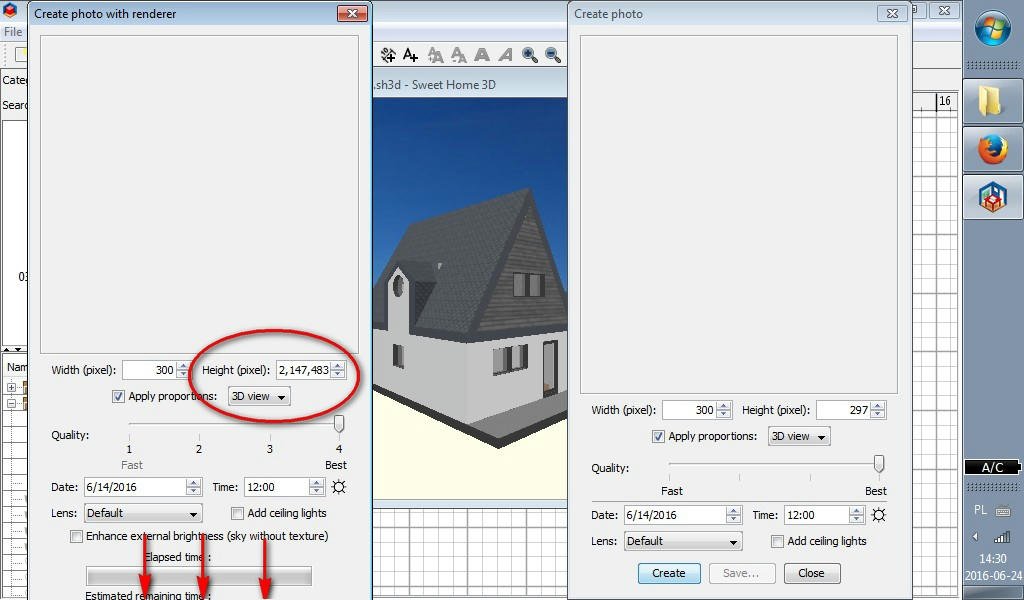
1) When "Apply proportions" is set to "3d view", changing image width to any value always makes height = 2,147,483,647; new height value makes width = 0.
Switching back from "Square", "4/3" and other proportions presets (that work fine) also causes this unwanted effect. If I want my image to keep proportions of 3d view but I need to change size I have to do it via standard "Create photo" window.
2) "Create photo with renderer" window doesn't fit to my screen height(1024x600px) - I don't see "Create", "Save" and "Close" buttons, even if I move or hide task bar. I use Tab key but I have to carefully count hits to avoid accidental skipping "Save" button when I'm finally satisfied with my image.
screenshot
I would be grateful for fixing it.
Progress and time of photo rendering
This topic has been viewed 44451 times and has 36 replies
Re: Progress and time of photo rendering (Create photo with renderer plug-in)
alax,
I can not reproduce it even by displaying the 3D view in a separate window.
Is this occasional or systematic?
Have others met the same kind of problem?
This will be fixed in the next version of the plugin that will be soon available.
1) When "Apply proportions" is set to "3d view", changing image width to any value always makes height = 2,147,483,647; new height value makes width = 0.
I can not reproduce it even by displaying the 3D view in a separate window.
Is this occasional or systematic?
Have others met the same kind of problem?
2) "Create photo with renderer" window doesn't fit to my screen height(1024x600px) - I don't see "Create", "Save" and "Close" buttons, even if I move or hide task bar.
This will be fixed in the next version of the plugin that will be soon available.
EnkoNyito
Re: Progress and time of photo rendering (Create photo with renderer plug-in)
Thanks for reply.
- When I open "CPwR" first and then detach 3D view - it also works fine.
- Problem occurs every time I open "CPwR" when 3D view window is already floating(in my case - almost all the time). What I forgot to mention in my previous post - resizing this floating 3D view window manually(dragging edges) makes no changes to width and height fields in "CPwR".
Apparently, only me and I [;)] have met this problem - it happens on my both laptops - WinXP and Win7(32-bit).
[:)]
- With 3D view docked (in main window) everything works fine.I can not reproduce it even by displaying the 3D view in a separate window. Is this occasional or systematic?
- When I open "CPwR" first and then detach 3D view - it also works fine.
- Problem occurs every time I open "CPwR" when 3D view window is already floating(in my case - almost all the time). What I forgot to mention in my previous post - resizing this floating 3D view window manually(dragging edges) makes no changes to width and height fields in "CPwR".
Have others met the same kind of problem?
Apparently, only me and I [;)] have met this problem - it happens on my both laptops - WinXP and Win7(32-bit).
This will be fixed in the next version of the plugin that will be soon available.
[:)]
Re: Progress and time of photo rendering (Create photo with renderer plug-in)
- Problem occurs every time I open "CPwR" when 3D view window is already floating(in my case - almost all the time). What I forgot to mention in my previous post - resizing this floating 3D view window manually(dragging edges) makes no changes to width and height fields in "CPwR".
By following your procedure, I was able to test the bug and find a solution. [:)]
EnkoNyito
Re: Progress and time of photo rendering (Create photo with renderer plug-in)
That's great! You're the man! [;)]
Re: Progress and time of photo rendering (Create photo with renderer plug-in)
Version 1.3
- Added advanced settings for rendering properties
- Enhancement option to external brightness (sky with or without texture)
- Fixed a 3D view management bug in a separate window
- Fixed a photo panel resizing bug for small screens
- Other minor fixes and improvements
- Added advanced settings for rendering properties
- Enhancement option to external brightness (sky with or without texture)
- Fixed a 3D view management bug in a separate window
- Fixed a photo panel resizing bug for small screens
- Other minor fixes and improvements
EnkoNyito
Re: Progress and time of photo rendering (Create photo with renderer plug-in)
In case of problems with previous links (unavailability of sourceforge), use the one attached.
- Attachments
-
- CreatePhotoWithRenderer-1.3.1.sh3p
- (134.3 KiB) Downloaded 599 times
EnkoNyito
Re: Progress and time of photo rendering (Create photo with renderer plug-in)
I had a lot of issues with the default render engine, especially the quality of the image (yes I disable ceiling lights and add lights myself) ..
I got strange art-effects, white spots, dark spots -> know issues, never get fixed. I really couldn't found any solution. Exporting & importing to Blender is an alternative way, but way to complicated for now. . Until I found this plugin. Although I have still strange white spots with this plugin . It could because of my chandelier (lot of glass)...
I got strange art-effects, white spots, dark spots -> know issues, never get fixed. I really couldn't found any solution. Exporting & importing to Blender is an alternative way, but way to complicated for now. . Until I found this plugin. Although I have still strange white spots with this plugin
. It could because of my chandelier (lot of glass)...Re: Progress and time of photo rendering (Create photo with renderer plug-in)
Maybe I'm too harsh, I really like that you put effort into the rendering engine. Kudos for that! [B-)] Don't get me wrong. But the future could be to switch to a better engine? Like from Blender perhaps.In case of problems with previous links (unavailability of sourceforge), use the one attached.
I really like Sweet Home 3D actually, but the render engine should get replaced by a more modern engine using GPU.
Re: Progress and time of photo rendering (Create photo with renderer plug-in)
This plug-in also uses the default rendering engine.Although I have still strange white spots with this plugin...
Change rendering engine means respecting certain conditions for open source software like Sweet Home 3D.But the future could be to switch to a better engine? Like from Blender perhaps.
EnkoNyito
Who is online
Users browsing this forum: No registered users and 1 guest