3D card problem
This topic has been viewed 4482 times and has 3 replies
3D card problem
How do I find what my current DirectX and OpenGL drivers are? What should I do to update these? Please give specific direction if possible.

Re: 3D card problem
is this what you mean
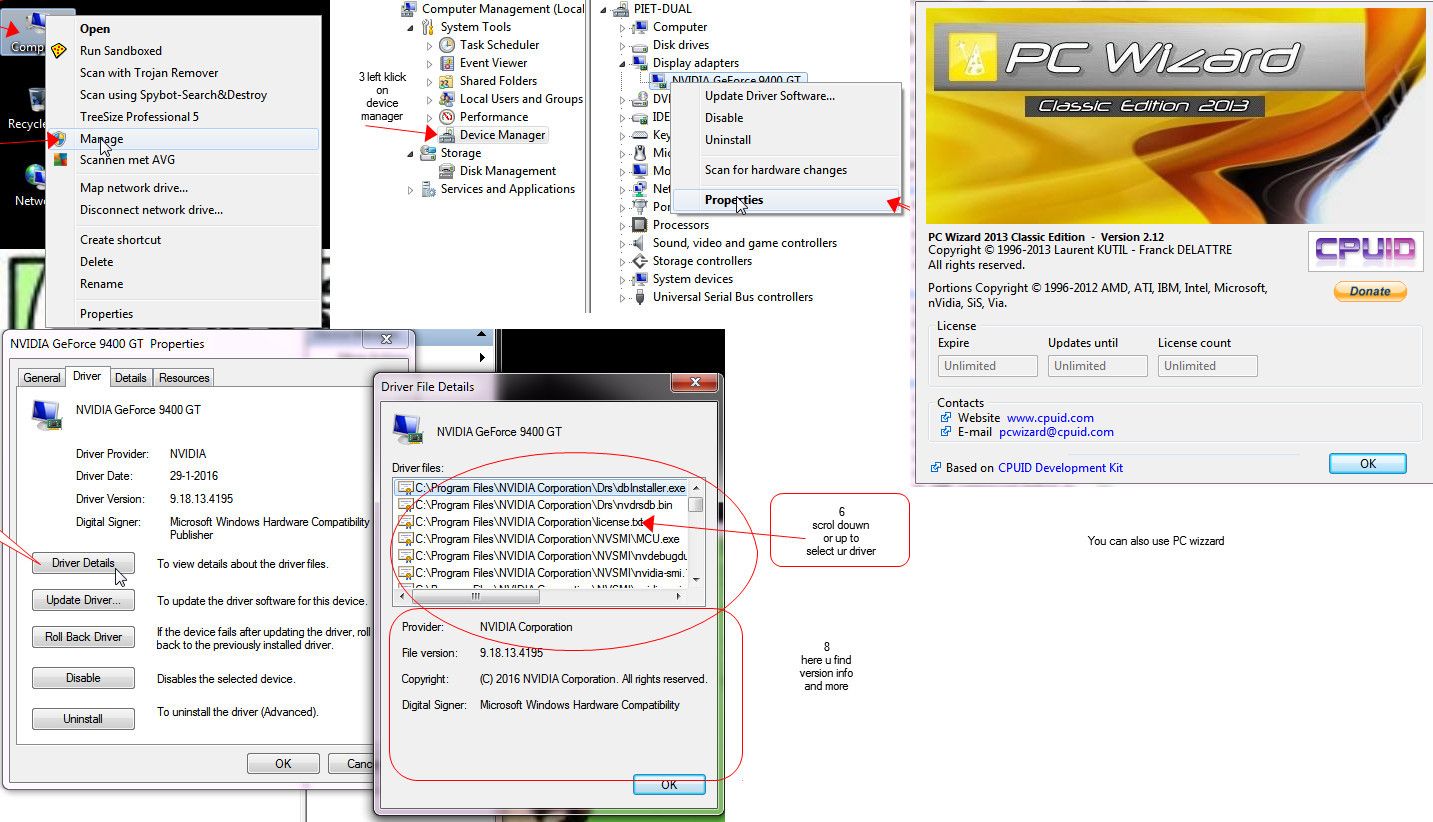
1 right click on ur computer icon
2 select Manage
3 left click device manager
4 right click display adapter / select properties
5 driver tab / select driver details
6 scroll up or douwn to view ur drivers
7 select driver by clicking ur mouse pointer
8 view ur version in lower panne
Done !
or you can download PC WIZZARD ..Url is on the picture
[:)]
1 right click on ur computer icon
2 select Manage
3 left click device manager
4 right click display adapter / select properties
5 driver tab / select driver details
6 scroll up or douwn to view ur drivers
7 select driver by clicking ur mouse pointer
8 view ur version in lower panne
Done !
or you can download PC WIZZARD ..Url is on the picture
[:)]
To Draw or not to Draw ...... Thats nolonger a question .. We draw
Re: 3D card problem
the diagnostic program for Direct X is in the
C:\Windows\System32\dxdiag.exe
folder
How to install the latest version >>
https://support.microsoft.com/en-us/kb/179113
C:\Windows\System32\dxdiag.exe
folder
How to install the latest version >>
https://support.microsoft.com/en-us/kb/179113
To Draw or not to Draw ...... Thats nolonger a question .. We draw
Re: 3D card problem
OpenGL Driver are tricky every graphic card has is own
if u conna mangle wit those ,,make sure u create a restore point
OpenGL Driver Support
https://developer.nvidia.com/opengl-driver
if u conna mangle wit those ,,make sure u create a restore point
OpenGL Driver Support
https://developer.nvidia.com/opengl-driver
To Draw or not to Draw ...... Thats nolonger a question .. We draw
Who is online
Users browsing this forum: No registered users and 1 guest