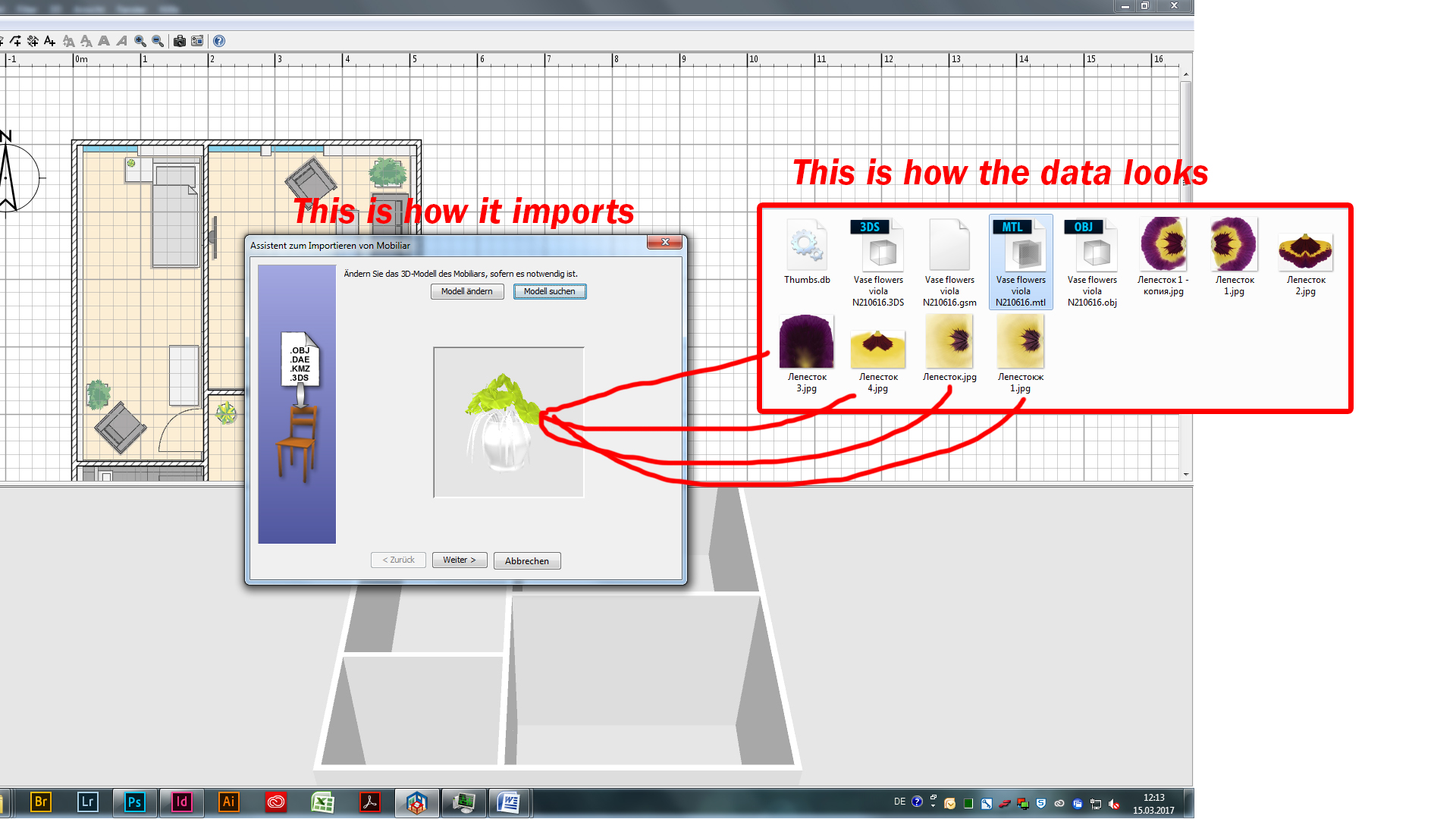
3DS not importing properly - textures missing

This topic has been viewed 4469 times and has 8 replies
Thread status: Active
Still a problem with your graphic card? [img]http://www.sweethome3d.com/images/flags/en_small.gif[/img]
Post Reply New Topic
SchokiDay
Posts: 8
Joined: Wed Mar 15, 2017 11:07 am
Country: Germany

3DS not importing properly - textures missing

Post by SchokiDay »

Is this just a crappy design or am I importing the *.3DS wrong.

All textures are missing [:(]

Example here:
http://fs5.directupload.net/images/170315/qts6z6us.jpg

Thanks in advance ;)
User avatar
Puybaret
Posts: 9440
Joined: Mon Nov 07, 2005 12:00 pm
Country: Paris, France
Contact:

Re: 3DS not importing properly - textures missing

Post by Puybaret »

It's probably an issue with the encoding of Cyrillic characters in the 3DS file.
How did you get this 3DS file?
Emmanuel Puybaret, Sweet Home 3D creator
SchokiDay
Posts: 8
Joined: Wed Mar 15, 2017 11:07 am
Country: Germany

Re: 3DS not importing properly - textures missing

Post by SchokiDay »

Thanks for the response!

I downloaded some 3D Objects on "https://archive3d.net/"
I am pretty new with this program and still testing all cind of things.
User avatar
hansmex
Posts: 4027
Joined: Sat Sep 26, 2009 11:36 am
Country: Netherlands

Re: 3DS not importing properly - textures missing

Post by hansmex »

It's a known problem that some/many of the models at archive3d.net miss textures.
Can you give a direct link to one of the models that causes problems?

H
Hans

new website - under constuction
hansdirkse.info
SchokiDay
Posts: 8
Joined: Wed Mar 15, 2017 11:07 am
Country: Germany

Re: 3DS not importing properly - textures missing

Post by SchokiDay »

Hi hansmex,

i happened to find the example (flowers) shown in my picture-link:

"https://archive3d.net/?a=download&id=83a105e8"

It doesnt apply the blossom texture or maybe i am doing something wrong?

And thx for all the halp so far [;)]
User avatar
Puybaret
Posts: 9440
Joined: Mon Nov 07, 2005 12:00 pm
Country: Paris, France
Contact:

Re: 3DS not importing properly - textures missing

Post by Puybaret »

This 3D model contains data at two formats that Sweet Home 3D is able to handle:
- OBJ format, but this one can't work because its accompanying MTL file it contains doesn't reference any texture image
- 3DS format, but the 3DS file references only one texture image instead of the 7 available images, and the non latin characters prevents it to work.
If you want my opinion, the submitter of this nice model didn't try the OBJ and 3DS exports he proposed in an other software.
Emmanuel Puybaret, Sweet Home 3D creator
SchokiDay
Posts: 8
Joined: Wed Mar 15, 2017 11:07 am
Country: Germany

Re: 3DS not importing properly - textures missing

Post by SchokiDay »

Thx a lot for your replies!
So its not a general problem rather then incompatible or bad modeling for sweet home 3D?

Since we are at it, i would have a followup question if its not to much :) ...concerning importing textures. Maybe you can also help me out here or i will simply open a new thread.

Anyway:
Can u skale textures after importing them?
Why i ask? -> while importing textures you have the option to skale textures, but i sometimes cant seem to find the right skale for my objects for them to connect right. So i "remport" and skale again and again until it suits my objects.
Or is there anything i have to check while importing and skaling?

Again, thanks a lot already!
User avatar
hansmex
Posts: 4027
Joined: Sat Sep 26, 2009 11:36 am
Country: Netherlands

Re: 3DS not importing properly - textures missing

Post by hansmex »

If it's a texture you imported yourself, the name of the texture appears in italics.
- select the texture
- click Modify
- change the appearance

H
Hans

new website - under constuction
hansdirkse.info
SchokiDay
Posts: 8
Joined: Wed Mar 15, 2017 11:07 am
Country: Germany

Re: 3DS not importing properly - textures missing

Post by SchokiDay »

Yes, thanks for this solution [=D>]
Post Reply New Topic

Who is online

Users browsing this forum: No registered users and 1 guest