Hi,
After download and installing new Win10 build 1703, I saw that sh3d crashed !
In opening, no problem.
I tryed to do a 'Save Under...' and bye...
No message...
When you re-try to open sh3d's file, do a simple 'Save' on a recuperated file, this resoluted the problem.
So, becareful !
====> 04-07-2017 - 15:21 GMT
1. Same crash when I want to import new model in existant project.
When I choose 'Furniture', 'Import furniture', 'choose model'........... CRASH ! similar to departure without saving.
2. Same thing on new project with an import.
Here is the latest log
[>:)]
 ALERT : Win10 build 1703
This topic has been viewed 14567 times and has 33 replies
-
bdfd

- Posts: 2614
- Joined: Sat Mar 29, 2014 7:17 am
- Country: LILLE, Les Hauts de France, Western Europa
ALERT : Win10 build 1703
- Attachments
-
[The extension log has been deactivated and can no longer be displayed.]
Evil progresses when good people do nothing!
---
SH3D 7.1 and nothing else - W11 64b in 4K
---
SH3D 7.1 and nothing else - W11 64b in 4K
-
bdfd
- Posts: 2614
- Joined: Sat Mar 29, 2014 7:17 am
- Country: LILLE, Les Hauts de France, Western Europa
Re: ALERT : Win10 build 1703
Hi,
Today, same crash in saving on rendering picture... [>:)]
Here is the most recent log...
Today, same crash in saving on rendering picture... [>:)]
Here is the most recent log...
- Attachments
-
[The extension log has been deactivated and can no longer be displayed.]
Evil progresses when good people do nothing!
---
SH3D 7.1 and nothing else - W11 64b in 4K
---
SH3D 7.1 and nothing else - W11 64b in 4K
Re: ALERT : Win10 build 1703
Maybe, that's because of non-ASCII characters in folder name?
java_command: com.eteks.sweethome3d.SweetHome3D -open D:\SH3D\Crйations\06 Cubique\10\Cubique10 meublйe.sh3d
Sure this is a bug author needs to fix, but I can see a workaround in renaming that folder
Code: Select all
Java frames: (J=compiled Java code, j=interpreted, Vv=VM code)
j  sun.awt.shell.Win32ShellFolder2.getDisplayNameOf(JJI)Ljava/lang/String;+0
j  sun.awt.shell.Win32ShellFolder2.access$1600(JJI)Ljava/lang/String;+4
j  sun.awt.shell.Win32ShellFolder2$13.call()Ljava/lang/String;+15
j  sun.awt.shell.Win32ShellFolder2$13.call()Ljava/lang/Object;+1
java_command: com.eteks.sweethome3d.SweetHome3D -open D:\SH3D\Crйations\06 Cubique\10\Cubique10 meublйe.sh3d
Sure this is a bug author needs to fix, but I can see a workaround in renaming that folder
-
bdfd
- Posts: 2614
- Joined: Sat Mar 29, 2014 7:17 am
- Country: LILLE, Les Hauts de France, Western Europa
Re: ALERT : Win10 build 1703
Good idea but LOST ! [:((]Maybe, that's because of non-ASCII characters in folder name?Code: Select all
Java frames: (J=compiled Java code, j=interpreted, Vv=VM code)
j  sun.awt.shell.Win32ShellFolder2.getDisplayNameOf(JJI)Ljava/lang/String;+0
j  sun.awt.shell.Win32ShellFolder2.access$1600(JJI)Ljava/lang/String;+4
j  sun.awt.shell.Win32ShellFolder2$13.call()Ljava/lang/String;+15
j  sun.awt.shell.Win32ShellFolder2$13.call()Ljava/lang/Object;+1
java_command: com.eteks.sweethome3d.SweetHome3D -open D:\SH3D\Crйations\06 Cubique\10\Cubique10 meublйe.sh3d
Sure this is a bug author needs to fix, but I can see a workaround in renaming that folder
Same crashes without french accents...
Evil progresses when good people do nothing!
---
SH3D 7.1 and nothing else - W11 64b in 4K
---
SH3D 7.1 and nothing else - W11 64b in 4K
-
bdfd
- Posts: 2614
- Joined: Sat Mar 29, 2014 7:17 am
- Country: LILLE, Les Hauts de France, Western Europa
Re: ALERT : Win10 build 1703
Fortunately, the option 'Save and compress' works fine !
[:)]
[:)]
Evil progresses when good people do nothing!
---
SH3D 7.1 and nothing else - W11 64b in 4K
---
SH3D 7.1 and nothing else - W11 64b in 4K
-
bdfd
- Posts: 2614
- Joined: Sat Mar 29, 2014 7:17 am
- Country: LILLE, Les Hauts de France, Western Europa
Re: ALERT : Win10 build 1703
Hi,
@Manu : What are the news ?
@Manu : What are the news ?
Evil progresses when good people do nothing!
---
SH3D 7.1 and nothing else - W11 64b in 4K
---
SH3D 7.1 and nothing else - W11 64b in 4K

Re: ALERT : Win10 build 1703
It looks like the Java bug #8170517 or #8173471. The first one was closed as non-reproducible and the second one was resolved recently but the fix is probably not published yet.
The bug must happen as soon as you try to access a file dialog box to choose a sh3d file or any other file handled by Sweet Home 3D, with a problem to access this file.
To cancel the directories that you used recently in Sweet Home 3D, run regedit, search for last/Directory# and last/Default/Directory in folders ending with com/eteks/sweethome3d and remove matching entries.
If it doesn't work better after that, try to move and open a Sweet Home 3D file in a very common place like your desktop to check if it works better or not.
The bug must happen as soon as you try to access a file dialog box to choose a sh3d file or any other file handled by Sweet Home 3D, with a problem to access this file.
To cancel the directories that you used recently in Sweet Home 3D, run regedit, search for last/Directory# and last/Default/Directory in folders ending with com/eteks/sweethome3d and remove matching entries.
If it doesn't work better after that, try to move and open a Sweet Home 3D file in a very common place like your desktop to check if it works better or not.
Emmanuel Puybaret, Sweet Home 3D creator
-
bdfd
- Posts: 2614
- Joined: Sat Mar 29, 2014 7:17 am
- Country: LILLE, Les Hauts de France, Western Europa
Re: ALERT : Win10 build 1703
Hi,
No change after remove all entries in "\HKEY_CURRENT_USER\Software\JavaSoft\Prefs\com\eteks\sweethome3d"... [:((]
Same crash with :
- Save Under
- choose new furniture
- save picture...
Why does it work with 'Save and compress' and NOT with 'Save' or 'Save as' ?
Another ideas ?
perhaps with java 1.9 ?
[:)]
No change after remove all entries in "\HKEY_CURRENT_USER\Software\JavaSoft\Prefs\com\eteks\sweethome3d"... [:((]
Same crash with :
- Save Under
- choose new furniture
- save picture...
Why does it work with 'Save and compress' and NOT with 'Save' or 'Save as' ?
Another ideas ?
perhaps with java 1.9 ?
[:)]
Evil progresses when good people do nothing!
---
SH3D 7.1 and nothing else - W11 64b in 4K
---
SH3D 7.1 and nothing else - W11 64b in 4K
Re: ALERT : Win10 build 1703
I just tried on a Windows 10 computer with Creator update (version 1703 / 15063.138), and didn't notice any issue.
You can try with Java 9 + Jar executable version for example, but keep in mind that Java 9 is still in Beta.
You can try with Java 9 + Jar executable version for example, but keep in mind that Java 9 is still in Beta.
Emmanuel Puybaret, Sweet Home 3D creator
-
bdfd
- Posts: 2614
- Joined: Sat Mar 29, 2014 7:17 am
- Country: LILLE, Les Hauts de France, Western Europa
Re: ALERT : Win10 build 1703
OK, we have same OS with the latest update (yesterday).I just tried on a Windows 10 computer with Creator update (version 1703 / 15063.138), and didn't notice any issue.
You can try with Java 9 + Jar executable version for example, but keep in mind that Java 9 is still in Beta.
The link to download java9 is HERE [B-)]
Here are the problems :
Java 9 is installed, After reboot I saw this :
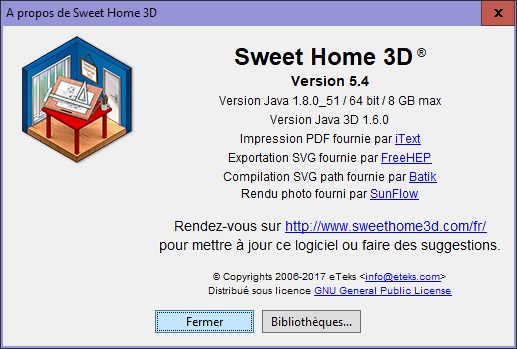
Always in java 1.8 ! [:-&]
So I saw a sub-directory jre8 in sh3d directory, I deleted it.
I launched sh3d and...
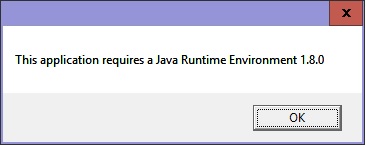
So I copied/pasted the jre-9 in programs directory into sh3d directory.
I launched sh3d and...
I deleted all plug-ins, same crashes... [>:)]
I desactived my anti-virus, same crashes... [:-&]
Latest updates after win10 1703
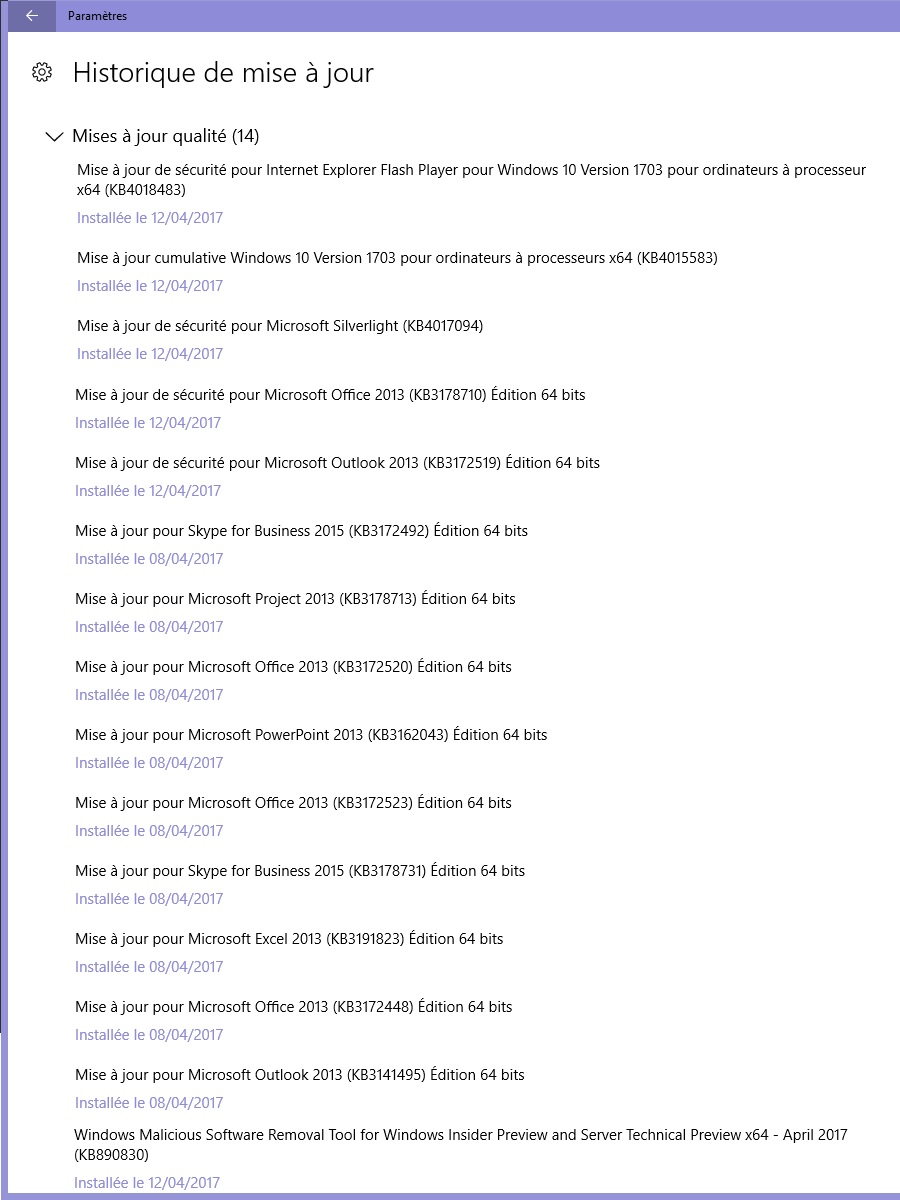
here is the latest logs :
What can I do more ?
Even the soft "Furniture Library Editor" crashes... [=;]
see the last joined log.
- Attachments
-
[The extension log has been deactivated and can no longer be displayed.]
-
[The extension log has been deactivated and can no longer be displayed.]
-
[The extension log has been deactivated and can no longer be displayed.]
-
[The extension log has been deactivated and can no longer be displayed.]
Evil progresses when good people do nothing!
---
SH3D 7.1 and nothing else - W11 64b in 4K
---
SH3D 7.1 and nothing else - W11 64b in 4K
Who is online
Users browsing this forum: No registered users and 1 guest