Help with multiple light sources in furniture object

This topic has been viewed 8062 times and has 5 replies
Thread status: Active
Looking for a particular 3D model or texture? [img]http://www.sweethome3d.com/images/flags/en_small.gif[/img]
Post Reply New Topic
Bubblobill
Posts: 77
Joined: Sun May 21, 2017 2:09 pm
Country: Australia

Help with multiple light sources in furniture object

Post by Bubblobill »

I made a model of a lamp I have at home to practice my modeling skills.
Image

I was not aware that creating lights is so painful, and this one, unfortunately, has five of them, and I cannot get it to emit light. Please assist with where I have gone wrong.

I created the original file in Blender. Exported it as Wavefront object which gave me the .obj and the .mtl files. Using the Furniture Library Editor I made a library containing just the one piece of furniture.

Renamed, unpacked, and edited the .properties file to

Code: Select all

name#1=Lamp - Floor, 5 x globe
tags#1=lamp, floor lamp, floor, light
category#1=Lights
icon#1=/Lamp - Floor, 5 x globe.png
model#1=/Lamp - Floor, 5 x globe/Lamp.Floor.5xGlobe.obj
multiPartModel#1=true
width#1=98.73148
depth#1=93.85602
height#1=183.83266
movable#1=true
doorOrWindow#1=false
lightSourceX#1=92.6 78.5 58.1 35.7 6.0
lightSourceY#1=47.3 67.6 77.3 86.1 87.7
lightSourceZ#1=120.1 135.7 150.1 164.4 179.0
lightSourceColor#1=#444444 #444444 #444444 #444444 #444444
lightSourceDiameter#1=19.0 19.0 19.0 19.0 19.0
creator#1=Bubblobill
(I started off with smaller diameters but set them large for trouble-shooting purposes to make sure they are not blocked by the globes if I have the globe material wrong).

Save, pack, rename, import... still doesn't work

Any idea how I have mismanaged this whole affair?

Regards,

Bubblobill

okh
Posts: 1545
Joined: Sun May 12, 2013 9:43 pm

Re: Help with multiple light sources in furniture object

Post by okh »

Hmm, I think you are wrong, your lamp does work!

1) Very nice lamp!
2) You do not make it easy for yourself with that kind of model, do you ? - of course, that would be painful [:)]
3) The PluginFurnitureCatalog.properties looks correct, neat tidy and with all elements in place. Nicely done! But I did not do the maths for the co-ordinates.
4) The .sh3f file had the directory zipped, so the .sh3f file did not work without extracting and re-packing the files.
5) That done, furniture library works and lamp imports beautifully and emits light - but I did not check whether each light source is in the right place.

But as far as I can tell - you have made a very cool lamp that works. Certainly one for sharing.

ok
Bubblobill
Posts: 77
Joined: Sun May 21, 2017 2:09 pm
Country: Australia

Re: Help with multiple light sources in furniture object

Post by Bubblobill »

Fixed! Thankyou very much okh

Image


Anyone that wants the new version is welcome to non-commercial use. It is modeled from a real thing so it would be poor form to share for profit.
User avatar
bdfd
Posts: 2614
Joined: Sat Mar 29, 2014 7:17 am
Country: LILLE, Les Hauts de France, Western Europa

Re: Help with multiple light sources in furniture object

Post by bdfd »

TY Bubblobill ! [=D>]

Great art... and warranted effect [:x]

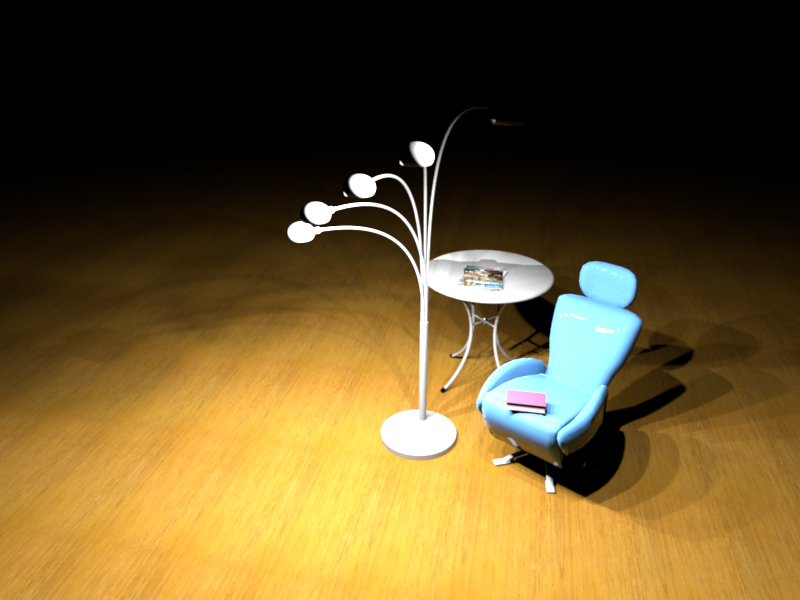
Image
800 x 600 in Q4

Are there really 5 lights or just one ?

[:)]
Evil progresses when good people do nothing!
---
SH3D 7.1 and nothing else - W11 64b in 4K
Bubblobill
Posts: 77
Joined: Sun May 21, 2017 2:09 pm
Country: Australia

Re: Help with multiple light sources in furniture object

Post by Bubblobill »

Most definitely 5 lights. I count 5 shadows :)

They are a bit too bright though, I presume the intensity would be decreased by changing the light source colour. There may need to be a future upgrade to the model.
User avatar
bdfd
Posts: 2614
Joined: Sat Mar 29, 2014 7:17 am
Country: LILLE, Les Hauts de France, Western Europa

Re: Help with multiple light sources in furniture object

Post by bdfd »

Most definitely 5 lights. I count 5 shadows :)
Of course, you are right.

[:)]
Evil progresses when good people do nothing!
---
SH3D 7.1 and nothing else - W11 64b in 4K
Post Reply New Topic

Who is online

Users browsing this forum: No registered users and 2 guests