Supporting wall/ beam?
This topic has been viewed 5578 times and has 3 replies
Supporting wall/ beam?
Help - anyone know how i can create a supporting wall/ beam between two walls at ceiling hight?

Re: Supporting wall/ beam?
there are lots off ways to create a support beam
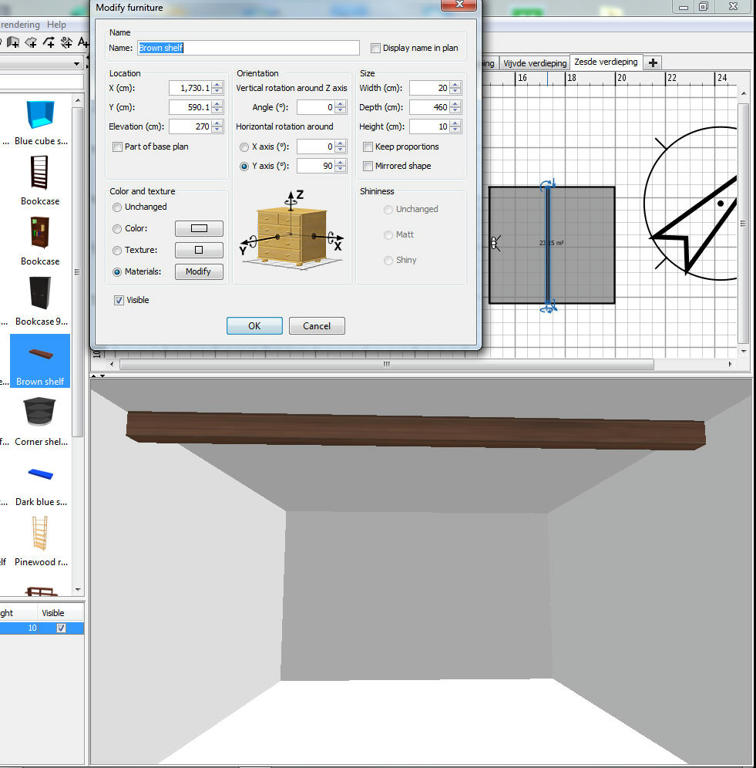
use the brown shelf from the furniture library and place it on the plan window
click twice on the shelf and edit the properties
adjust the hight ( elevation ) until it hits the sealing . set the depth to your room with . and the with and height for your beam thickness .
select modify to put a wooden texture on it
example
use the brown shelf from the furniture library and place it on the plan window
click twice on the shelf and edit the properties
adjust the hight ( elevation ) until it hits the sealing . set the depth to your room with . and the with and height for your beam thickness .
select modify to put a wooden texture on it
example
To Draw or not to Draw ...... Thats nolonger a question .. We draw
Re: Supporting wall/ beam?
I use boxes on my side.
Re: Supporting wall/ beam?
Thanks FDpaffie. This helped me too.
Who is online
Users browsing this forum: No registered users and 2 guests