Hello
I really like the project
Thanks Lizard2k1
I am Italian and I have difficulties with English, I would like to add myself as a beta tester, I hope to be able to follow you.
I'm trying your project, but I do not understand how it filters the elements.
If I can suggest I would only filter the first part of the string, which could be a code to filter the categories, for example
first class (p = 56)
name # 1 = BaseAP56H72 from015
name # 2 = BaseAP56H72 from030
name # 3 = BaseAP56H72 from040
name # 4 = BaseAP56H72 from045
second category (p = 45)
name # 9 = BaseAP45H72 from015
name # 10 = BaseAP45H72 from030
name # 11 = BaseAP45H72 from040
I hope I have understood, the categories must be separated only by the first part of the string.
This is what I think.
Bye thank you!! Great
Group furniture items in category
This topic has been viewed 12960 times and has 34 replies
Re: Group furniture items in category
no offense please, but:
From description of v0.2In piece preview are show only the first one:
Also please look at others known bug, for not spending time of it's searching and reporting:Known bugs: 5. Grouped tree view show incorrect toolTip.
Known bugs:
3. Changing language disturb filtering catalog combobox (Restart solve it).
4. Parameters from setting dialog not saved between app starts.
5. Grouped tree view show incorrect toolTip.
6. Grouped tree view dragging not worked
Re: Group furniture items in category
Thanks for your answer
unfortunately due to the language something escapes me.
I follow and I keep trying, thanks
unfortunately due to the language something escapes me.
I follow and I keep trying, thanks
Re: Group furniture items in category
Thank you dorin for your critics | suggestions.
To Golia:
Thank you for interest to my job, i hope you will like it.
1. Items compared one with other only in same category.
1.1. If names of two items containing more than one word, than comparing follow:
1.1.1 first word of one item with first word of second item.
1.1.2 first word of one item with last word of second item.
1.1.3 last word of one item with first word of second item.
1.1.4 last word of one item with last word of second item.
1.2. If name containing only one word - simple compare name of one with other item in same category
For example:
Items with follow names will be groupped:
Simple chair, Chair, Chair with arms:
But next will not:
Red chair with arms, Very cool chair.
I try do something with it, may be split long row of icons by it's count, by 10-12 items may be?In tree view are show the name of last piece at the end of the icons row which sometime could be confusing (not for me).
Do not understand this [:(]Anyway I've already observe few duplicates in mine collections which I've have to clean.
Yes, that's appear more often than we would like. I try fix or reduce delay for this.When I set something in Your plugin I observe a delay for few seconds.
Did you mean move this options to submenu of "Tools" Menu? Or simple rename labels near check-boxes?in Your settings menu put the same name as is in SH3D settings "Category folders"&"Searchable list"
To Golia:
Thank you for interest to my job, i hope you will like it.
Filtering (Grouping) processing by follow rules:but I do not understand how it filters the elements.
1. Items compared one with other only in same category.
1.1. If names of two items containing more than one word, than comparing follow:
1.1.1 first word of one item with first word of second item.
1.1.2 first word of one item with last word of second item.
1.1.3 last word of one item with first word of second item.
1.1.4 last word of one item with last word of second item.
1.2. If name containing only one word - simple compare name of one with other item in same category
For example:
Items with follow names will be groupped:
Simple chair, Chair, Chair with arms:
But next will not:
Red chair with arms, Very cool chair.

Re: Group furniture items in category
You've right!
I was a little superficial; I've read the known bugs after I post in forum. I did'n respect my own rule from the motto.
SORRY! Can't promise but I try do not make it again [:-B]
Meanwhile I have a new suggestion for the place where I think this plugin have to be:
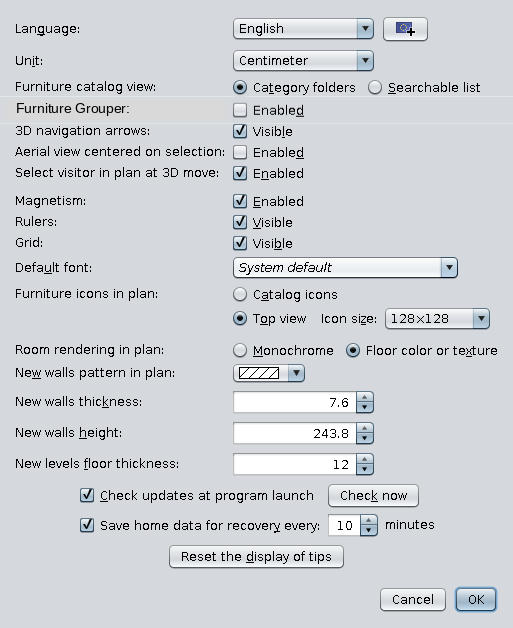
next after "Furniture catalog view:"
Note: I only modify a png image; I'm still not capable to program something but I learning.
I was a little superficial; I've read the known bugs after I post in forum. I did'n respect my own rule from the motto.
SORRY! Can't promise but I try do not make it again [:-B]
Meanwhile I have a new suggestion for the place where I think this plugin have to be:
next after "Furniture catalog view:"
Note: I only modify a png image; I'm still not capable to program something but I learning.
A computer program does what you tell it to do, not what you want it to do. Murphy's Law
When all else fails, read the instructions. Murphy's Law
If you don't like "AS IS", DIY. Dorin's law
When all else fails, read the instructions. Murphy's Law
If you don't like "AS IS", DIY. Dorin's law
Re: Group furniture items in category
To dorin
About add check-box to main setting window: I think this possible, i try do it in next version.
About add check-box to main setting window: I think this possible, i try do it in next version.
Re: Group furniture items in category
In tree view are show the name of last piece at the end of the icons row which sometime could be confusing (not for me).
I try do something with it, may be split long row of icons by it's count, by 10-12 items may be?
Maybe this is a bather solution, count the pieces in row.
Anyway I've already observe few duplicates in mine collections which I've have to clean.
Do not understand this 
Is exactly for what I need this plugin. I have more than 1000 pieces from different sources and some of them are duplicate or pretty similar and also are in different category; some of them have only a different texture and so on. So, this plugin aids me to identify and clean the furniture library.
According to this for me could be useful if in preview I see the name of furniture library and the id number to easily find and modify/delete. But this is for the future; urgency low.
Did you mean move this options to submenu of "Tools" Menu? Or simple rename labels near check-boxes?
I want to say to be the same text as is actually in Preferences.
Meanwhile I've send You another suggestion to move it completely from "Tools" and add it in "Preferences" as I try to improvise in my picture.
A computer program does what you tell it to do, not what you want it to do. Murphy's Law
When all else fails, read the instructions. Murphy's Law
If you don't like "AS IS", DIY. Dorin's law
When all else fails, read the instructions. Murphy's Law
If you don't like "AS IS", DIY. Dorin's law
Re: Group furniture items in category
Ok Lizard2k1 I think I start to understand
keep it up, the work you do will bring SH to be very productive, if you need to rename all my library.
Thanks I will continue to try the new versions
keep it up, the work you do will bring SH to be very productive, if you need to rename all my library.
Thanks I will continue to try the new versions
Re: Group furniture items in category
v.0.3 release (17 Apr 2018) SH3D Plugin Form.
Issues:
1. Add room floor perimeter and sides.
Fixes:
1. Grouped tree view dragging now worked!
Known bugs:
3. Changing language disturb filtering catalog combobox (Restart solve it).
4. Parameters from setting dialog not saved between app starts.
5. Grouped tree view show incorrect toolTip.
7. Switch between (List<=>Tree)views has a bad delay (dorin)
Issues:
1. Add room floor perimeter and sides.
Fixes:
1. Grouped tree view dragging now worked!
Known bugs:
3. Changing language disturb filtering catalog combobox (Restart solve it).
4. Parameters from setting dialog not saved between app starts.
5. Grouped tree view show incorrect toolTip.
7. Switch between (List<=>Tree)views has a bad delay (dorin)
Re: Group furniture items in category
Quick Update v.0.4 release (17 Apr 2018) SH3D Plugin Form.
Quick Fix: Removed dependence on custom SH3D build.
Quick Fix: Removed dependence on custom SH3D build.
Who is online
Users browsing this forum: No registered users and 1 guest