Hi,
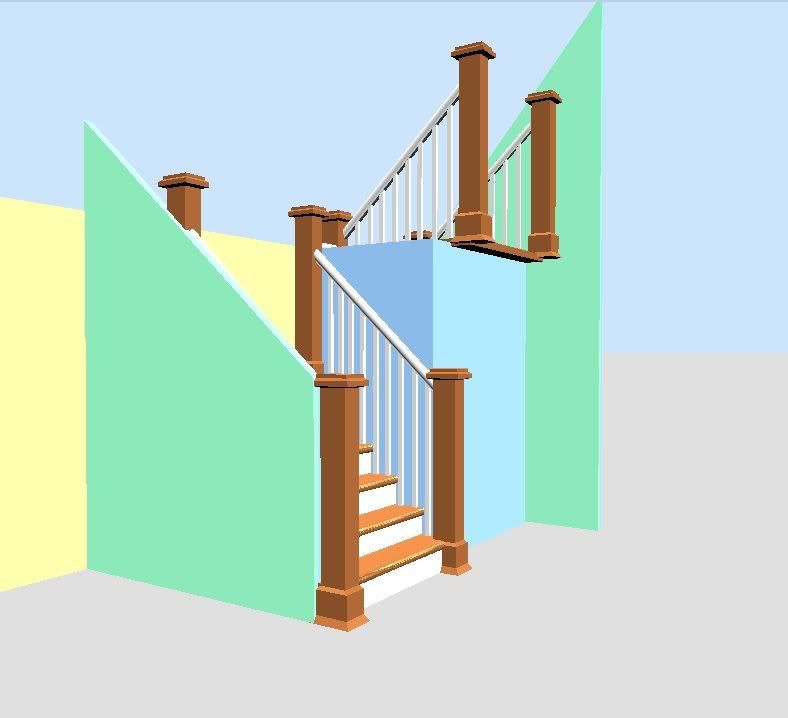
Is it a way to draw a wall with a slope not on its top, but at its bottom (along a staircase) ?
[Note: this thread was started on sourceforge.net forums]
Wall with a slope at the bottom
This topic has been viewed 9481 times and has 3 replies

Re: Wall with a slope at the bottom
I've done that.
Just choose "sloping wall" and give the ending point (or starting point) a lower number.
For example: Start: 125, End: 55 (or the reverse, depending upon how you've placed your stairs). The numbers I used were for the "Grand Staircase" model.
See this screenshot example: http://i64.photobucket.com/albums/h186/gymnart/Stairs-slopedwalls.jpg
Just choose "sloping wall" and give the ending point (or starting point) a lower number.
For example: Start: 125, End: 55 (or the reverse, depending upon how you've placed your stairs). The numbers I used were for the "Grand Staircase" model.
See this screenshot example: http://i64.photobucket.com/albums/h186/gymnart/Stairs-slopedwalls.jpg

Re: Wall with a slope at the bottom
If I understand correctly, it's not possible with a wall but you can do it with the right triangle object I added in 3D models import page at
http://sweethome3d.sourceforge.net/models/triangle.zip .
During its importation, rotate the triangle in such a way that its hypothenuse is below and not above.
If it's not clear enough, don't hesitate to ask more information.
http://sweethome3d.sourceforge.net/models/triangle.zip .
During its importation, rotate the triangle in such a way that its hypothenuse is below and not above.
If it's not clear enough, don't hesitate to ask more information.
Emmanuel Puybaret, Sweet Home 3D creator
-
yves_bruant
- Posts: 4
- Joined: Thu Sep 04, 2008 11:31 am
Re: Wall with a slope at the bottom
Thanks a lot
Who is online
Users browsing this forum: No registered users and 2 guests