Light & textures - rendering examples of this and that.

This topic has been viewed 457485 times and has 128 replies
Thread status: Active
Share your snapshots made with Sweet Home 3D here [img]http://www.sweethome3d.com/images/flags/en_small.gif[/img]
User avatar
AdeleAlli
Posts: 155
Joined: Wed Jul 18, 2018 10:13 am
Country: Italy

Re: Light & textures - rendering examples of this and that.

Post by AdeleAlli »

This is one more, a sea view bedroom :)

Image

And this is the other part of the bedroom

Image
User avatar
Ceciliabr
Posts: 637
Joined: Sun Jul 07, 2013 3:41 pm
Country: Copenhagen, Denmark
Contact:

Re: Light & textures - rendering examples of this and that.

Post by Ceciliabr »

Very nice!
Seems you're getting the hang of it.

Here's a tip:
Try to scale down your background image so that the sky starts at the top of the green area of the sky template, and watch what happens.

Cec
rontant
Posts: 113
Joined: Wed Jul 04, 2018 2:26 am
Country: Singapore

Re: Light & textures - rendering examples of this and that.

Post by rontant »

Here is a result I obtained using your template Cecilia.

What do you think about it?
For the one with seaview, I think you placed the horizon way too high. Make sure the horizon and the distant mountain are within the green band in Cecilia's template.
User avatar
AdeleAlli
Posts: 155
Joined: Wed Jul 18, 2018 10:13 am
Country: Italy

Re: Light & textures - rendering examples of this and that.

Post by AdeleAlli »

Very nice!
Seems you're getting the hang of it.

Here's a tip:
Try to scale down your background image so that the sky starts at the top of the green area of the sky template, and watch what happens.

Cec
Thanks, I think now it is better :)

Image

But the problem is that I should scale a lot the background image in order to have a large covering of the sky, and this brings a lower quality of it.
User avatar
AdeleAlli
Posts: 155
Joined: Wed Jul 18, 2018 10:13 am
Country: Italy

Re: Light & textures - rendering examples of this and that.

Post by AdeleAlli »

Here is a result I obtained using your template Cecilia.

What do you think about it?
For the one with seaview, I think you placed the horizon way too high. Make sure the horizon and the distant mountain are within the green band in Cecilia's template.
Here is the result, I think it is better, thank you Rontant.

Image
rontant
Posts: 113
Joined: Wed Jul 04, 2018 2:26 am
Country: Singapore

Re: Light & textures - rendering examples of this and that.

Post by rontant »

Yes, you got it. Well done. Bravo!
User avatar
Ceciliabr
Posts: 637
Joined: Sun Jul 07, 2013 3:41 pm
Country: Copenhagen, Denmark
Contact:

Re: Light & textures - rendering examples of this and that.

Post by Ceciliabr »

But the problem is that I should scale a lot the background image in order to have a large covering of the sky, and this brings a lower quality of it.

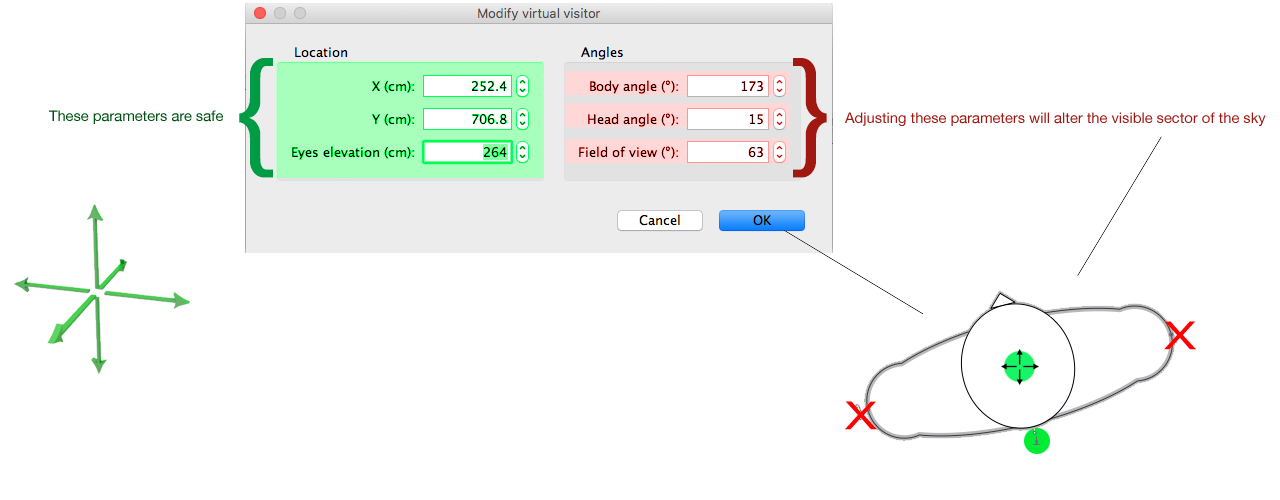
Seems you are using a wide angle FoV here.
Try setting the FoV to around 60 and move the camera back until you have a nice shot.

Note: you can move the camera further back to see the coordinates better. In fact you can move the camera anywhere on the x,y and z -axis, and your preview will still show exactly the same sector of the sky.

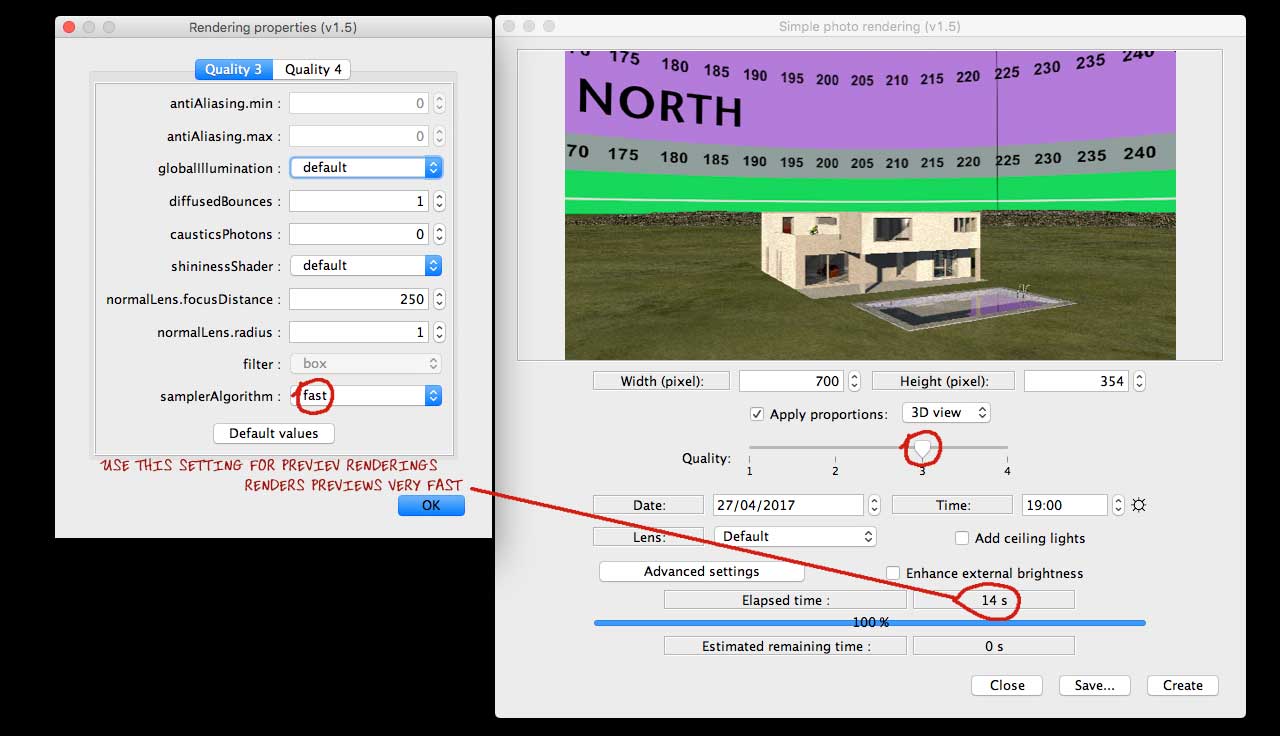
Image

Do this again:

Image

Look at the coordinates. Your image does not need to cover more than what's inside the coordinates, neither the width or the height.


Cec
User avatar
AdeleAlli
Posts: 155
Joined: Wed Jul 18, 2018 10:13 am
Country: Italy

Re: Light & textures - rendering examples of this and that.

Post by AdeleAlli »

I tried to change some parameters, to adjust the virtual visitor and to scale the background image, here is the result:

Image
Mike53
Posts: 678
Joined: Sat Jan 06, 2018 1:02 am
Country: UK

Re: Light & textures - rendering examples of this and that.

Post by Mike53 »

Wonderful, expert, tutorial, th Cec
User avatar
Ceciliabr
Posts: 637
Joined: Sun Jul 07, 2013 3:41 pm
Country: Copenhagen, Denmark
Contact:

Re: Light & textures - rendering examples of this and that.

Post by Ceciliabr »

@ AdeleAlli

I think it's better when the horizon/sky-image is sized this, but maybe you should select a wider image, so that the horizon is covered for the full with of the snapshot.

If I could see your project file, I could make some suggestions about using the sky image.


Cec
Post Reply New Topic

Who is online

Users browsing this forum: No registered users and 2 guests
