Yes, I uninstalled Java 10 and tried Java 8. It works but the photo rendering option is now broken. I'll stick to 5.7 for now.I’m not sure it can run with Java 10. Could you uninstall Java 10 and try with Java 8?
Sweet Home 3D 6.0
This topic has been viewed 1206447 times and has 196 replies
Re: Sweet Home 3D 6.0

Re: Sweet Home 3D 6.0
Today, the Beta 5 brings the following features:
- A new indicator displayed in the middle of the selected wall to easily change its arc extent without the need to guess the right angle.

This should make it easier to create walls with smooth transitions, for example to create garden areas or round swimming pools.
- The ability to enter texts on multiple lines with options to align them.
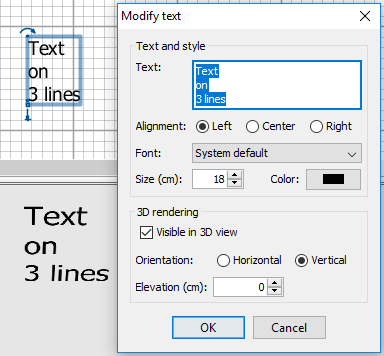
When text alignment is set to Left, the rotation center will be at bottom left of the selected text, and when text alignment is set to Right, the rotation center will be at its bottom right.
- New Plan > Flip horizontally and Plan > Flip vertically menu items to flip the selected items around a vertical or horizontal axis. I hope you'll agree with the logic programmed to compute the symmetry of texts and furniture/room labels.
As announced previously, I also forced the encoding of exported CSV files to UTF-8 on all systems.
Finally, I tried to optimize how 3D walls are updated when doors and windows are changed, and slowdowns should be less present in case of a complex home with many walls and doors and windows.
- A new indicator displayed in the middle of the selected wall to easily change its arc extent without the need to guess the right angle.
This should make it easier to create walls with smooth transitions, for example to create garden areas or round swimming pools.
- The ability to enter texts on multiple lines with options to align them.
When text alignment is set to Left, the rotation center will be at bottom left of the selected text, and when text alignment is set to Right, the rotation center will be at its bottom right.
- New Plan > Flip horizontally and Plan > Flip vertically menu items to flip the selected items around a vertical or horizontal axis. I hope you'll agree with the logic programmed to compute the symmetry of texts and furniture/room labels.
As announced previously, I also forced the encoding of exported CSV files to UTF-8 on all systems.
Finally, I tried to optimize how 3D walls are updated when doors and windows are changed, and slowdowns should be less present in case of a complex home with many walls and doors and windows.
Emmanuel Puybaret, Sweet Home 3D creator
Re: Sweet Home 3D 6.0
Thanks for great, new features. Multiple line text will be very useful.
So far there have been no problems with the beta versions, but then, you really have added lots of stuff to consider [:)] All nice. Head still spinning with all the new .obj group names. Will take some time to digest and test.
ok
So far there have been no problems with the beta versions, but then, you really have added lots of stuff to consider [:)] All nice. Head still spinning with all the new .obj group names. Will take some time to digest and test.
ok
Re: Sweet Home 3D 6.0
Tonight, the Beta 6 fixes two old problems reported by Ceciliabr and Okh:
- it fixes how objects very close and very far are displayed in Sweet Home 3D.
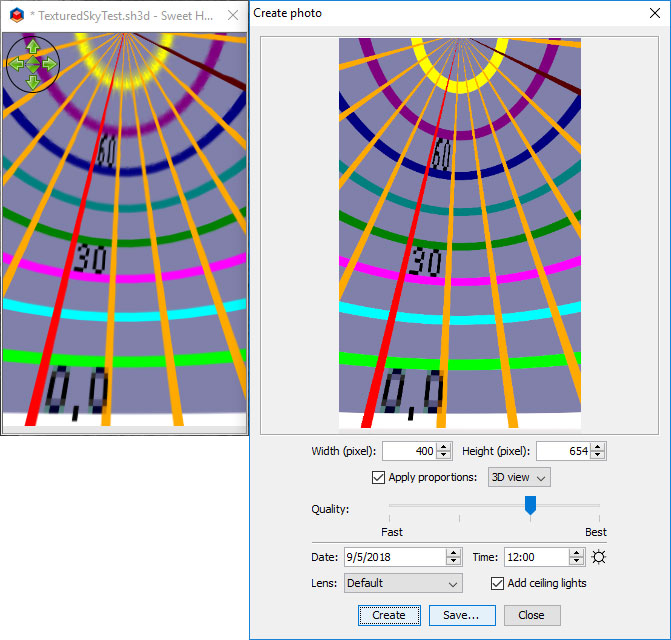
- it also fixes how sky texture are displayed in the 3D view, in such a way it now shows the same image in SunFlow rendering engine, as (logically) requested here. Compared to previous versions, this fix will display sky textures a little differently in the 3D view, and I hope you won't mind this change.
Okh and ndorigatti, I hope you'll be able to test .obj modifications to handle openings. Don't hesitate to request some help.
- it fixes how objects very close and very far are displayed in Sweet Home 3D.
- it also fixes how sky texture are displayed in the 3D view, in such a way it now shows the same image in SunFlow rendering engine, as (logically) requested here. Compared to previous versions, this fix will display sky textures a little differently in the 3D view, and I hope you won't mind this change.
Okh and ndorigatti, I hope you'll be able to test .obj modifications to handle openings. Don't hesitate to request some help.
Emmanuel Puybaret, Sweet Home 3D creator

I have tested it.
I have tested it.
5.7 sky box algorithm is wrong.
6.0B6's sky box algorithm is correct.
But 5.7 can support 16K sky box Texture.(17430X4322 pixel)
6.0B6 can only support 8K sky box Texture.
8K's sky box is not clear enough.Need to support 16K
https://overpic.net/viewer.php?file=x2c ... ifyu2p.png

5.7 sky box algorithm is wrong.
https://overpic.net/viewer.php?file=xy4 ... zm85wn.png

6.0B6's sky box algorithm is correct.
https://overpic.net/viewer.php?file=xee ... 21y635.png

6.0B6 Do not support 16K sky box Texture.
https://overpic.net/viewer.php?file=xyt ... enk4pd.png

Partial panorama
5.7 sky box algorithm is wrong.
6.0B6's sky box algorithm is correct.
But 5.7 can support 16K sky box Texture.(17430X4322 pixel)
6.0B6 can only support 8K sky box Texture.
8K's sky box is not clear enough.Need to support 16K
https://overpic.net/viewer.php?file=x2c ... ifyu2p.png

5.7 sky box algorithm is wrong.
https://overpic.net/viewer.php?file=xy4 ... zm85wn.png

6.0B6's sky box algorithm is correct.
https://overpic.net/viewer.php?file=xee ... 21y635.png

6.0B6 Do not support 16K sky box Texture.
https://overpic.net/viewer.php?file=xyt ... enk4pd.png

Partial panorama
Re: Sweet Home 3D 6.0
Scan panorama Like this

This picture is 220 degrees.
Set the arc wall to 220 degrees.
Set the texture to the appropriate size
----------------------
However,in Sweet Home 3D. the radian of the wall should not exceed 270 degrees. I hope the author can change to 360 degrees.

This picture is 220 degrees.
Set the arc wall to 220 degrees.
Set the texture to the appropriate size
----------------------
However,in Sweet Home 3D. the radian of the wall should not exceed 270 degrees. I hope the author can change to 360 degrees.
Re: Sweet Home 3D 6.0
Thanks for your tests.
I wouldn't worry about the large image you couldn't render. It's probably because you launched SweetHome3D.6.0.beta.jnlp with javaws.exe 32 bit. If you run it with javaws.exe 64 bit, it won't fail.
I wouldn't worry about the large image you couldn't render. It's probably because you launched SweetHome3D.6.0.beta.jnlp with javaws.exe 32 bit. If you run it with javaws.exe 64 bit, it won't fail.
Emmanuel Puybaret, Sweet Home 3D creator
Re: Sweet Home 3D 6.0
Today, the Beta 7 brings various features requested by users:
- Resizing the selected piece of furniture can be forced along only its width or depth when Ctrl shortcut (alt under macOS) is pressed
- The list of video formats were updated with 2.40:1 ratio formats, and HD resolutions
- The column widths are now saved and restored at home opening
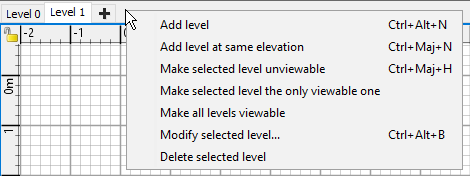
- I added the menu items Plan > Make level the only viewable one and Plan > Make all levels viewable
- As soon as a home has some levels, all menu items related to levels are now available in a separated contextual menu displayed on level tabs.
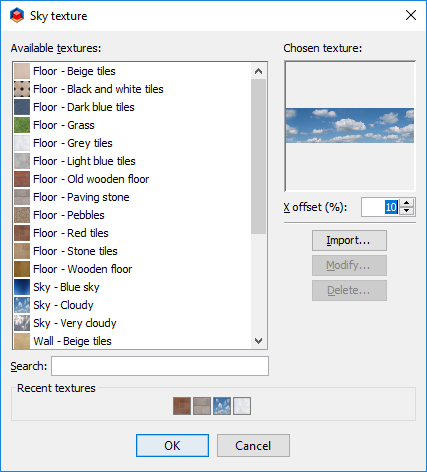
- I added the X offset and Y offset spinners to the texture modification dialog box. These attributes let you set how the selected texture should be shifted along its width and height. The values are expressed in percentage of the width or the height of the texture.
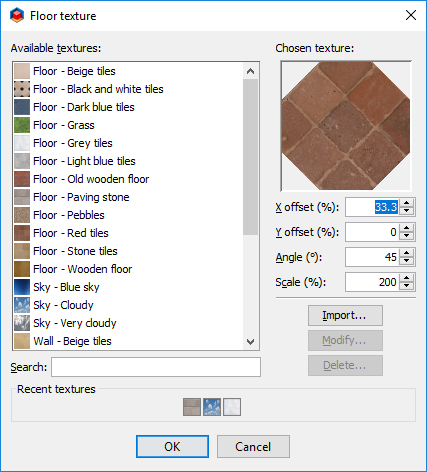
When this dialog box is displayed to choose the sky texture, only the X offset spinner is displayed to let you shift the sky image.
Hope you'll like these new features and how I programmed them. Don't hesitate to request some adjustments if needed. I'll study them closely...
- Resizing the selected piece of furniture can be forced along only its width or depth when Ctrl shortcut (alt under macOS) is pressed
- The list of video formats were updated with 2.40:1 ratio formats, and HD resolutions
- The column widths are now saved and restored at home opening
- I added the menu items Plan > Make level the only viewable one and Plan > Make all levels viewable
- As soon as a home has some levels, all menu items related to levels are now available in a separated contextual menu displayed on level tabs.
- I added the X offset and Y offset spinners to the texture modification dialog box. These attributes let you set how the selected texture should be shifted along its width and height. The values are expressed in percentage of the width or the height of the texture.
When this dialog box is displayed to choose the sky texture, only the X offset spinner is displayed to let you shift the sky image.
Hope you'll like these new features and how I programmed them. Don't hesitate to request some adjustments if needed. I'll study them closely...
Emmanuel Puybaret, Sweet Home 3D creator
Re: Sweet Home 3D 6.0
That makes today's wisth redundant [:)] and I suppose request 879 too. This really is a great improvement. As are many of the other new features, but now development is faster than it is possible to test.....dialog box is displayed to choose the sky texture, only the X offset spinner is displayed to let you shift the sky image...
But the sky offset really works beautifully. Better than I hoped for this morning.
Thanks and congratulations. And no glitches in my somewhat random testing.
ok
Re: Sweet Home 3D 6.0
Great you like it [:)]
I know that you proposed an angle for the sky texture offset, but using a percentage seems more versatile in other cases, and isn’t too difficult to convert from degrees : 180° = 50%, 90° = 25%, 45° = 12.5%,...
I know that you proposed an angle for the sky texture offset, but using a percentage seems more versatile in other cases, and isn’t too difficult to convert from degrees : 180° = 50%, 90° = 25%, 45° = 12.5%,...
Emmanuel Puybaret, Sweet Home 3D creator
Who is online
Users browsing this forum: No registered users and 0 guests