Sweet Home 3D 6.0
This topic has been viewed 1206408 times and has 196 replies
-
UbuntuBirdy

- Posts: 421
- Joined: Thu Aug 31, 2017 10:31 pm
- Country: Switzerland
- Contact:
Re: Sweet Home 3D 6.0
Hans, try to start SH3D from the terminal...
Pascal
SH3D 6.6 / Ubuntu 22.04 (Mainline-Kernel) / Radeon RX580 / Ryzen 7 5800x
SH3D 6.6 / Ubuntu 22.04 (Mainline-Kernel) / Radeon RX580 / Ryzen 7 5800x

Re: Sweet Home 3D 6.0
Birdy,
Many, if not most of the online solutions involve using the terminal. Believe me, I've tried every solution that seemed halfway reasonable...
Open to new suggestions!!!
H
Many, if not most of the online solutions involve using the terminal. Believe me, I've tried every solution that seemed halfway reasonable...
Open to new suggestions!!!
H
-
UbuntuBirdy
- Posts: 421
- Joined: Thu Aug 31, 2017 10:31 pm
- Country: Switzerland
- Contact:
Re: Sweet Home 3D 6.0
In my sh3d.desktop file this is what I patched together from many suggestions and this is working on my Ubuntu 18.04:
Exec=sh -c "/usr/share/SweetHome3D/SweetHome3D-Java3D-1_5_2" %U
"/usr/share/SweetHome3D/" is the path where SH3D is installed.
Exec=sh -c "/usr/share/SweetHome3D/SweetHome3D-Java3D-1_5_2" %U
"/usr/share/SweetHome3D/" is the path where SH3D is installed.
Pascal
SH3D 6.6 / Ubuntu 22.04 (Mainline-Kernel) / Radeon RX580 / Ryzen 7 5800x
SH3D 6.6 / Ubuntu 22.04 (Mainline-Kernel) / Radeon RX580 / Ryzen 7 5800x

Re: Sweet Home 3D 6.0
Tonight, the Beta 11 gets closer to the final release even if translation process may slow down its arrival...
It brings some various improvements like:
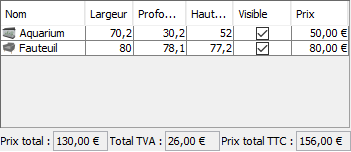
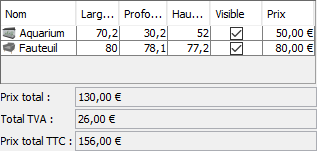
- the ability of total price labels displayed under the furniture list to stack on each other if there's not enough space to display their content.
Enough space:
Not enough space:
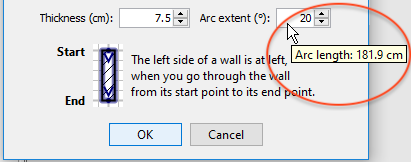
- a tooltip associated to the Arc extent field in Wall dialog box, to display the length of the middle arc of a wall when its arc extent is not 0
- the ability to enter a minimum height of 0 for sloping walls
- the support of ARM 64bit Windows in Sweet Home 3D installer as proposed by arm64appcompatguy
- the ability to select 32 bit or 64 bit architecture in Windows installer user interface when it's run under Windows 64 bit, without the need to use [font=courier new]/os.arch[/font] and [font=courier new]/j3d.version[/font] options from the command line (these options are still available if needed).
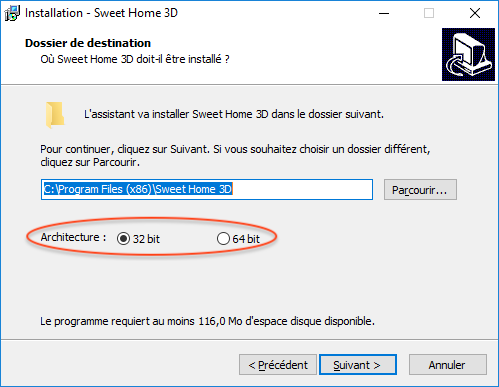
Under Windows 10 64 bit, the 32 bit option is selected by default in the hope it will solve the problems of people who can't run Sweet Home 3D. So, pay attention to this option if you want to run Sweet Home 3D 64 bit under Windows 10.
- Under Mac OS X, Sweet Home 3D DMG installer comes with a private copy of Java 8 to avoid being obliged to install Apple Java 6.
This Beta version brings also some important bug fixes:
- furniture and texture libraries loading under Java 10 now works (thanks to Jiri Slaby's suggestion)
- HiDPI screens are much better supported under Java 8 without the requirement to define a scale and change Swing look and feel. System property [font=courier new]com.eteks.sweethome3d.resolutionScale[/font] is still supported if you want to apply an additional scale to Sweet Home 3D user interface.
Finally, to allow you to test the features bound to installers, here are some Beta versions you can download and test:
- Windows installer: see updated Beta 12 version
- Mac OS X installer: SweetHome3D-6.0.beta11-macosx.dmg (66 MB)
- Linux 64bit installer: SweetHome3D-6.0.beta11-linux-x64.tgz (65 MB)
Hans, I hope that version will work for you!
It brings some various improvements like:
- the ability of total price labels displayed under the furniture list to stack on each other if there's not enough space to display their content.
Enough space:
Not enough space:
- a tooltip associated to the Arc extent field in Wall dialog box, to display the length of the middle arc of a wall when its arc extent is not 0
- the ability to enter a minimum height of 0 for sloping walls
- the support of ARM 64bit Windows in Sweet Home 3D installer as proposed by arm64appcompatguy
- the ability to select 32 bit or 64 bit architecture in Windows installer user interface when it's run under Windows 64 bit, without the need to use [font=courier new]/os.arch[/font] and [font=courier new]/j3d.version[/font] options from the command line (these options are still available if needed).
Under Windows 10 64 bit, the 32 bit option is selected by default in the hope it will solve the problems of people who can't run Sweet Home 3D. So, pay attention to this option if you want to run Sweet Home 3D 64 bit under Windows 10.
- Under Mac OS X, Sweet Home 3D DMG installer comes with a private copy of Java 8 to avoid being obliged to install Apple Java 6.
This Beta version brings also some important bug fixes:
- furniture and texture libraries loading under Java 10 now works (thanks to Jiri Slaby's suggestion)
- HiDPI screens are much better supported under Java 8 without the requirement to define a scale and change Swing look and feel. System property [font=courier new]com.eteks.sweethome3d.resolutionScale[/font] is still supported if you want to apply an additional scale to Sweet Home 3D user interface.
Finally, to allow you to test the features bound to installers, here are some Beta versions you can download and test:
- Windows installer: see updated Beta 12 version
- Mac OS X installer: SweetHome3D-6.0.beta11-macosx.dmg (66 MB)
- Linux 64bit installer: SweetHome3D-6.0.beta11-linux-x64.tgz (65 MB)
Hans, I hope that version will work for you!
Emmanuel Puybaret, Sweet Home 3D creator
-
UbuntuBirdy
- Posts: 421
- Joined: Thu Aug 31, 2017 10:31 pm
- Country: Switzerland
- Contact:
Re: Sweet Home 3D 6.0
Beta 11 only starts like described in my last post (Ubuntu 18.04). And a hundred times longer loading times than in 5.7 (for my biggest project it takes hours...).
Pascal
SH3D 6.6 / Ubuntu 22.04 (Mainline-Kernel) / Radeon RX580 / Ryzen 7 5800x
SH3D 6.6 / Ubuntu 22.04 (Mainline-Kernel) / Radeon RX580 / Ryzen 7 5800x
-
UbuntuBirdy
- Posts: 421
- Joined: Thu Aug 31, 2017 10:31 pm
- Country: Switzerland
- Contact:
Re: Sweet Home 3D 6.0
Sorry, this was my fault. I forgot to increase the value for the max usable memory...(for my biggest project it takes hours...)
Pascal
SH3D 6.6 / Ubuntu 22.04 (Mainline-Kernel) / Radeon RX580 / Ryzen 7 5800x
SH3D 6.6 / Ubuntu 22.04 (Mainline-Kernel) / Radeon RX580 / Ryzen 7 5800x

Re: Sweet Home 3D 6.0
Sorry, this was my fault. I forgot to increase the value for the max usable memory...
How did you do that?
None of my old projects works.
Cec
Re: Sweet Home 3D 6.0
Cec, in the macOS version based on Java 8, edit the [font=courier new]SweetHome3D.cfg[/font] file found in the [font=courier new]Contents/Java[/font] subfolder of Sweet Home 3D application and set the maximum memory in a line [font=courier new]-Xmx[/font] set after the line [font=courier new][JVMUserOptions][/font], writing for example [font=courier new]-Xmx6g[/font] for 6 GB.
If the [font=courier new]SweetHome3D.cfg[/font] file is protected, run a command like in a Terminal window.
If the [font=courier new]SweetHome3D.cfg[/font] file is protected, run a command like
Code: Select all
sudo nano /Applications/Sweet\ Home\ 3D.app/Contents/Java/SweetHome3D.cfgEmmanuel Puybaret, Sweet Home 3D creator
Re: Sweet Home 3D 6.0
Emmanuel,
I'm sorry to report that I can't get this version to work.
H
I'm sorry to report that I can't get this version to work.
H
-
bdfd

- Posts: 2614
- Joined: Sat Mar 29, 2014 7:17 am
- Country: LILLE, Les Hauts de France, Western Europa
Re: Sweet Home 3D 6.0
None problem for me ! [;)]
.
.
Evil progresses when good people do nothing!
---
SH3D 7.1 and nothing else - W11 64b in 4K
---
SH3D 7.1 and nothing else - W11 64b in 4K
Who is online
Users browsing this forum: No registered users and 2 guests