Under my Windows 10 64 bit, Sweet Home 3D version 6.0 (x64) is installed directly in the directory "C:\Program Files (x86)" without possibility to choose the architecture if Sweet Home 3D version 5.7 (x64) is already present in the "C:\Program Files" or "C:\Program Files (x86)" directory.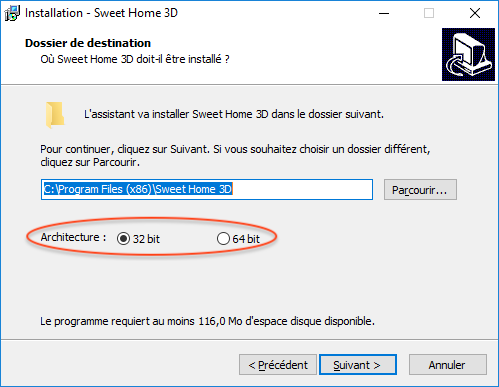
Under Windows 10 64 bit, the 32 bit option is selected by default in the hope it will solve the problems of people who can't run Sweet Home 3D. So, pay attention to this option if you want to run Sweet Home 3D 64 bit under Windows 10.
Sweet Home 3D 6.0
This topic has been viewed 1206428 times and has 196 replies
Re: Sweet Home 3D 6.0
EnkoNyito

Re: Sweet Home 3D 6.0
If there is an old version, there will be no 32BIT/64BIT option.Tonight, the Beta 11

Re: Sweet Home 3D 6.0
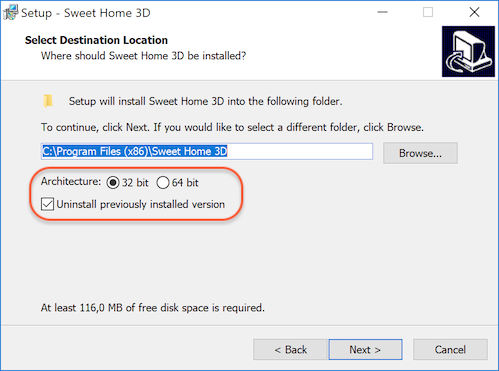
Thanks for your tests. I updated Windows installer to always display the installation folder screen with an additional option to uninstall the previously installed version.
Download it from SweetHome3D-6.0.beta12-windows.exe (51 MB)
Download it from SweetHome3D-6.0.beta12-windows.exe (51 MB)
Emmanuel Puybaret, Sweet Home 3D creator
-
bdfd

- Posts: 2614
- Joined: Sat Mar 29, 2014 7:17 am
- Country: LILLE, Les Hauts de France, Western Europa
Re: Sweet Home 3D 6.0
Good idea for newbies ! [:D]
None problem for me with this beta 12 ! [;)]
.
Evil progresses when good people do nothing!
---
SH3D 7.1 and nothing else - W11 64b in 4K
---
SH3D 7.1 and nothing else - W11 64b in 4K
Re: Sweet Home 3D 6.0
I think of an important thing
In the software setup interface or software installation interface, add a memory size setting option.
just like SweetHome3D.l4j.ini
The default use of 0.9G in software 32 is very small, and the 64 bit 4G is too small.Slightly more complicated rendering requires 10G's memory usage.

Re: Sweet Home 3D 6.0
Great!
I love this version.
Just one question: Is max mem 14.2 Gb?
Cec
I love this version.
Just one question: Is max mem 14.2 Gb?
Cec
Re: Sweet Home 3D 6.0
Maybe in a future version...In the software setup interface or software installation interface, add a memory size setting option.
just like SweetHome3D.l4j.ini
In 32 bit, a higher value won't work. In 64 bit, the default max is half of the available RAM.The default use of 0.9G in software 32 is very small, and the 64 bit 4G is too small.
When run in 64 bit, the working limit must be the RAM size available on your computer when Sweet Home 3D runs.Is max mem 14.2 Gb?
Emmanuel Puybaret, Sweet Home 3D creator

Re: Sweet Home 3D 6.0
To all <?> Ubuntu users who have problems running the beta version.
Thanks to the help of UbuntuBirdy I now can try the beta version 6. Here are the program lines you need:
Note the following:
- you can change the Name and GenericName to whatever you like
- you can leave out the Comment lines
- you can change [de] and [de-CH] to your own language
- in the path names change "hans" to your own user name
- make sure that the path name /SweetHome3D-beta611/ points correctly to your file (name and location)
- open a Text Editor and copy the above text
- save and name the file xxx.desktop where xxx is the name you want
- then copy the script to /home/hans/.local/share/applications/
- this is a hidden file, so you need to do CTRL-H to show the file
- under the start button, type SW and SH3D should show up
Thank you very much Birdy!!!
H
Thanks to the help of UbuntuBirdy I now can try the beta version 6. Here are the program lines you need:
Code: Select all
[Desktop Entry]
Version=1.0
Name=Sweet Home 3D BETA 611
GenericName=Interior 2D design application with 3D preview
Generic Name[de]=Innenraumplaner
Comment=Interior design Java application for quickly choosing and placing furniture on a house 2D plan drawn by the end-user with a 3D preview
Comment[de]=Innenraumplaner zum Auswählen und Platzieren von Möbeln auf einem 2D-Hausplan mit 3D-Vorschau
Path=/home/hans/SweetHome3D-beta611
Exec=sh -c "/home/hans/SweetHome3D-beta611/SweetHome3D-Java3D-1_5_2" %U
Icon=/home/hans/SweetHome3D-beta611/SweetHome3DIcon.png
StartupNotify=true
StartupWMClass=com-eteks-sweethome3d-SweetHome3D
Terminal=false
Type=Application
Categories=2DGraphics;3DGraphics;
Keywords=interior;design;2D;3D;home;house;furniture;java;
MimeType=application/sweethome3d;
Name[de_CH]=SweetHome3D BETA 611- you can change the Name and GenericName to whatever you like
- you can leave out the Comment lines
- you can change [de] and [de-CH] to your own language
- in the path names change "hans" to your own user name
- make sure that the path name /SweetHome3D-beta611/ points correctly to your file (name and location)
- open a Text Editor and copy the above text
- save and name the file xxx.desktop where xxx is the name you want
- then copy the script to /home/hans/.local/share/applications/
- this is a hidden file, so you need to do CTRL-H to show the file
- under the start button, type SW and SH3D should show up
Thank you very much Birdy!!!
H
Re: Sweet Home 3D 6.0
So many new great features - oh, Emmanuel, please don't stop [:p]
Due to "3d error" I had to install 6.0 beta 11 with "j3d.version=1.5.2" (Win 7, 32bit) and now it works nice.

Due to "3d error" I had to install 6.0 beta 11 with "j3d.version=1.5.2" (Win 7, 32bit) and now it works nice.
-
UbuntuBirdy

- Posts: 421
- Joined: Thu Aug 31, 2017 10:31 pm
- Country: Switzerland
- Contact:
Re: Sweet Home 3D 6.0
Glad I could help you, Hans.Thank you very much Birdy!!!
H
There are two great programming highlights since time immemorial: once Linux and of course SweetHome3D!
The result is a law of the universe: who's able to use SweetHome3D on a Linux-System, will be happy!
And of course I will try to make as many people happy as possible by showing them how to use SweetHome3D on Linux.
A humble servant of the universe
Pascal
Pascal
SH3D 6.6 / Ubuntu 22.04 (Mainline-Kernel) / Radeon RX580 / Ryzen 7 5800x
SH3D 6.6 / Ubuntu 22.04 (Mainline-Kernel) / Radeon RX580 / Ryzen 7 5800x
Who is online
Users browsing this forum: No registered users and 2 guests