Problem with "Hole" Visibility while Import

This topic has been viewed 9303 times and has 10 replies
Thread status: Active
Discuss anything here [img]http://www.sweethome3d.com/images/flags/en_small.gif[/img]
kvepete
Posts: 2
Joined: Tue Oct 30, 2018 12:45 pm

Problem with "Hole" Visibility while Import

Post by kvepete »

Hello Dear Forum,
im stil using sh3d for a while.
Now i have a problem with the "hole"-visibility from objects.
Using sh3d 5.7, today update to 6.0 - same problem.

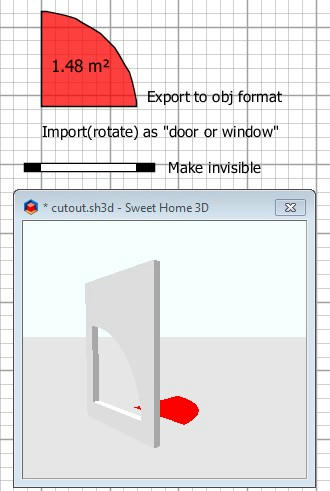
1) 1st Hole - with Rounded Door from BuildIn Library
2) 2nd Hole - with WallOpeningInvisible
3) Red Arc - Rounded Door from Build-in-lib export to *.obj
then reimport with door/window

At that moment the object is included in the wall, the hole is going lost? Same when i include it in the "Invisible Wall".
This is happening with every Objects i import.

See the screenshot here:

Image

I spent a couple of hours to find a solution, but i didn't find
helpful informations.

Any ideas what i'm doing wrong, or what's wrong?
Thank you for help.
Peter
User avatar
Puybaret
Posts: 9440
Joined: Mon Nov 07, 2005 12:00 pm
Country: Paris, France
Contact:

Re: Problem with "Hole" Visibility while Import

Post by Puybaret »

Why exporting / reimporting models found in the default catalog? You'll lose their cutout.
You should just use the models in the furniture catalog.
Emmanuel Puybaret, Sweet Home 3D creator
kvepete
Posts: 2
Joined: Tue Oct 30, 2018 12:45 pm

Re: Problem with "Hole" Visibility while Import

Post by kvepete »

thank you for the reply,

Export/Reimport was for example - when i construct a "special hole" with different objects, export it for use in the library.

But the same problem is when i download this object:
http://www.sweethome3d.com/models/roundDoorFrame.zip
When i import it (door/window option checked) there is no cutout in the wall?
Same with the "arc.zip" i've downloaded from this thread.
http://www.sweethome3d.com/support/foru ... 3747#17527
See my screenshot
Thank you.
Kind Regards Pete
alaX
Posts: 73
Joined: Tue May 24, 2016 4:26 pm
Country: Poland

Re: Problem with "Hole" Visibility while Import

Post by alaX »

User avatar
dorin
Posts: 824
Joined: Thu Apr 24, 2014 9:14 am
Country: Vatra Dornei, Suceava, Romania

Re: Problem with "Hole" Visibility while Import

Post by dorin »

For a few versions ago is more simple.
e.g.
The straight way
Image
A computer program does what you tell it to do, not what you want it to do. Murphy's Law
When all else fails, read the instructions. Murphy's Law
If you don't like "AS IS", DIY. Dorin's law
User avatar
dorin
Posts: 824
Joined: Thu Apr 24, 2014 9:14 am
Country: Vatra Dornei, Suceava, Romania

Re: Problem with "Hole" Visibility while Import

Post by dorin »

Update
Image
A computer program does what you tell it to do, not what you want it to do. Murphy's Law
When all else fails, read the instructions. Murphy's Law
If you don't like "AS IS", DIY. Dorin's law
User avatar
UbuntuBirdy
Posts: 421
Joined: Thu Aug 31, 2017 10:31 pm
Country: Switzerland
Contact:

Re: Problem with "Hole" Visibility while Import

Post by UbuntuBirdy »

@dorin - WTF! How did you create this SVG-path? I always spend hours for creating a simple cutout for my boats and it would take my hole life to create a cutout like this one in your picture!
Pascal

SH3D 6.6 / Ubuntu 22.04 (Mainline-Kernel) / Radeon RX580 / Ryzen 7 5800x
User avatar
dorin
Posts: 824
Joined: Thu Apr 24, 2014 9:14 am
Country: Vatra Dornei, Suceava, Romania

Re: Problem with "Hole" Visibility while Import

Post by dorin »

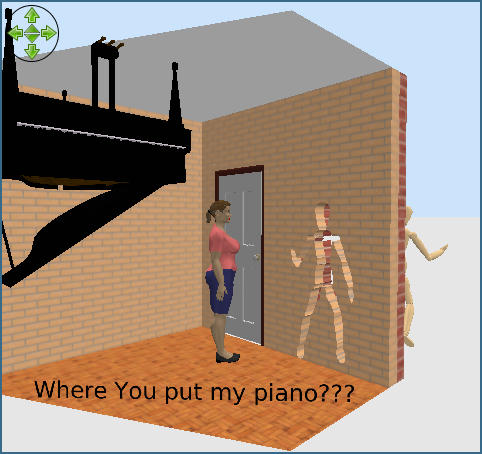
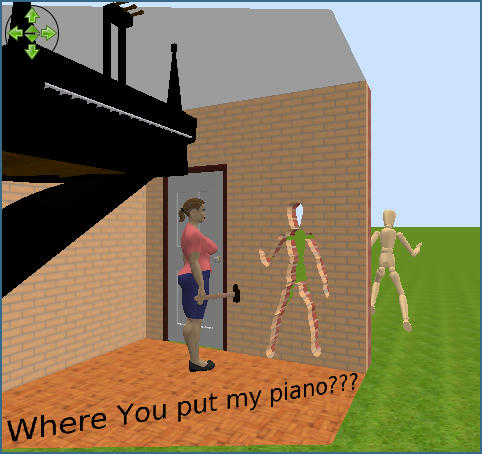
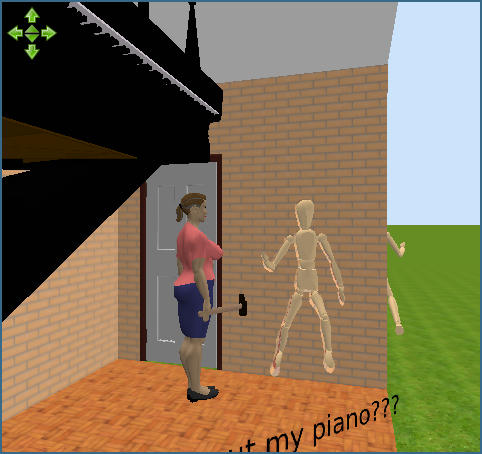
Well, when You have a hammer over head You make a hole instantly.
Image
Now the steeps:
1. Peeve Your wife.
2. Export the mannequin as object; import as door
3. Insert it in a straight single (not splinted) wall. Will make the cut over contour.
4. Modify furniture -> Modify texture -> select all -> Invisible ->OK
NOTE: It don't work on angled or curved walls even for simple forms.
A computer program does what you tell it to do, not what you want it to do. Murphy's Law
When all else fails, read the instructions. Murphy's Law
If you don't like "AS IS", DIY. Dorin's law
User avatar
UbuntuBirdy
Posts: 421
Joined: Thu Aug 31, 2017 10:31 pm
Country: Switzerland
Contact:

Re: Problem with "Hole" Visibility while Import

Post by UbuntuBirdy »

hmm... I haven't thought it's as simple as this. It seems I'm often thinking to far... But I'm not sure if I can adapt this solution to my problem...
Pascal

SH3D 6.6 / Ubuntu 22.04 (Mainline-Kernel) / Radeon RX580 / Ryzen 7 5800x
alaX
Posts: 73
Joined: Tue May 24, 2016 4:26 pm
Country: Poland

Re: Problem with "Hole" Visibility while Import

Post by alaX »

Kvepete - if you want only cut-outs, without frame etc, make single face (any shape without holes).
Example:
Image
Post Reply New Topic

Who is online

Users browsing this forum: No registered users and 1 guest