Thanks for the quick reply, but unfortunately the same problem continues after uninstalling the 64 bit version and replacing it with the 32 bit version ... after a minute or so, moving the mouse begins to create endless duplicate views of parts of the window.
Any other thoughts?
I had used SH3D in the past without any issues. I have a design of my home that I would really like to be able to access.
Additional System Info:
Sweet Home 3D ®
Version 6.1.2
Java version 1.8.0_202 - 32bit - 0.1 / 0.6 GB
Java 3D version 1.5.2
OS Name Microsoft Windows 10 Home
Version 10.0.17134 Build 17134
System Manufacturer Micro-Star International Co., Ltd.
System Model GS65 Stealth Thin 8RF
System Type x64-based PC
Processor Intel(R) Core(TM) i7-8750H CPU @ 2.20GHz, 2201 Mhz, 6 Core(s), 12 Logical Processor(s)
Installed Physical Memory (RAM) 16.0 GB
Total Physical Memory 15.8 GB
Available Physical Memory 8.34 GB
Total Virtual Memory 32.8 GB
Available Virtual Memory 21.9 GB
Page File Space 17.0 GB
Graphics problems...
This topic has been viewed 52076 times and has 39 replies

Re: Graphics problems...
Install the program in 32 bit again, then copy the [font=courier new]SweetHome3D.l4j.ini[/font] attached to this post in the installation folder of Sweet Home 3D (probably C:\Program Files (x86)\Sweet Home 3D) and restart the program.
- Attachments
-
[The extension ini has been deactivated and can no longer be displayed.]
Emmanuel Puybaret, Sweet Home 3D creator
Re: Graphics problems...
Thanks, Puybaret! That seems to be a good work-around.
After a 10 min test, everything has worked fine on my primary monitor. Oddly, though, as soon as I move it to my external monitor, the program now crashes.
Another side note that may be helpful from a development standpoint: the problem seems to be some conflict with the nvida card (driver up-to-date directly from nvidia).
With the standard installation (prior to adding your ini file) I found last night that if I disabled my nvidia card and only ran with the onboard graphics, everything ran well.

I also tried the opposite, but with that the problems continued (nvidia card only ... onboard graphics disabled).
After a 10 min test, everything has worked fine on my primary monitor. Oddly, though, as soon as I move it to my external monitor, the program now crashes.
Another side note that may be helpful from a development standpoint: the problem seems to be some conflict with the nvida card (driver up-to-date directly from nvidia).
With the standard installation (prior to adding your ini file) I found last night that if I disabled my nvidia card and only ran with the onboard graphics, everything ran well.
I also tried the opposite, but with that the problems continued (nvidia card only ... onboard graphics disabled).
Re: Graphics problems...
I spoke too soon 
It's back to doing the same thing.
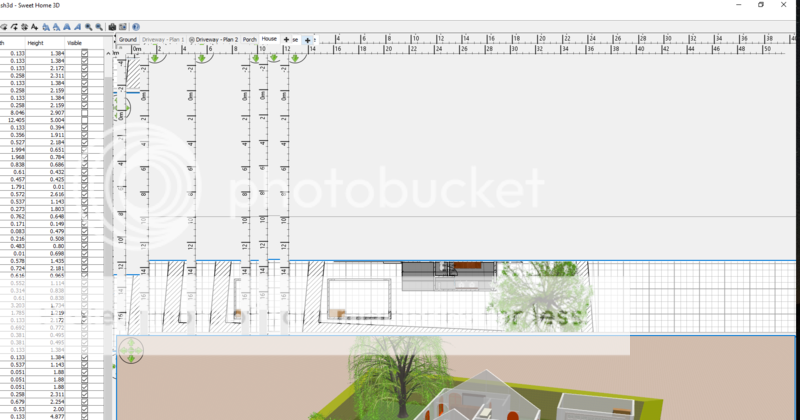
It's back to doing the same thing.
Re: Graphics problems...
Hi!
Did you ever get this fixed? I have the exact same problem.
Did you ever get this fixed? I have the exact same problem.
Re: Graphics problems...
habe das selbe problem
win10 pro
nvidia rtx-2080-ti
i9-9900x
32gb ram
sh3d ver. 6.1.4
java ver. 1.8.0_202 64bit
java 3d ver. 1.6.1
win10 pro
nvidia rtx-2080-ti
i9-9900x
32gb ram
sh3d ver. 6.1.4
java ver. 1.8.0_202 64bit
java 3d ver. 1.6.1

Re: Graphics problems...
Did u try setting your screen resolution lower like 1280x1024 0r 1920x1200
java seems to have a problem with 4k resolutions
read; https://pivotce.com/2017/12/11/fix-java ... i-display/
Find java.exe and/or javaw.exe likely found in C:\Program Files\Sweet Home 3D\jre8\bin\javaw.exe
Right click on it and select -> Properties
Go to Compatibility tab
Check Override high DPI scaling behavior.
Choose System for Scaling performed by:
Click OK
i hope it may help you
java seems to have a problem with 4k resolutions
read; https://pivotce.com/2017/12/11/fix-java ... i-display/
Find java.exe and/or javaw.exe likely found in C:\Program Files\Sweet Home 3D\jre8\bin\javaw.exe
Right click on it and select -> Properties
Go to Compatibility tab
Check Override high DPI scaling behavior.
Choose System for Scaling performed by:
Click OK
i hope it may help you
To Draw or not to Draw ...... Thats nolonger a question .. We draw
Re: Graphics problems...
Unfortunately, nothing has changed, have tried a few settings.
still have graphic errors
still have graphic errors
Re: Graphics problems...
Hi guys,
Is there any solution to this problem?
I tried everything that i have been reading here but still no result. Also tried disconnecting my advanced periphials but also no luck with that.
Does it have anything to do with the resolution that you think?
It is too bad because i liked using the program very much. Would it help to buy the version provided in the windows store?
I hope we can find a solution
Is there any solution to this problem?
I tried everything that i have been reading here but still no result. Also tried disconnecting my advanced periphials but also no luck with that.
Does it have anything to do with the resolution that you think?
It is too bad because i liked using the program very much. Would it help to buy the version provided in the windows store?
I hope we can find a solution
Re: Graphics problems...
Can anyone please provide support? Is there any solution??
Will i still have this problem if i buy the payed version?
Will i still have this problem if i buy the payed version?
Who is online
Users browsing this forum: No registered users and 1 guest