
No, but I'm adaptable. [:)]No change regarding your problem?
Light & textures - rendering examples of this and that.
This topic has been viewed 457375 times and has 128 replies
Re: Light & textures - rendering examples of this and that.
Re: Light & textures - rendering examples of this and that.
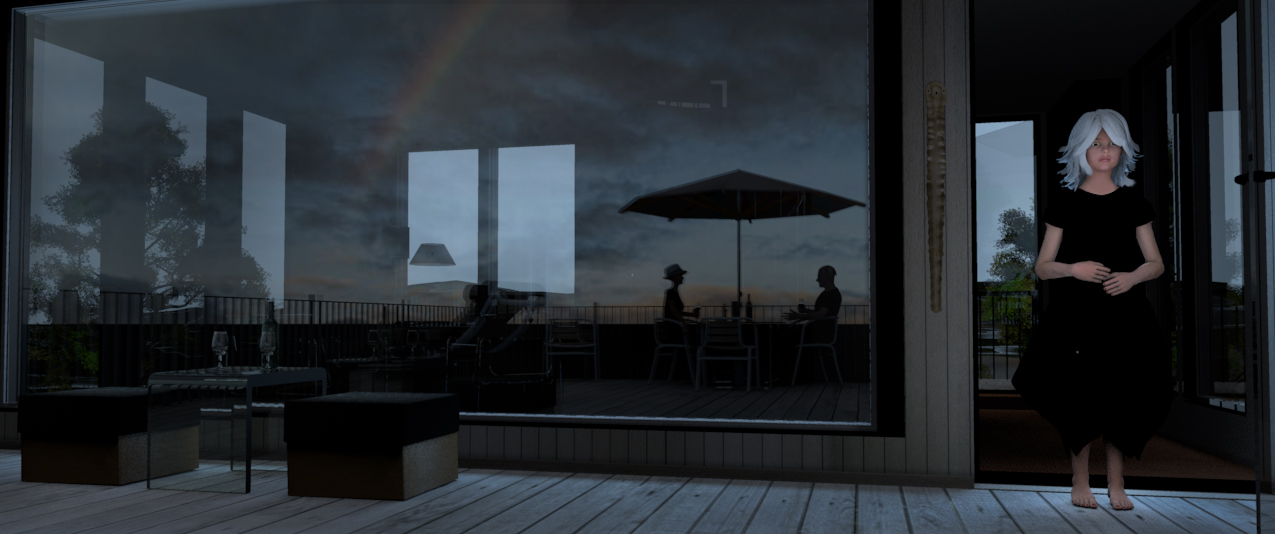
Your suggestion was right, Enko, it was a Java-issue.
After installing the latest java update, the problem is now gone!
Tested again and again, same result.
Cec
After installing the latest java update, the problem is now gone!
Tested again and again, same result.
Cec
Re: Light & textures - rendering examples of this and that.
[:)]Your suggestion was right, Enko, it was a Java-issue.
After installing the latest java update, the problem is now gone!
Tested again and again, same result.
EnkoNyito
Re: Light & textures - rendering examples of this and that.
Another attempt on creating a rainy day withSH3D...
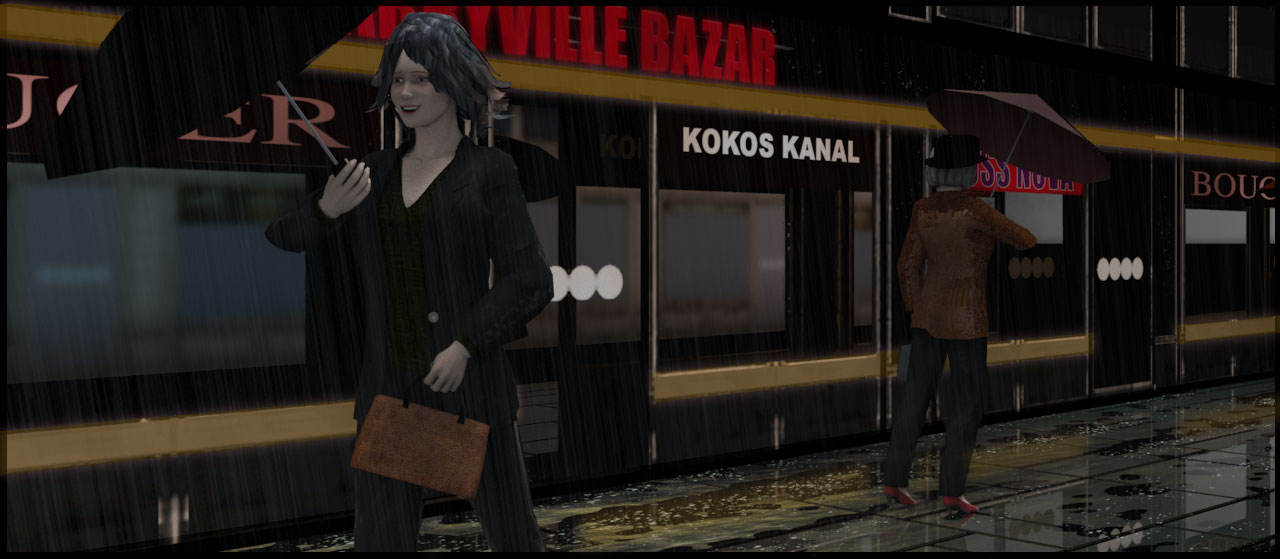
... resulting from an attempt to create a low-poly human 3D-model:
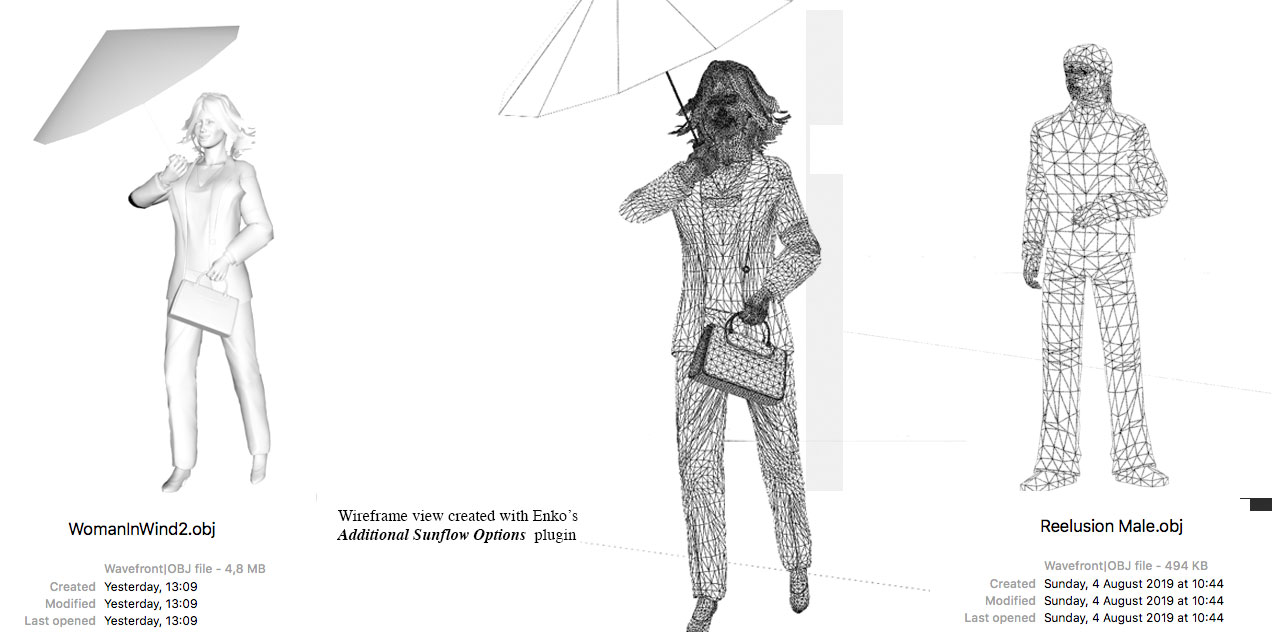
Not completely overjoyed with the result, but I'm learning.
I managed to reduce my model from 25 Mb to 5 Mb without loosing too much,
but Reelusion makes low poly models the 10th of that size...
Anyway, it's a start.
Cec
... resulting from an attempt to create a low-poly human 3D-model:
Not completely overjoyed with the result, but I'm learning.
I managed to reduce my model from 25 Mb to 5 Mb without loosing too much,
but Reelusion makes low poly models the 10th of that size...
Anyway, it's a start.
Cec
Re: Light & textures - rendering examples of this and that.
The introduction of weather conditions in these last 2 images is excellent, changes the appearance and feel completely, though i cannot quite figure out the reflected shop names, and reducing the model size could well help many users who haven't a magic box attached to the screen to handle some larger models, so thx in advance, [;)].
Would the rain be ok as a texture applied to an opaque surface positioned in front of the viewer
Would the rain be ok as a texture applied to an opaque surface positioned in front of the viewer
Re: Light & textures - rendering examples of this and that.
Hi Mike,
I’m not quite sure what you are referring to... maybe the reflections in the windows?
Anyway; I am using mirrors a lot – to create a closed circuit, so to speak – both to get rid of the ugly horizon line and to create an illusion of something endless.
Mirrors can be a blessing [;)]
Let me show the layout from the project window:
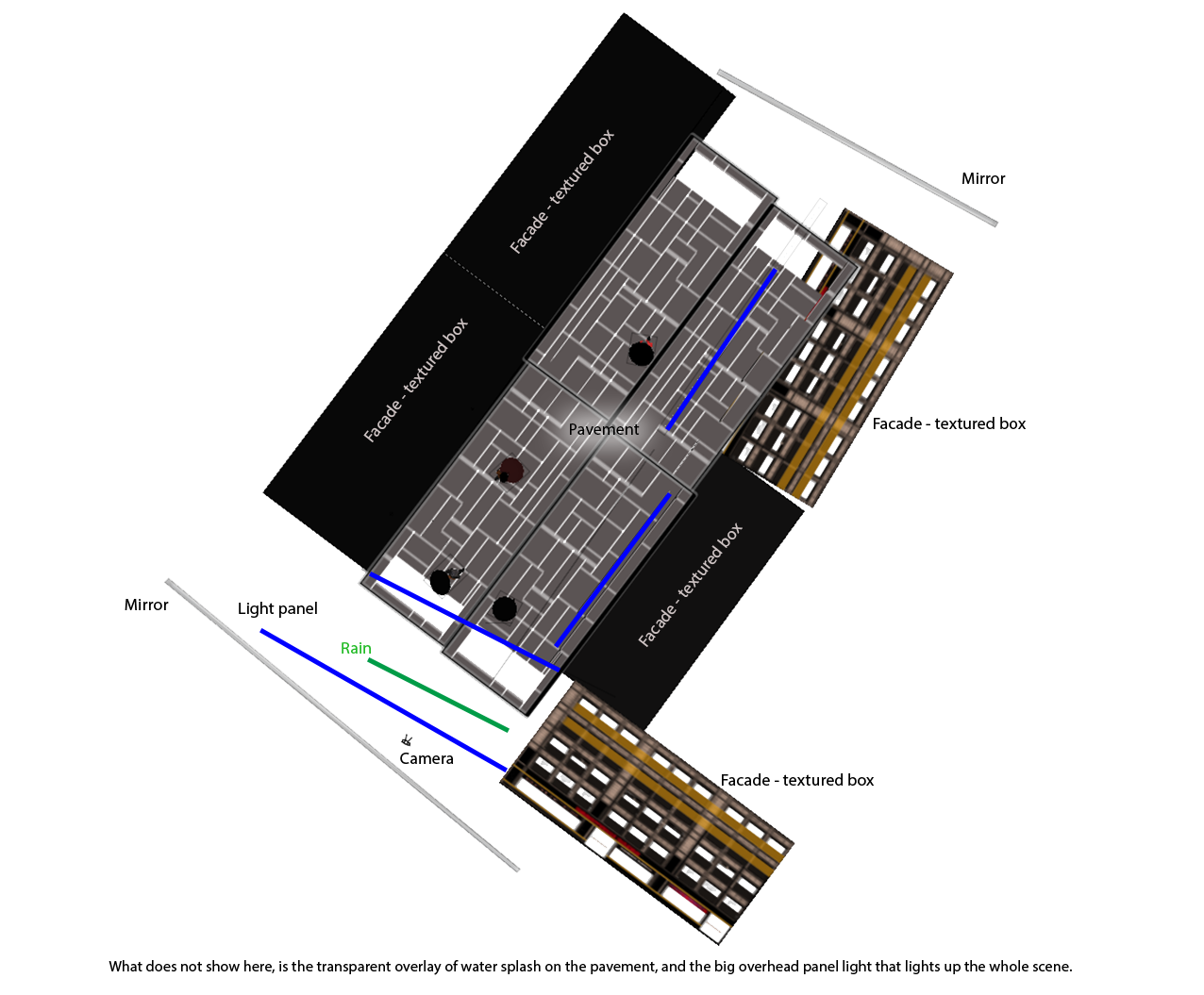
As you can see, there are two mirrors, one at each end of the "street", facing another at an angle, so that the reflection in one mirror is reflected in the other and the angle creates a curved street.
No, not opaque! The rain ( and the water splashing) must be transparent .png or .gif files.
I use .png.
I made the transparent .png for the rain in Photoshop, using the Kyle’s spatter brush to cover a 2500 x 2500 image to make drops on the pavement,
and then I applied a quite heavy motion blur to create the rain from the same file:

Of course, the closer to the camera, the bigger the rain, and the more light you shine on it, the more visible it gets.
My computer is 5 years old and has no "magic box" – but it has a lot of memory. The main reason you need a lot of memory to handle big files, is that the entire project is copied to memory before it's sent to Sunflow for rendering.
This project is 42.2 Mb, mostly because I'm using some fairly heavy textures here. I would normally resume that 2Gb memory should be enough to handle and render a 42.2 Mb project.
But looking at my memory usage I'm not so sure about that:

SH3D says it's using 2,1 GB, ( to handle a project file of 42.2 Mb) and the Activity monitor states that there's 4.4GB of cached memory ( which I think might be my project file + a copied version for Sunflow).
Is 4:4 Gb really necessary to handle a 45Mb file?
I think I'll just give up trying to understand caching and swapping and wired and compressed memory.
But I know one thing: Big textures don't render slower than small textures – if you have memory enough.
And memory is pretty cheap these days.
Here is a quick rendering to show the effect of the mirrors. It took 12 minutes on a 12-core Mac with 128GB memory :
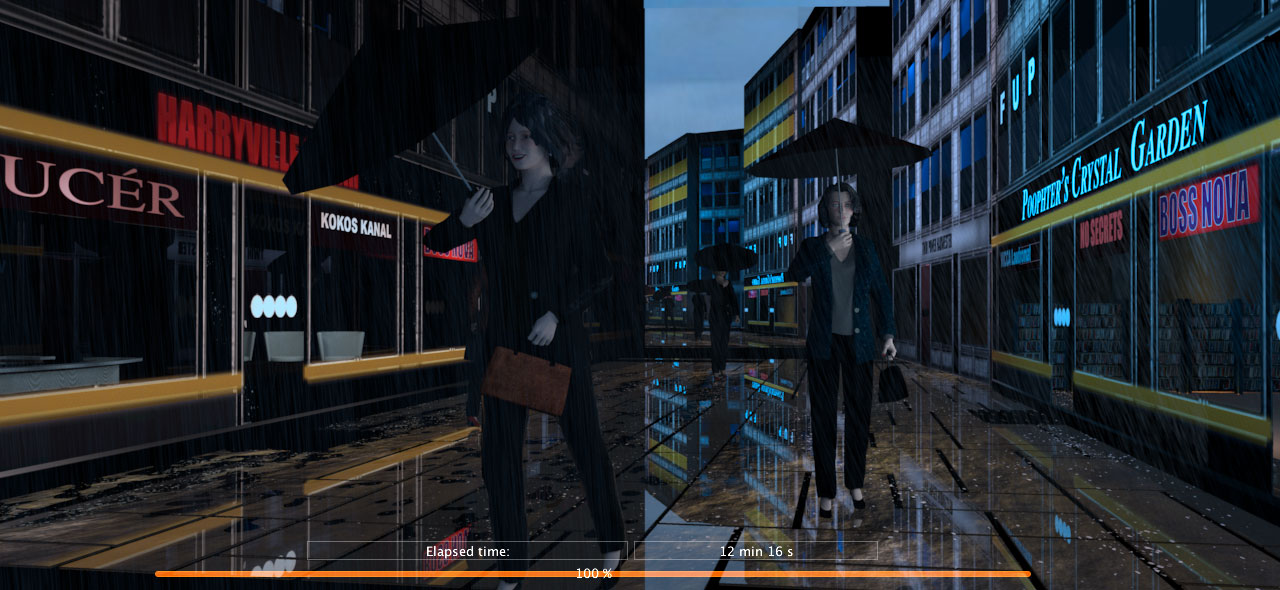
I ‘m a bit reluctant to publish the project file yet , since I’m not completely happy with neither the models, the rain or the water splashing, but maybe later.
Cec
though i cannot quite figure out the reflected shop names
I’m not quite sure what you are referring to... maybe the reflections in the windows?
Anyway; I am using mirrors a lot – to create a closed circuit, so to speak – both to get rid of the ugly horizon line and to create an illusion of something endless.
Mirrors can be a blessing [;)]
Let me show the layout from the project window:
As you can see, there are two mirrors, one at each end of the "street", facing another at an angle, so that the reflection in one mirror is reflected in the other and the angle creates a curved street.
Would the rain be ok as a texture applied to an opaque surface positioned in front of the viewer
No, not opaque! The rain ( and the water splashing) must be transparent .png or .gif files.
I use .png.
I made the transparent .png for the rain in Photoshop, using the Kyle’s spatter brush to cover a 2500 x 2500 image to make drops on the pavement,
and then I applied a quite heavy motion blur to create the rain from the same file:
Of course, the closer to the camera, the bigger the rain, and the more light you shine on it, the more visible it gets.
and reducing the model size could well help many users who haven't a magic box attached to the screen to handle some larger models
My computer is 5 years old and has no "magic box" – but it has a lot of memory. The main reason you need a lot of memory to handle big files, is that the entire project is copied to memory before it's sent to Sunflow for rendering.
This project is 42.2 Mb, mostly because I'm using some fairly heavy textures here. I would normally resume that 2Gb memory should be enough to handle and render a 42.2 Mb project.
But looking at my memory usage I'm not so sure about that:
SH3D says it's using 2,1 GB, ( to handle a project file of 42.2 Mb) and the Activity monitor states that there's 4.4GB of cached memory ( which I think might be my project file + a copied version for Sunflow).
Is 4:4 Gb really necessary to handle a 45Mb file?
I think I'll just give up trying to understand caching and swapping and wired and compressed memory.
But I know one thing: Big textures don't render slower than small textures – if you have memory enough.
And memory is pretty cheap these days.
Here is a quick rendering to show the effect of the mirrors. It took 12 minutes on a 12-core Mac with 128GB memory :
I ‘m a bit reluctant to publish the project file yet , since I’m not completely happy with neither the models, the rain or the water splashing, but maybe later.
Cec
Re: Light & textures - rendering examples of this and that.
Hi Cec.
Thx for the explanations
The magic black box refers to my lack of knowledge, and interest, in anything that is inside the case, so everything it does is magic.
Sorry to have been vague as to what i could not understand in your image, it''s the name KOKOS and the 4 large white dots, these are either side of the figure in red shoes. The name appears almost as a shadow inside the shop, as do the dots, my mind just cannot figure out is, if its reflection, on what? if it's shadow, why color.
I am both baffled and curious, but not critical.
MIke
Thx for the explanations
The magic black box refers to my lack of knowledge, and interest, in anything that is inside the case, so everything it does is magic.
Sorry to have been vague as to what i could not understand in your image, it''s the name KOKOS and the 4 large white dots, these are either side of the figure in red shoes. The name appears almost as a shadow inside the shop, as do the dots, my mind just cannot figure out is, if its reflection, on what? if it's shadow, why color.
I am both baffled and curious, but not critical.
MIke
Re: Light & textures - rendering examples of this and that.
Ah, yes, now I see what you mean.s the name KOKOS and the 4 large white dots, these are either side of the figure in red shoes
No mystery; It's a double layer of transparent glass that creates the "ghosting".
Cec.
Re: Light & textures - rendering examples of this and that.
[:)] thx, happy to realise i've not gone completely bonkers yet
Re: Light & textures - rendering examples of this and that.
@Mike
On a totally different topic: Why are you online while I am offline, even if I'm logged in?
cec
On a totally different topic: Why are you online while I am offline, even if I'm logged in?
cec
Who is online
Users browsing this forum: No registered users and 1 guest