Hi all
I downloaded some models from 3dwarehouse.sketchup.com as dae and imported them into sh3d. Unfortunately, the models 3D views look somehow strange: the models consist of many polygons, and all surrounding lines (i.e. the whole mesh) are shown. Can I change that, are some settings wrong?
Thank you for all hints.
Best,
Bernd
Imported dae shows polygon lines
This topic has been viewed 5526 times and has 5 replies

Re: Imported dae shows polygon lines
Use Modify Furniture -> Materials -> Modify, then make the edge lines invisible.
H
H
Re: Imported dae shows polygon lines
Thanks a lot!

Re: Imported dae shows polygon lines
Hi!
I have different problem - need edges to be shown, but there are none of them. Haven't found any edge switcher in Modify Furniture -> Materials -> Modify...
Situation: I negotiate house frame construction with builders, and export model from my soft in dae or obj; import to SH as a furniture and publish it online. But when there is no edges it hard to understand whether there one board or several.
Please, help to switch on the edges!
Needed view:

SH view:

Material parameters:

I have different problem - need edges to be shown, but there are none of them. Haven't found any edge switcher in Modify Furniture -> Materials -> Modify...
Situation: I negotiate house frame construction with builders, and export model from my soft in dae or obj; import to SH as a furniture and publish it online. But when there is no edges it hard to understand whether there one board or several.
Please, help to switch on the edges!
Needed view:
SH view:
Material parameters:

Re: Imported dae shows polygon lines
Hello Gildaniel,
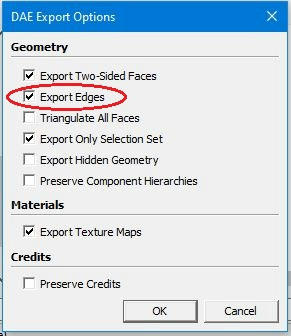
I think that your problem can be solved if your CAD-software has export option like 'Export Edges' in Sketcup Make 2017 I have used here.
Usually I dont't use this option but now it is necessary (picture below)
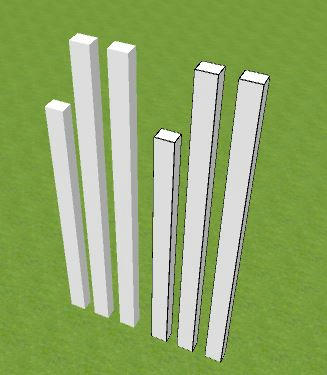
Below is part of SH3D:s 3D view: on left 3 pillars exported without Export Edges, on the right same pillars exported with that option.
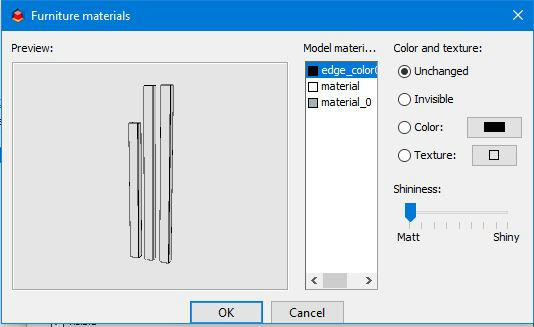
And in last picture can be seen Furniture Material when rightmost 3 pillars are selected. Now there is edge color available as needed.
I hope this help or at least show some possibilies to solve your problem.
Seppo
I think that your problem can be solved if your CAD-software has export option like 'Export Edges' in Sketcup Make 2017 I have used here.
Usually I dont't use this option but now it is necessary (picture below)
Below is part of SH3D:s 3D view: on left 3 pillars exported without Export Edges, on the right same pillars exported with that option.
And in last picture can be seen Furniture Material when rightmost 3 pillars are selected. Now there is edge color available as needed.
I hope this help or at least show some possibilies to solve your problem.
Seppo
Re: Imported dae shows polygon lines
SeppoV12, thank you very much for your help!
Who is online
Users browsing this forum: No registered users and 1 guest