
Z-offset for texture?

This topic has been viewed 5476 times and has 3 replies
Thread status: Active
Features you would like to see [img]http://www.sweethome3d.com/images/flags/en_small.gif[/img]
Post Reply New Topic
User avatar
SeppoV12
Posts: 50
Joined: Thu Mar 28, 2019 2:40 pm
Country: Finland

Z-offset for texture?

Post by SeppoV12 »

Is it possible to add Z-offset for textures (just like X- and y-offset)?

I think that could solve 'problem' with crossing loghouse cornes: joints should be like in real world example left.
On the right is flat wall with log wall texture. No matter what I try (different level for walls, base board, different wall heights..), SH texturing outsmart me and joints in both walls are at same level.

I am equally satisfied if someone can show (simple?) solution for this without program modifications.
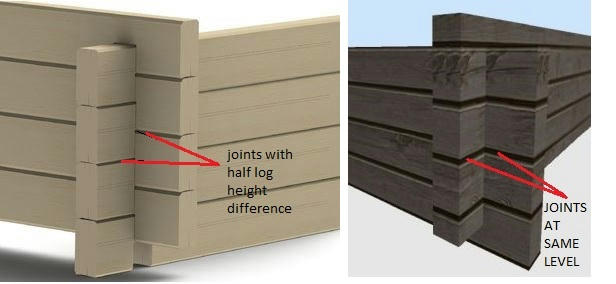

Image
User avatar
UbuntuBirdy
Posts: 421
Joined: Thu Aug 31, 2017 10:31 pm
Country: Switzerland
Contact:

Re: Z-offset for texture?

Post by UbuntuBirdy »

I would create 2 different textures, one with half log shifted in z.
Pascal

SH3D 6.6 / Ubuntu 22.04 (Mainline-Kernel) / Radeon RX580 / Ryzen 7 5800x
User avatar
Puybaret
Posts: 9440
Joined: Mon Nov 07, 2005 12:00 pm
Country: Paris, France
Contact:

Re: Z-offset for texture?

Post by Puybaret »

There's no 3rd dimension for textures shifting. The way a texture image is applied on a surface depends on the texture coordinates defined on a 3D model. Shifting the texture along X and Y allows to shift the image on all the surface of the 3D model (or a wall), but shifting the image and on a part of the model and not on another part is only possible if you change those texture coordinates which is not possible in Sweet Home 3D.

A solution for your problem is to use 2 different objects. But if you use walls, shift the texture along Y will work too.
Emmanuel Puybaret, Sweet Home 3D creator
User avatar
SeppoV12
Posts: 50
Joined: Thu Mar 28, 2019 2:40 pm
Country: Finland

Re: Z-offset for texture?

Post by SeppoV12 »

@UbuntuBirdy
I would create 2 different textures, one with half log shifted in z.
I didn't notice it..so obvious when you mentioned it.
My quick and dirty solution was to cut of half log height from texture, both upper and lower part of it. Texture is no more seamless but this is not problem with wall heights I am using.
Thank you Pascal!

@Puybaret
Thank you for the explanation.
I tried different objects, even single 3D log arrays.
Now I am using walls, so handy with doors and windows [:D]
Post Reply New Topic

Who is online

Users browsing this forum: No registered users and 1 guest