Why do boxes and triangles rotated about the X axis act differently?
When a box is shaped as a board with 1" width, 6" height and 48" depth, it's depth is along the Y axis. It will rotate about the X axis as expected. The dimensions make a board that would be flat against a vertical wall that is along the Y axis.
When a triangle is shaped as a board with 6" width, 6" height and 1" depth, it's width is in the Y axis. It will rotate about the Y axis when a value is inserted in the X axis of the modify furniture menu. The dimensions make a triangle that would be flat against a vertical wall that is along the Y axis.
Rotation different between box and triangle
This topic has been viewed 2505 times and has 2 replies
-
bert.struik

- Posts: 32
- Joined: Fri Apr 24, 2015 7:51 pm
- Country: Vancouver, Canada
-
bert.struik
- Posts: 32
- Joined: Fri Apr 24, 2015 7:51 pm
- Country: Vancouver, Canada
Re: Rotation different between box and triangle
It is probably that the coordinate system of the object is different than the coordinate system of the drawing. Sorry I did not figure that out before posting.

Re: Rotation different between box and triangle
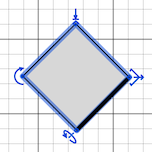
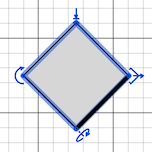
As you noticed, the axes of the horizontal rotation of the objects depends on how you already rotated around its vertical axis: their X rotation axis is parallel to the thick line drawn in front of the object in the plan, and their Y rotation axis is perpendicular to this thick line.
The little arrow used to handle the rotation around a horizontal axis is also supposed to help you guess this axis.
Object rotated around its X rotation axis:
Object rotated around its Y rotation axis:
The little arrow used to handle the rotation around a horizontal axis is also supposed to help you guess this axis.
Object rotated around its X rotation axis:
Object rotated around its Y rotation axis:
Emmanuel Puybaret, Sweet Home 3D creator
Who is online
Users browsing this forum: No registered users and 1 guest