FreeCAD Model in SH3D

This topic has been viewed 4668 times and has 5 replies
Thread status: Active
How can I do this? [img]http://www.sweethome3d.com/images/flags/en_small.gif[/img]
Post Reply New Topic
Ferdo
Posts: 2
Joined: Wed Dec 23, 2020 5:57 am
Country: Austria

FreeCAD Model in SH3D

Post by Ferdo »

Hello everyone! This my first post in this forum and I hope one of you can help me.

I want to create furniture with the Part Workbench in FreeCAD (v0.18). The import of a simple test model in OBJ format into SH3D worked well basically but originally it had two parts in differnt colors. Now it's all one color and merched to one part. So my question is what needs to be done either in FreeCAD or SH3D to keep the differnt parts and make them selectable for customization.

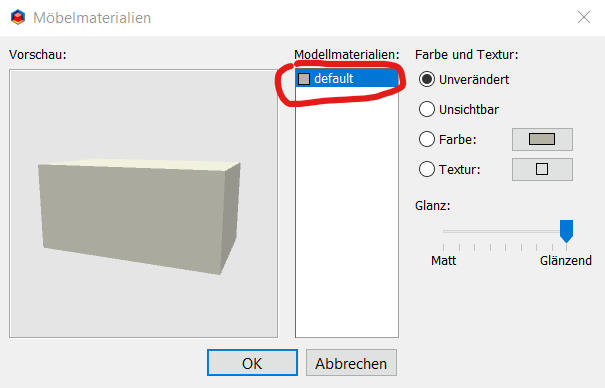
My test model in SH3D. It's in german language but nevertheless it should be recognizable what happened. I expacted to have here the two parts to be selectable.
Image

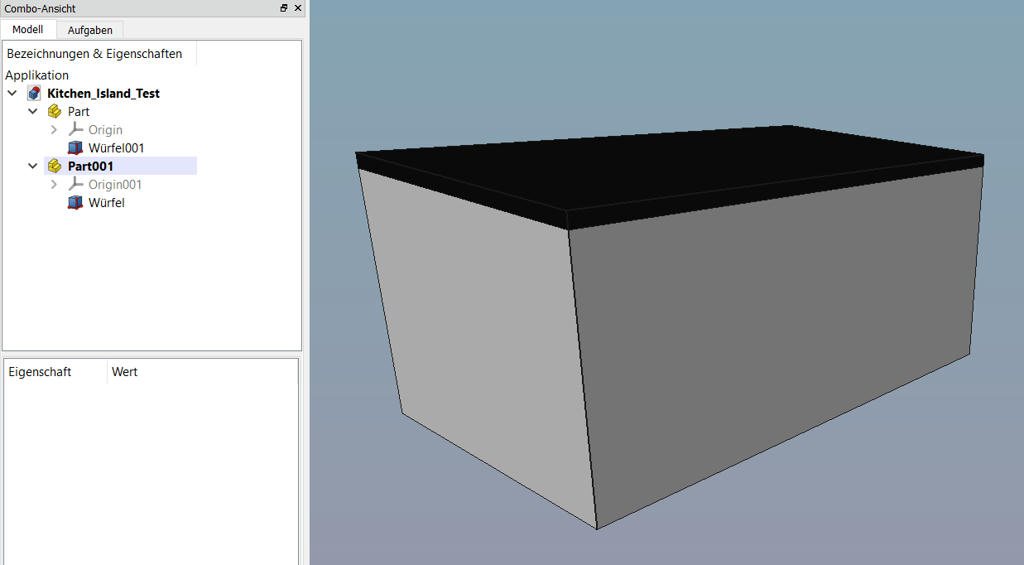
Original model in FreeCAD:
Image
User avatar
hansmex
Posts: 4027
Joined: Sat Sep 26, 2009 11:36 am
Country: Netherlands

Re: FreeCAD Model in SH3D

Post by hansmex »

Probable solution:
Give both parts a different texture, and they will show up as two parts in SH3D. You can then change colour or texture after importing the model.

H
Hans

new website - under constuction
hansdirkse.info
User avatar
UbuntuBirdy
Posts: 421
Joined: Thu Aug 31, 2017 10:31 pm
Country: Switzerland
Contact:

Re: FreeCAD Model in SH3D

Post by UbuntuBirdy »

The easyest way is to make two parts in FreeCAD and rejoin them in SH3D. This is the way I alway go when modeling with FreeCAD for use in SH3D.
Pascal

SH3D 6.6 / Ubuntu 22.04 (Mainline-Kernel) / Radeon RX580 / Ryzen 7 5800x
Mike53
Posts: 678
Joined: Sat Jan 06, 2018 1:02 am
Country: UK

Re: FreeCAD Model in SH3D

Post by Mike53 »

might be worth checking that you did export both parts
Ferdo
Posts: 2
Joined: Wed Dec 23, 2020 5:57 am
Country: Austria

Re: FreeCAD Model in SH3D

Post by Ferdo »

Give both parts a different texture, and they will show up as two parts in SH3D.
This is not working unfortunately.
The easyest way is to make two parts in FreeCAD and rejoin them in SH3D. This is the way I alway go when modeling with FreeCAD for use in SH3D.
This works. It means you don't see a solution besides this workaround, right? What other tool do you use for modeling?
might be worth checking that you did export both parts

This was also my first idea. [;)] Both parts are there.


Thank you all for your answers!
User avatar
UbuntuBirdy
Posts: 421
Joined: Thu Aug 31, 2017 10:31 pm
Country: Switzerland
Contact:

Re: FreeCAD Model in SH3D

Post by UbuntuBirdy »

The easyest way is to make two parts in FreeCAD and rejoin them in SH3D. This is the way I alway go when modeling with FreeCAD for use in SH3D.
This works. It means you don't see a solution besides this workaround, right? What other tool do you use for modeling?
I have not found another solution until now. But I do not search anymore, because this solution gives also some great options: you can hide easily some parts of your construction; you can easily redesign parts of your construction...
Pascal

SH3D 6.6 / Ubuntu 22.04 (Mainline-Kernel) / Radeon RX580 / Ryzen 7 5800x
Post Reply New Topic

Who is online

Users browsing this forum: No registered users and 2 guests