
Hans, I didn't change the way the program is launched. [:(]
What I don't understand is whether your desktop icon is wrong or the program doesn't work anymore.
How many times did you try to launch the new beta?
Can you still launch the beta from the JNLP link?
I tested again the 6 arrows and they work in both modes.
The left, right, up and down navigation arrows have the same effect as the matching keys of the keyboard, whereas the two small up and down arrows at center have the same effect as the page up and page down keys.
I hope you'll be able to launch the program again.
Sweet Home 3D 2.3
This topic has been viewed 174756 times and has 56 replies
Re: Sweet Home 3D 2.3
Emmanuel Puybaret, Sweet Home 3D creator

Re: Sweet Home 3D 2.3
Emmanuel:
Well, I did a big update for Ubuntu, so I guess that causes the problem.
Yes, I can start SH3D by clicking the download link; it checks and finds the already downloaded file and starts it.
I restarted my computer to see if the icon would start the program, but without success.
If I open a terminal and copy-paste the "text" from the icon, the program starts without a problem.
/usr/lib/jvm/java-6-sun-1.6.0.16/jre/bin/javaws -localfile -offline /home/hans/.java/deployment/cache/6.0/14/81813ce-3dc3e262
I can't reproduce the little problem with the new arrows, so maybe it was just a quirk.
Hans
Well, I did a big update for Ubuntu, so I guess that causes the problem.
Yes, I can start SH3D by clicking the download link; it checks and finds the already downloaded file and starts it.
I restarted my computer to see if the icon would start the program, but without success.
If I open a terminal and copy-paste the "text" from the icon, the program starts without a problem.
/usr/lib/jvm/java-6-sun-1.6.0.16/jre/bin/javaws -localfile -offline /home/hans/.java/deployment/cache/6.0/14/81813ce-3dc3e262
I can't reproduce the little problem with the new arrows, so maybe it was just a quirk.
Hans
Re: Sweet Home 3D 2.3
I'm glad to read it still works. [:)]
I guess this dialog is just a new security warning added to Ubuntu. I hope it won't prevent other users from using Sweet Home 3D.
I guess this dialog is just a new security warning added to Ubuntu. I hope it won't prevent other users from using Sweet Home 3D.
Emmanuel Puybaret, Sweet Home 3D creator
Re: Sweet Home 3D 2.3
Emmanuel:
In v2.3.b7 I cannot modify my imported models anymore.
Of course there could be several reasons for this behaviour.
- because I start the program from the online jnlp-link?
- because I use Ubuntu?
- because it's a bug?
Hans
In v2.3.b7 I cannot modify my imported models anymore.
Of course there could be several reasons for this behaviour.
- because I start the program from the online jnlp-link?
- because I use Ubuntu?
- because it's a bug?
Hans
Re: Sweet Home 3D 2.3
This is a bug and I fixed it in version 2.3 Beta 8.
Thank you for your help. [:)]
Thank you for your help. [:)]
Emmanuel Puybaret, Sweet Home 3D creator
Re: Sweet Home 3D 2.3
Hello,
When using Ubuntu 10.04 you will have to change the program permissions in order to be able to start SH3D from the desktop icon.
Right-click the text icon on the desktop and select PROPERTIES. A window opens as seen below:
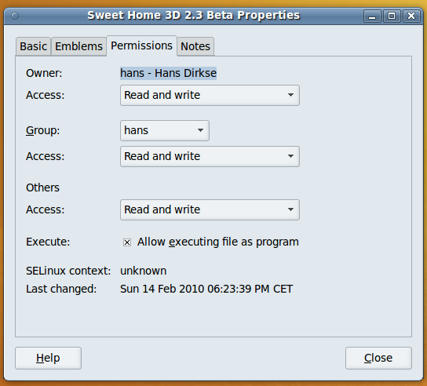
Click the PERMISSIONS tab and make sure to check the box that says "Allow executing file as a program". I also changed the other settings to "Read and write" although I am not sure if that is necessary. Close the window and you'll see that the desktop icon now shows the SH3D logo. Double-clicking the icon now starts the program.
Success.
Hans
When using Ubuntu 10.04 you will have to change the program permissions in order to be able to start SH3D from the desktop icon.
Right-click the text icon on the desktop and select PROPERTIES. A window opens as seen below:
Click the PERMISSIONS tab and make sure to check the box that says "Allow executing file as a program". I also changed the other settings to "Read and write" although I am not sure if that is necessary. Close the window and you'll see that the desktop icon now shows the SH3D logo. Double-clicking the icon now starts the program.
Success.
Hans
Re: Sweet Home 3D 2.3
Emmanuel:
I made a model of a spiral staircase, using a grouped set of 3 elements to build the steps. Due to some small not-reproducible bug I had to save the model and re-open it. Unfortunately the grouping info is not saved with the rest of the model/scene info.
Is there a chance you could add this?
Hans
I made a model of a spiral staircase, using a grouped set of 3 elements to build the steps. Due to some small not-reproducible bug I had to save the model and re-open it. Unfortunately the grouping info is not saved with the rest of the model/scene info.
Is there a chance you could add this?
Hans
Re: Sweet Home 3D 2.3
Hans, the grouping info should be saved.
I just tried and it worked for me.
If you find a way to reproduce this bug, don't hesitate to post it to help me fix it. [:)]
I just tried and it worked for me.
If you find a way to reproduce this bug, don't hesitate to post it to help me fix it. [:)]
Emmanuel Puybaret, Sweet Home 3D creator
Re: Sweet Home 3D 2.3
I found the bug about the grouping info. In fact the grouping info is lost in memory just after you save your home. So if you save twice a home with a group, the group info will be lost also in the file.
Sorry for this problem, I will be fixed in the next beta version.
Sorry for this problem, I will be fixed in the next beta version.
Emmanuel Puybaret, Sweet Home 3D creator
Re: Sweet Home 3D 2.3
Emmanuel:
Thanks for your dedication and meticulous bug hunting.
Please, don't say sorry for bugs in the program, I guess it's inevitable. What counts, is the speed with which they are solved.
Thanks again!!
Hans
Thanks for your dedication and meticulous bug hunting.
Please, don't say sorry for bugs in the program, I guess it's inevitable. What counts, is the speed with which they are solved.
Thanks again!!
Hans
Who is online
Users browsing this forum: No registered users and 1 guest