Bonjour
J'ai un problème avec FurnitureLibraryEditor. Il crash dès que je veux modifier quelque chose.
Pour être sûr, j'ai chargé la bibliothèque Contributions téléchargée depuis le site, enregistré sous test.sh3f.
https://i.imgur.com/Z8nwTIz.png
Si je fais Modifier sur un élément ou si j'importe autre chose, ça plante avec le message suivant :
https://i.imgur.com/zvYDlsH.png
Furniture Library Editor released
This topic has been viewed 2891119 times and has 252 replies
-
riribreizh
- Posts: 1
- Joined: Sun Oct 11, 2020 1:07 pm
- Country: France
-
Thops_of_Kenya

- Posts: 7
- Joined: Fri Apr 17, 2020 8:17 am
- Country: Kenya
Re: Furniture Library Editor released
Hi
Thanks for a great editor. At last i can get some order in my library
I have one problem though, i cant open the furniture library, i get a message about that it's not a valid SH3F file, i also get that when the file i exported (all imported objects).
I don't know if it, for some reason above my knowledge, is supposed to be like this.
If it's not, it could be my fault as i, in a dark moment, added a folder with a swedish letter ( ö ), can it be that?
Especialy that folder creates a problem as the last of the objects in that can't be moved or deleted.
Can i solve this somehow ?
/Thops
Thanks for a great editor. At last i can get some order in my library
I have one problem though, i cant open the furniture library, i get a message about that it's not a valid SH3F file, i also get that when the file i exported (all imported objects).
I don't know if it, for some reason above my knowledge, is supposed to be like this.
If it's not, it could be my fault as i, in a dark moment, added a folder with a swedish letter ( ö ), can it be that?
Especialy that folder creates a problem as the last of the objects in that can't be moved or deleted.
Can i solve this somehow ?
/Thops

Re: Furniture Library Editor released
The editor is a standalone application, not a plug-in.
H
H
-
Thops_of_Kenya
- Posts: 7
- Joined: Fri Apr 17, 2020 8:17 am
- Country: Kenya
Re: Furniture Library Editor released
Thanks for the correction of my definition.
/Thops
/Thops
Re: Furniture Library Editor released
Am really enjoying using SH3D but I've been butting my head against a problem for a few hours.
I'm not getting anywhere with an L shaped SVG hole for stairs using the Furniture Library editor on Ubuntu 20.04.2 LTS.
Even the supplied example is not working (M0,0 v0.8 h0.5 v-0.3 h0.5 v-0.5 z) from the "L shape(d staircase)" section at http://www.sweethome3d.com/SVGPathMiniM ... Home3D.pdf
This is just giving the usual rectangular hole. I've followed the instructions in the PDF - is there something that is missing there or out of date?
I've also tested with L code, e.g. M0,0 L0.5,0 L0.5,0.3 L0.3,0.3 L0.3,1.0 L0,1.0 L0,0 which works just fine in an SVG file, but again, not in an SH3D file. Any ideas?
I'm not getting anywhere with an L shaped SVG hole for stairs using the Furniture Library editor on Ubuntu 20.04.2 LTS.
Even the supplied example is not working (M0,0 v0.8 h0.5 v-0.3 h0.5 v-0.5 z) from the "L shape(d staircase)" section at http://www.sweethome3d.com/SVGPathMiniM ... Home3D.pdf
This is just giving the usual rectangular hole. I've followed the instructions in the PDF - is there something that is missing there or out of date?
I've also tested with L code, e.g. M0,0 L0.5,0 L0.5,0.3 L0.3,0.3 L0.3,1.0 L0,1.0 L0,0 which works just fine in an SVG file, but again, not in an SH3D file. Any ideas?

Re: Furniture Library Editor released
I just tried both shapes under Ubuntu 18 and macOS 10.14 and they worked as expected.
Did you try with Sweet Home 3D version available at SourceForge.net?
Did you try with Sweet Home 3D version available at SourceForge.net?
Emmanuel Puybaret, Sweet Home 3D creator
Re: Furniture Library Editor released
I have not yet tried what happens with the code you have shown, but from what i see here :-
M0,0 v0.8 h1 v-0.8 z (example is anti clockwise)
M0,0 Moveto co-ordinates 0,0
v0.8 Cut 0.8 vertically
h1 Cut 1 horizontally
v-0.8 Cut -0.8 vertically (- means up)
z Cut to start (closes)
for a rectangle you would need v and h + a z to close
M0,0 v0.8 h1 v-0.8 z (example is anti clockwise)
M0,0 Moveto co-ordinates 0,0
v0.8 Cut 0.8 vertically
h1 Cut 1 horizontally
v-0.8 Cut -0.8 vertically (- means up)
z Cut to start (closes)
for a rectangle you would need v and h + a z to close
Re: Furniture Library Editor released
That's encouraging, so I spent another hour trying everything possible to produce an L-shaped hole in the ceiling for my staircase - without success. I've tried VH encoding, L encoding, my required measurements, the example measurements and a simplified rectangular hole - all to no effect. Always, the ceiling hole is the full rectangular base dimensions. It is not possible to make it smaller. The SVG encoding seems fine. It looks like a bug at the moment. Maybe because the design file is too big? I'm at a loss to explain this lack of custom hole ability.I just tried both shapes under Ubuntu 18 and macOS 10.14 and they worked as expected.
Did you try with Sweet Home 3D version available at SourceForge.net?
I'm using the latest version of SH3D, i.e. 6.5 and I've looked inside the SH3F zip file and the SVG line is preserved as expected.
Can you see if you can make an L-shaped hole in this SH3D file with this SH3F staircase?
sh3f file
https://drive.google.com/file/d/1jIwirV ... sp=sharing
sh3d file (this is crazy big, even though it is basically one floor of 5 rooms).
https://drive.google.com/file/d/1w8UFLf ... sp=sharing



Re: Furniture Library Editor released
Few advises:
1. When you make staircase in real life watch your head!
That's why:
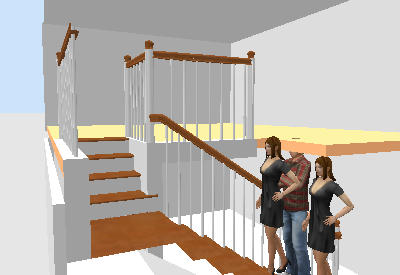
Look at the head of man (184.5cm tall)
Unfortunately I've see this in real life.
staircaseCutOutShape#1=
M0,0 v0.645 h0.5 v-0.382 h0.5 v-0.258 z
The second:
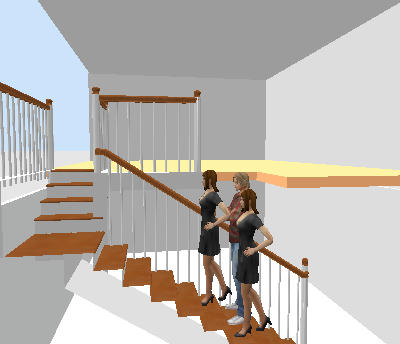
staircaseCutOutShape#1=
M0,0 v0.789 h0.5 v-0.532 h0.5 v-0.258 z
2.For a precise cut out you have to make some calculations
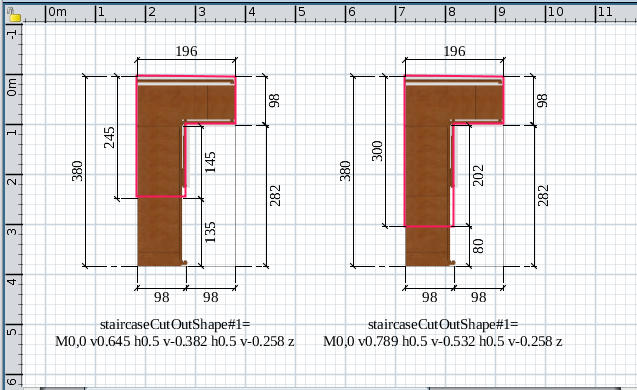
- the red lines represent cut out
- to calculate you need to divide the needed dimension to total dimension (vertically or horizontally)
For second cut out to find first v0.789 I do 300/380 and so on.
3. When use Furniture Editor and modify a furniture move the preview a little until the program take a new shoot.
In this way you avoid the dark background.
4. Here is the modified furniture
5. In future you will have to learn how to make round corners.
Good luck [B-)]
1. When you make staircase in real life watch your head!
That's why:
Look at the head of man (184.5cm tall)
Unfortunately I've see this in real life.
staircaseCutOutShape#1=
M0,0 v0.645 h0.5 v-0.382 h0.5 v-0.258 z
The second:
staircaseCutOutShape#1=
M0,0 v0.789 h0.5 v-0.532 h0.5 v-0.258 z
2.For a precise cut out you have to make some calculations
- the red lines represent cut out
- to calculate you need to divide the needed dimension to total dimension (vertically or horizontally)
For second cut out to find first v0.789 I do 300/380 and so on.
3. When use Furniture Editor and modify a furniture move the preview a little until the program take a new shoot.
In this way you avoid the dark background.
4. Here is the modified furniture
5. In future you will have to learn how to make round corners.
Good luck [B-)]
A computer program does what you tell it to do, not what you want it to do. Murphy's Law
When all else fails, read the instructions. Murphy's Law
If you don't like "AS IS", DIY. Dorin's law
When all else fails, read the instructions. Murphy's Law
If you don't like "AS IS", DIY. Dorin's law
Re: Furniture Library Editor released
Really appreciate the work you've done on this and I understand about stair heights, but the file you created when imported into my version of SH3D it still does not create an L-shaped opening, just the usual rectangular opening. If the L-shaped opening works for you, then the file is fine and it must, therefore be either:
* SH3D program (v6.5 on Linux) has a bug
* I'm doing something wrong with the furniture import (I choose "Staircase")
* SH3D program (v6.5 on Linux) has a bug
* I'm doing something wrong with the furniture import (I choose "Staircase")
Who is online
Users browsing this forum: No registered users and 1 guest