
Indeed this is another issue which happen also with some old files.
I don't get no error message but insert the new level.
If exist some round walls it draw the radius and nothing more.
I don't know why!!
My workaround:
-save the file with new level (eventually under new name)
-reopen the file
-delete new level
-try again. Usually work in this way.
Auto Dimensioning plugin
This topic has been viewed 159997 times and has 35 replies
Re: Auto Dimensioning plugin
A computer program does what you tell it to do, not what you want it to do. Murphy's Law
When all else fails, read the instructions. Murphy's Law
If you don't like "AS IS", DIY. Dorin's law
When all else fails, read the instructions. Murphy's Law
If you don't like "AS IS", DIY. Dorin's law

Re: Auto Dimensioning plugin
Thanks for the workaround, it worked [;)]
From your description, it sounds like an issue about the selected level of a home which is [font=courier new]null[/font] as long as the home doesn't contain any level.
At line 137 of [font=courier new]AutoDimensionigPlugin.java[/font], you create a new level in that case but then you don't update [font=courier new]selectedLevel[/font] field which makes [font=courier new]getWallsAtLevel[/font] fail line 143 when it tries to update [font=courier new]wallsAtLevel[/font] list.
Did you try to use Eclipse debugger (explained in the Debugging the plug-in section of the Plug-in developer's guide)?
From your description, it sounds like an issue about the selected level of a home which is [font=courier new]null[/font] as long as the home doesn't contain any level.
At line 137 of [font=courier new]AutoDimensionigPlugin.java[/font], you create a new level in that case but then you don't update [font=courier new]selectedLevel[/font] field which makes [font=courier new]getWallsAtLevel[/font] fail line 143 when it tries to update [font=courier new]wallsAtLevel[/font] list.
Did you try to use Eclipse debugger (explained in the Debugging the plug-in section of the Plug-in developer's guide)?
Emmanuel Puybaret, Sweet Home 3D creator
Re: Auto Dimensioning plugin
@Emmanuel
Thanks you test it and especially you have read the script.
Believe me or not but every time when I start to make a new plugin I read again and again your tutorial + I try to understand how you and others do this.
Without Eclipse debugger and assistance I can't do nothing.
About the bug:
I investigate a little and I compare few simple files created under different SH3D versions.
When I create and test a plugin I've made some test files with the current version of SH3D.
Rarely I've test on old files and this is my fault.
Now, after comparing the xml file created with 5.4, 6.2 and 6.5.2 I've observe on last it exist level0 even it is the only one.
Maybe this induce me in error and Eclipse debugger don't say nothing.
That's prove I'm not a programmer.
I will see if I can improve it without mess other functions.
Until there I recommend for users who have old files with unique level to update their file by adding a level, save file, reopen and delete the added level.
In this way you will have an updated file.
If you only open and save the file will don't work.
Thanks you test it and especially you have read the script.
Did you try to use Eclipse debugger (explained in the Debugging the plug-in section of the Plug-in developer's guide)?
Believe me or not but every time when I start to make a new plugin I read again and again your tutorial + I try to understand how you and others do this.
Without Eclipse debugger and assistance I can't do nothing.
About the bug:
I investigate a little and I compare few simple files created under different SH3D versions.
When I create and test a plugin I've made some test files with the current version of SH3D.
Rarely I've test on old files and this is my fault.
Now, after comparing the xml file created with 5.4, 6.2 and 6.5.2 I've observe on last it exist level0 even it is the only one.
Maybe this induce me in error and Eclipse debugger don't say nothing.
That's prove I'm not a programmer.
I will see if I can improve it without mess other functions.
Until there I recommend for users who have old files with unique level to update their file by adding a level, save file, reopen and delete the added level.
In this way you will have an updated file.
If you only open and save the file will don't work.
A computer program does what you tell it to do, not what you want it to do. Murphy's Law
When all else fails, read the instructions. Murphy's Law
If you don't like "AS IS", DIY. Dorin's law
When all else fails, read the instructions. Murphy's Law
If you don't like "AS IS", DIY. Dorin's law
Re: Auto Dimensioning plugin
Forget what I've say!
I'm totally wrong and is only my fault!
I've made a simple file with 6.5.2 and is not what I suppose.
Maybe when I try to clean the code I delete even some necessary lines.
I'll try to fix it as soon as possible and I'll post an other update.
Now back to work.
I'm sorry for the inconvenient [:((]
I'm totally wrong and is only my fault!
I've made a simple file with 6.5.2 and is not what I suppose.
Maybe when I try to clean the code I delete even some necessary lines.
I'll try to fix it as soon as possible and I'll post an other update.
Now back to work.
I'm sorry for the inconvenient [:((]
A computer program does what you tell it to do, not what you want it to do. Murphy's Law
When all else fails, read the instructions. Murphy's Law
If you don't like "AS IS", DIY. Dorin's law
When all else fails, read the instructions. Murphy's Law
If you don't like "AS IS", DIY. Dorin's law
Re: Auto Dimensioning plugin
No problem.
From the context, the quick fix should be to add at line 138, but I didn't try.
From the context, the quick fix should be to add
Code: Select all
selectedLevel = getHome().getSelectedLevel();Emmanuel Puybaret, Sweet Home 3D creator
Re: Auto Dimensioning plugin
New and fixed (hope) version 1.4.1
@Emmanuel
You are a good teacher! Thanks!
I've try to fix bug that make plugin to don't do what we expect in some circumstances.
Now I hope it work with unique level file (old or new) and also with demo files.
Don't ask me what I'm done because I don't know.
I'm sorry for the inconvenient!!
PS @ Emmanuel
I've read Your reply after I make this post.
I've found the same solution but after 4 hours of investigate the code by inserting spays on different stage.
Thanks a lot!!!
Also on Source Forge
@Emmanuel
You are a good teacher! Thanks!
I've try to fix bug that make plugin to don't do what we expect in some circumstances.
Now I hope it work with unique level file (old or new) and also with demo files.
Don't ask me what I'm done because I don't know.
I'm sorry for the inconvenient!!
PS @ Emmanuel
I've read Your reply after I make this post.
I've found the same solution but after 4 hours of investigate the code by inserting spays on different stage.
Thanks a lot!!!
Also on Source Forge
A computer program does what you tell it to do, not what you want it to do. Murphy's Law
When all else fails, read the instructions. Murphy's Law
If you don't like "AS IS", DIY. Dorin's law
When all else fails, read the instructions. Murphy's Law
If you don't like "AS IS", DIY. Dorin's law
Re: Auto Dimensioning plugin
Thanks for the update.
Sorry, I should have probably written my suggestion earlier to help you fix this issue faster.
I added your plug-in to the Plug-ins and tools page. Thanks again for your contribution!
Sorry, I should have probably written my suggestion earlier to help you fix this issue faster.
I added your plug-in to the Plug-ins and tools page. Thanks again for your contribution!
Emmanuel Puybaret, Sweet Home 3D creator
Re: Auto Dimensioning plugin
New version 1.5 and on Source Forge
- a better way to identify exterior walls
- add roof projection
- some changes in interface
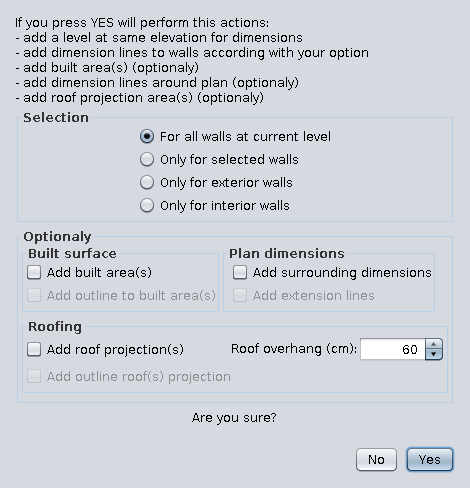
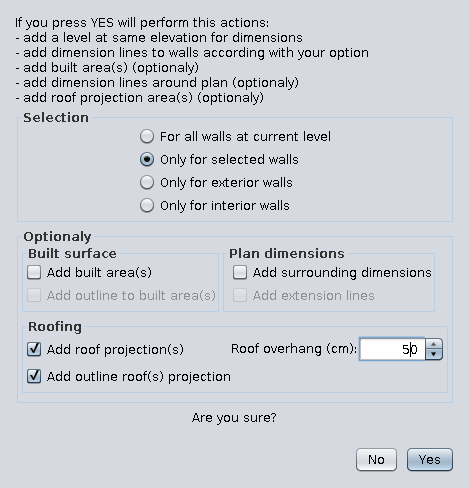
The result with 50 cm overhang
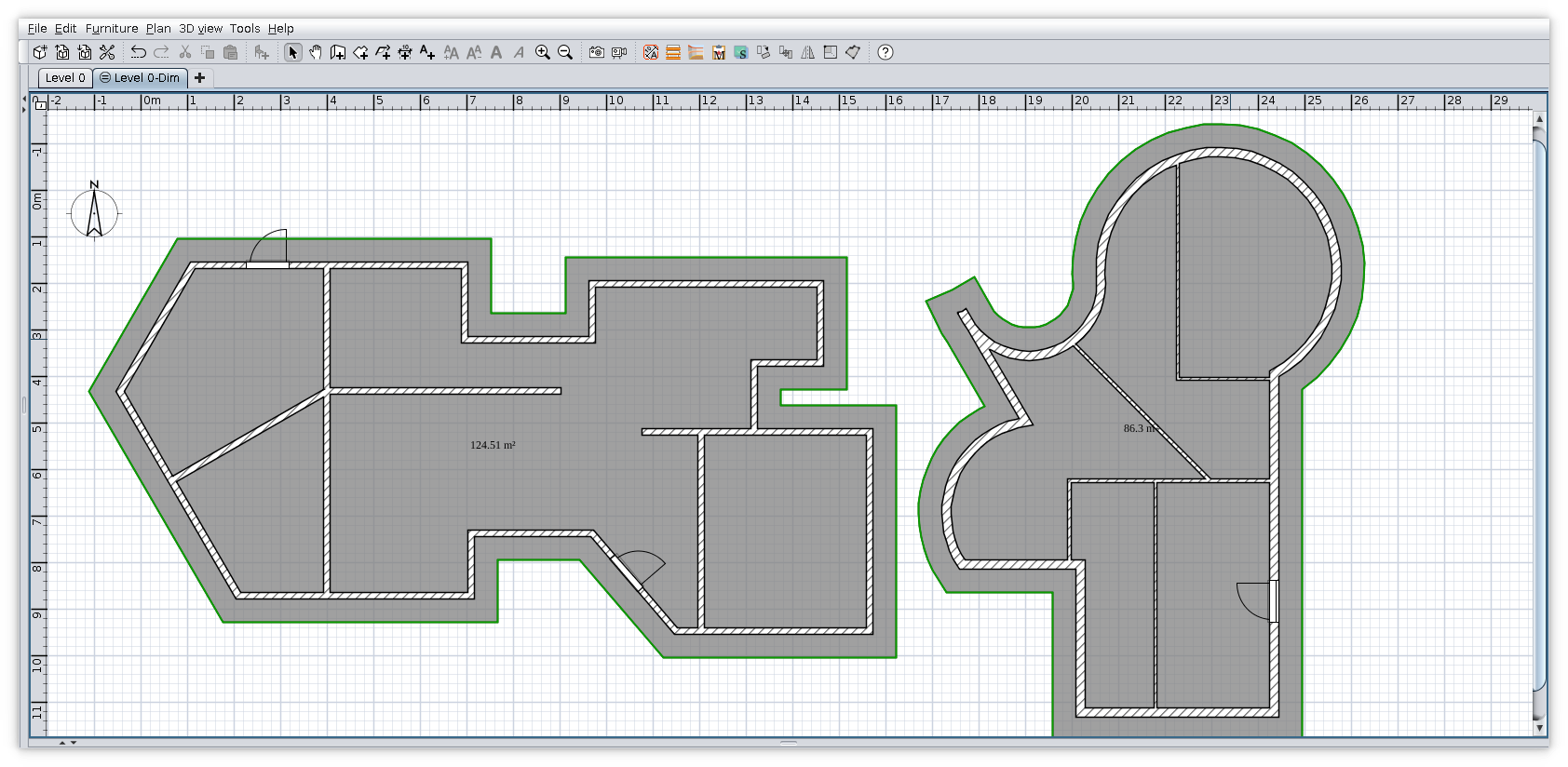
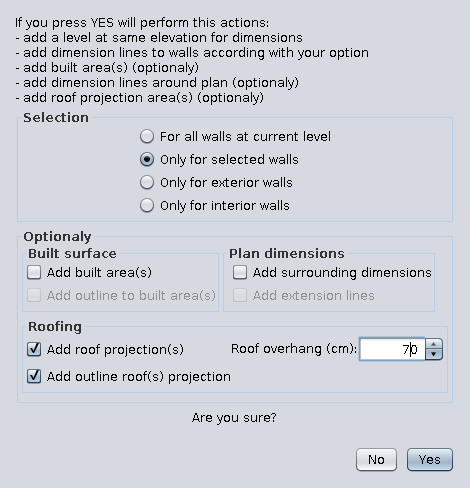
The result with 70 cm overhang
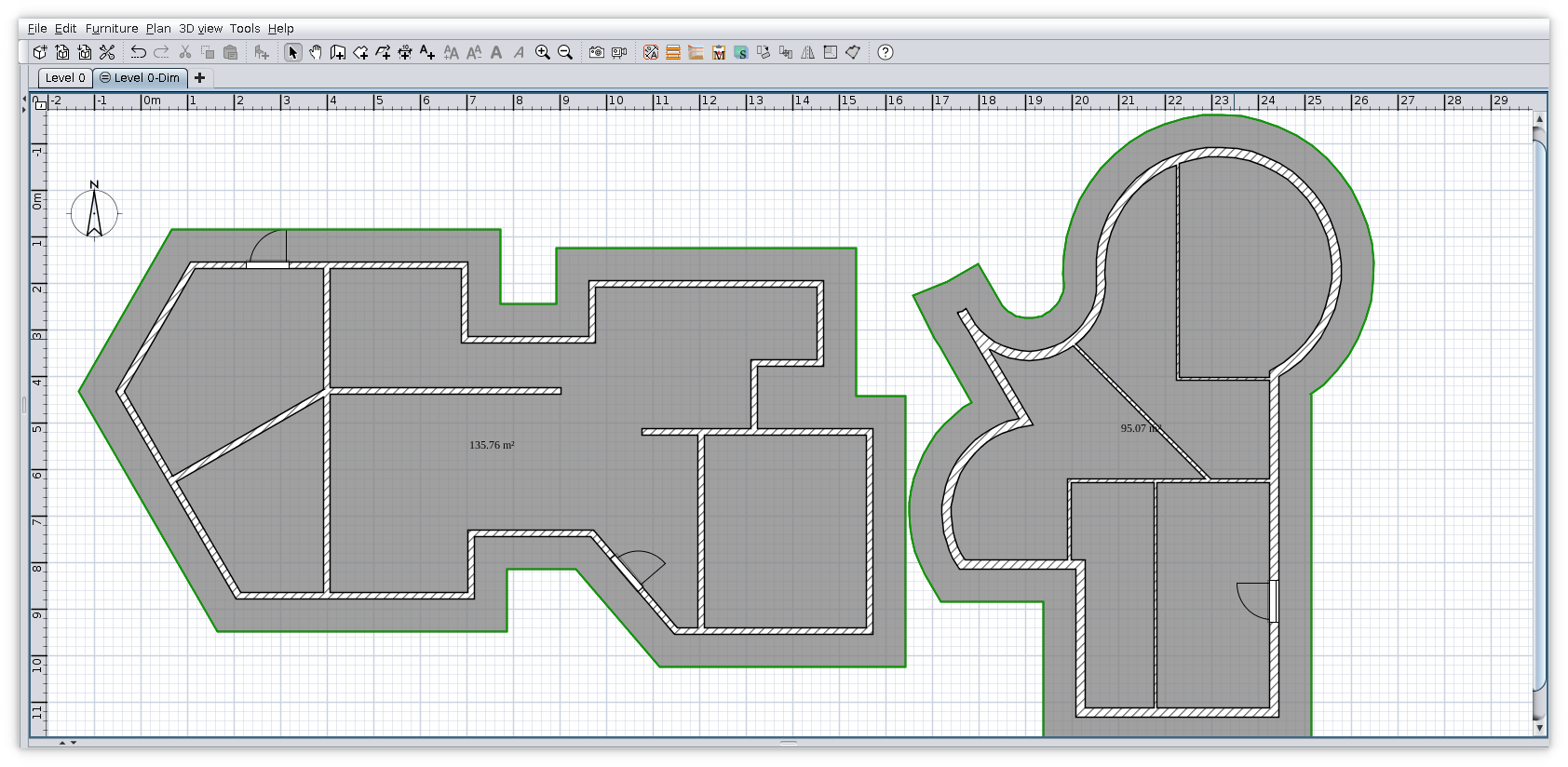
- a better way to identify exterior walls
- add roof projection
- some changes in interface
The result with 50 cm overhang
The result with 70 cm overhang
A computer program does what you tell it to do, not what you want it to do. Murphy's Law
When all else fails, read the instructions. Murphy's Law
If you don't like "AS IS", DIY. Dorin's law
When all else fails, read the instructions. Murphy's Law
If you don't like "AS IS", DIY. Dorin's law

Re: Auto Dimensioning plugin
I downloaded v1.5 from both links, but after installing SH3D still reports v1.3.
Also, the interface doesn't match what is shown in your images.
CORRECTION
SH3D now correctly indicates v1.5.
H
Also, the interface doesn't match what is shown in your images.
CORRECTION
SH3D now correctly indicates v1.5.
H
-
miro_ilias
- Posts: 13
- Joined: Fri Feb 03, 2017 12:55 pm
- Country: Slovakia
Re: Auto Dimensioning plugin
Hello, I added autodimensioning, saved the sh3d model and read it again. Is there a way to delete all these autodimensioning lines from the sh3d model please ?
Who is online
Users browsing this forum: No registered users and 1 guest