3D View with Outline or Stroke just like SketchUp
This topic has been viewed 6270 times and has 6 replies
3D View with Outline or Stroke just like SketchUp
Hello, I'm going to try to create a plugin. I want to have an option for 3D view to have a Stroke or Outline just like sketch up. Any ideas on this? I have a background on Programming. I just need some tips and I'll handle the rest =D thank you very much


Re: 3D View with Outline or Stroke just like SketchUp
Hi and welcome on board!
I don't know whats the purpose of your plugin is or how sketchup work but for this kind of task I use walls in place of stroke.
I use this for my Roof generator plugin (very far to be usable).
PROS: If you intend to make it open source I'm available to help.
CONS: I'm not a programmer.
I don't know whats the purpose of your plugin is or how sketchup work but for this kind of task I use walls in place of stroke.
I use this for my Roof generator plugin (very far to be usable).
PROS: If you intend to make it open source I'm available to help.
CONS: I'm not a programmer.
A computer program does what you tell it to do, not what you want it to do. Murphy's Law
When all else fails, read the instructions. Murphy's Law
If you don't like "AS IS", DIY. Dorin's law
When all else fails, read the instructions. Murphy's Law
If you don't like "AS IS", DIY. Dorin's law
Re: 3D View with Outline or Stroke just like SketchUp
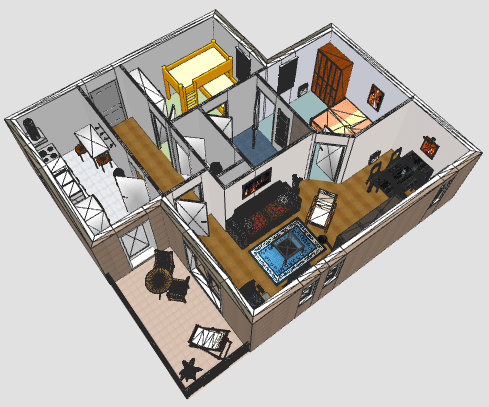
Hello, I'm sorry for the late reply because I can't find this post. I found it in my profile. Anyway I wanted like this just like the Thread sir hansmex has given me.
http://www.sweethome3d.com/images/forum ... utline.png
But the problem is it can't be added in a plugin and it's heavy in resource just sir ziolink32 said in that thread and it can only be used when you change the source code of Sweet Home.
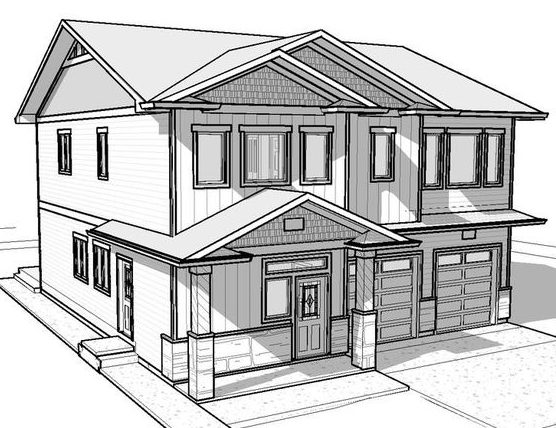
@sir Dorin. I need it because I will use it in anime/webcomis because the 3D Photo created in Sweet Home 3D has no Lines so I needed to trace the edges.
What I wanted to accomplish is when I create photo in 3D View, it will automatically draw lines or outlines so that it will look like 2D Drawings.
Here's the sample I want to accomplish
https://doitbeforeme.com/wp-content/upl ... 513173.jpg
http://www.sweethome3d.com/images/forum ... utline.png
But the problem is it can't be added in a plugin and it's heavy in resource just sir ziolink32 said in that thread and it can only be used when you change the source code of Sweet Home.
@sir Dorin. I need it because I will use it in anime/webcomis because the 3D Photo created in Sweet Home 3D has no Lines so I needed to trace the edges.
What I wanted to accomplish is when I create photo in 3D View, it will automatically draw lines or outlines so that it will look like 2D Drawings.
Here's the sample I want to accomplish
https://doitbeforeme.com/wp-content/upl ... 513173.jpg

Re: 3D View with Outline or Stroke just like SketchUp
You don't need to recompile the program, just read the end of thread #1472.
Emmanuel Puybaret, Sweet Home 3D creator
Re: 3D View with Outline or Stroke just like SketchUp
Hello I got it now and It's working using his method but it's only
this.drawingMode = DrawingMode.OUTLINE;
is there a way where I can use
this.drawingMode = DrawingMode.FILL_AND_OUTLINE; ?
here's the command line that's working for DrawingMode.OUTLINE
java -Dcom.eteks.sweethome3d.j3d.drawingModeEnabled=true -jar ./Desktop/dev-files/SweetHome3D-6.6.jar
this.drawingMode = DrawingMode.OUTLINE;
is there a way where I can use
this.drawingMode = DrawingMode.FILL_AND_OUTLINE; ?
here's the command line that's working for DrawingMode.OUTLINE
java -Dcom.eteks.sweethome3d.j3d.drawingModeEnabled=true -jar ./Desktop/dev-files/SweetHome3D-6.6.jar
Re: 3D View with Outline or Stroke just like SketchUp
Hello I managed to do what he instructed in the end of thread#1472. Thank you very much to all of you for replying. Although it didn't do what I want to accomplish but I'm still thankful. This is a good reference for me. Thanks =)
drawingMode='OUTLINE' changed to drawingMode='FILL_AND_OUTLINE' in the XML
drawingMode='OUTLINE' changed to drawingMode='FILL_AND_OUTLINE' in the XML
Who is online
Users browsing this forum: No registered users and 1 guest