
Yes
the object library related functions are the core of SH3D.
Now there is also deformed furniture (wall bed, wall table, dual purpose coffee table) is also not possible, too much trouble to deform manually
Plugins manager
This topic has been viewed 103503 times and has 50 replies
-
Daniels118

- Posts: 503
- Joined: Wed Nov 17, 2021 9:04 pm
- Country: Italy
Re: Plugins manager
New version released!
Changelog:
Changelog:
- Added i18n support for about tab
- Fixed opening hyperlinks on Linux
- Fixed plugin recognition in case of unknown versions
- Added german translation

Re: Plugins manager
Very useful tool!
1. On user side:
The goods:
- on Search tab filter the already installed and let only the rest.
- for every plugin add a list with available translations.
2. On web page:
- the link to World Installation map point ONLY to list NOT to map like few days ago
(or this is only on my side?)
- at login Firefox is complain "This connection is not secure"
I don't care about this but maybe others.
1. On user side:
The goods:
- at start inform You if is some updates
- it make correct update even the plugin name have some modifications compared with installed version (eg. have a version number in name)
- this avoid to have duplicate and is more easy to control
- it make update only one at a time not multiple which mean You need to restart SH3D after every update (at least this happen to me)
- on Search tab filter the already installed and let only the rest.
- for every plugin add a list with available translations.
2. On web page:
- the link to World Installation map point ONLY to list NOT to map like few days ago
(or this is only on my side?)
- at login Firefox is complain "This connection is not secure"
I don't care about this but maybe others.
A computer program does what you tell it to do, not what you want it to do. Murphy's Law
When all else fails, read the instructions. Murphy's Law
If you don't like "AS IS", DIY. Dorin's law
When all else fails, read the instructions. Murphy's Law
If you don't like "AS IS", DIY. Dorin's law
Re: Plugins manager
OK, I've just encounter a problem which I expected:
RotateHomePlugin.sh3p is inside of a zip archive in dist folder.
Plugin Manager downloaded the archive, delete my current installation but than it don't know what to do next.
For me is not necessarily a problem, I could fix it for me but than I have to pay attention to not update it again.
So, I suggest to have a minimal set of rules in make and publish plugin:
- usually the source code are included in sh3p but if not, have to be published in two separate files(sh3p AND zip).
Normal users need only sh3p.
- some rules about license files and README file(s).
- maybe to include also a CHANGE LOG file which could be translated
Are only few suggestions and I expect more.
RotateHomePlugin.sh3p is inside of a zip archive in dist folder.
Plugin Manager downloaded the archive, delete my current installation but than it don't know what to do next.
For me is not necessarily a problem, I could fix it for me but than I have to pay attention to not update it again.
So, I suggest to have a minimal set of rules in make and publish plugin:
- usually the source code are included in sh3p but if not, have to be published in two separate files(sh3p AND zip).
Normal users need only sh3p.
- some rules about license files and README file(s).
- maybe to include also a CHANGE LOG file which could be translated
Are only few suggestions and I expect more.
A computer program does what you tell it to do, not what you want it to do. Murphy's Law
When all else fails, read the instructions. Murphy's Law
If you don't like "AS IS", DIY. Dorin's law
When all else fails, read the instructions. Murphy's Law
If you don't like "AS IS", DIY. Dorin's law
-
Daniels118
- Posts: 503
- Joined: Wed Nov 17, 2021 9:04 pm
- Country: Italy
Re: Plugins manager
Hi Dorin,
The "Languages" field is reported under the plugin description on the Plugin manager:
This is intended to inform the user about the plugin translations.
The "Languages" field must not be confused with the "Language" column, which is related to the translations shown in the Plugin manager, not the plugin itself.
I will implement a rule to automatically redirect to the secure connection.
You have earned the bug reporter badge! [:D]
I will add the rule to avoid this case, however this means this plugin will leave the Plugin manager, unless we upload the sh3p file separately. I have to contact the plugin's author to ask him to fix the deliverable; only if I won't get any reply in a reasonable amount of time, I will upload the sh3p file by myself.
Even if you have to update one plugin at a time, you can update them all and then execute a single restart of SH3D, there is no need to restart for every single update. I could add a "update all" or "update selected" button in a future release, however I think once you have updated everything to the latest version, it will be very rare that there could be multiple plugins to update at once, unless you haven't used SH3D for several months.it make update only one at a time not multiple which mean You need to restart SH3D after every update (at least this happen to me)
There is a reason for having even already installed plugins in the search tab. A plugin may offer several secondary features, some of which cannot be deduced by the plugin's name, but they could be listed in the plugin's keywords. An user could have installed a plugin to use a feature and he could not be aware of its other features. If - at a later time - the user search for such features using the search tab, he could get one of his installed plugins in the results, and learn from the description that this plugins also offer the feature he is looking for.on Search tab filter the already installed and let only the rest.
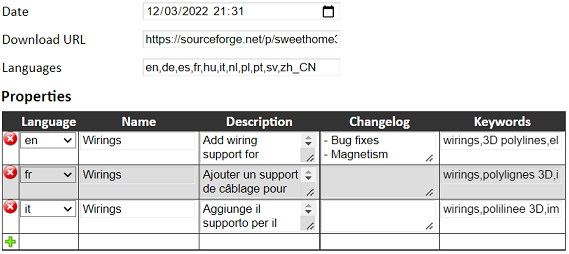
This is already implemented. Look at this picture from the developer interface:for every plugin add a list with available translations
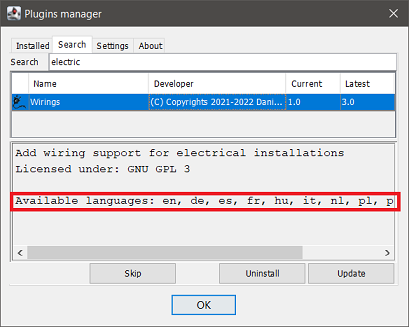
The "Languages" field is reported under the plugin description on the Plugin manager:
This is intended to inform the user about the plugin translations.
The "Languages" field must not be confused with the "Language" column, which is related to the translations shown in the Plugin manager, not the plugin itself.
The world map is plugin specific, so you have to click on a plugin name from the list to see its map. What's changed from the previous days is just the aspect of the list.the link to World Installation map point ONLY to list NOT to map like few days ago
This is a terrible mistake I made initially when I published the links. You can switch to https: https://daniels118.altervista.org/sh3d/pluginmanager/at login Firefox is complain "This connection is not secure"
I will implement a rule to automatically redirect to the secure connection.
There is already a set of rules, one of which is to have ApplicationPlugin.properties within the archive. This already excludes archive which contain in turn a sh3p file (dist) and a zip file (src), but I didn't manage sh3p+plain src folder.RotateHomePlugin.sh3p is inside of a zip archive in dist folder.
You have earned the bug reporter badge! [:D]
I will add the rule to avoid this case, however this means this plugin will leave the Plugin manager, unless we upload the sh3p file separately. I have to contact the plugin's author to ask him to fix the deliverable; only if I won't get any reply in a reasonable amount of time, I will upload the sh3p file by myself.
This is a good idea, but I won't implement it as a requirement, it will be mostly a guideline: I don't want to impose my rules beyond the ones provided by SH3D, unless they became part of SH3D itself (I don't like de facto standards).- some rules about license files and README file(s).
- maybe to include also a CHANGE LOG file which could be translated
Re: Plugins manager
This are usually happens when I typing before I think.
With aid Your explanations it work ALL. It remind me what I've done few days ago (age???)
I'm totally agree with "guideline" in place of "rules".
I don't think is necessarily.
Unfortunately, BEFORE read Your answer, I've already repack and upload "AS IS" on Source Forge.
Now I wait the owner reaction (I hope he doesn't beat me).
With aid Your explanations it work ALL. It remind me what I've done few days ago (age???)
I'm totally agree with "guideline" in place of "rules".
I could add a "update all" or "update selected" button in a future release
I don't think is necessarily.
this means this plugin will leave the Plugin manager, unless we upload the sh3p file separately
Unfortunately, BEFORE read Your answer, I've already repack and upload "AS IS" on Source Forge.
Now I wait the owner reaction (I hope he doesn't beat me).
A computer program does what you tell it to do, not what you want it to do. Murphy's Law
When all else fails, read the instructions. Murphy's Law
If you don't like "AS IS", DIY. Dorin's law
When all else fails, read the instructions. Murphy's Law
If you don't like "AS IS", DIY. Dorin's law
-
Daniels118
- Posts: 503
- Joined: Wed Nov 17, 2021 9:04 pm
- Country: Italy
Re: Plugins manager
I've sent a private message to Michel MBEM to ask him if he wishes to upgrade his plugin or he agree with a change in ownership, so that we can continue his work.
I would wait at least for 2 weeks before going on.
I would wait at least for 2 weeks before going on.
-
Daniels118
- Posts: 503
- Joined: Wed Nov 17, 2021 9:04 pm
- Country: Italy
Re: Plugins manager
Version 1.2 released!
Changelog:
Updating to this version will also help to manage alpha and beta releases of other plugins.
Enjoy! [:)]
Changelog:
- Implemented warning when installing beta versions
- Implemented the capability to install old versions
- Implemented HTML support for plugins descriptions and changelogs
- Implemented localized language names in plugins descriptions
- Added an icon to the menu entry
- Fixed a bug occurring when a modal message is displayed at startup
- Fixed codepage in "about" tab
- Fixed properties fallback to default language
- The Plugin manager can be opened even if the updates download fails
- Added Norwegian translation
Updating to this version will also help to manage alpha and beta releases of other plugins.
Enjoy! [:)]
Re: Plugins manager
The new Simplified Chinese versions of the 30 plug-ins I translated are here
Transfer link:https://cowtransfer.com/s/28d3ac9ca70c4e passphrase: acxy1d
Transfer link:https://cowtransfer.com/s/28d3ac9ca70c4e passphrase: acxy1d
Re: Plugins manager
The Simplified Chinese versions of the ExportPlanImage-1.0 plug-ins
Transfer link:https://cowtransfer.com/s/66b390c58db840 passphrase: ko369j
Transfer link:https://cowtransfer.com/s/66b390c58db840 passphrase: ko369j
Who is online
Users browsing this forum: No registered users and 1 guest