
Here's a first beta version of Sweet Home 3D 7.0.
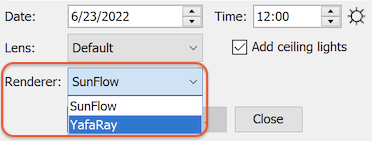
This new version includes YafaRay rendering engine which you can activate with the new Renderer dropdown list shown in photo and video creation dialog boxes (which can be resized now). The default engine remains SunFlow at the moment but this might change in the future if the YafaRay is a fully stable solution.
It includes also the following features:
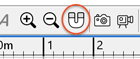
- Magnetism can be activated and deactivated with a button in the toolbar (this button won't appear on small screens).
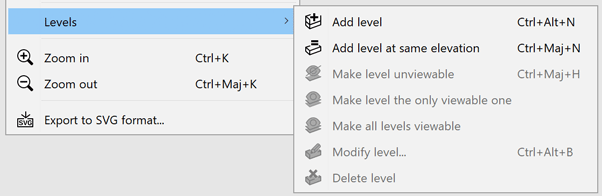
- Plan menu items handling levels were moved to the Levels sub menu to reduce the length of this menu:
- The virtual visitor is represented with a camera symbol at a fixed size in the plan when the default virtual visitor gets too small.

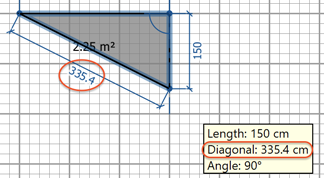
- It's possible to enter the diagonal value for the current point in the room creation tool tip to be able to draw rooms by triangulation:

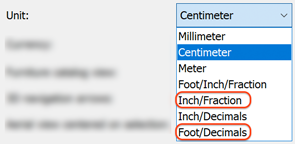
- Inch/Fraction and Foot/Decimals units were added to preferences pane. Inch/Fraction displays lengths in inches followed by the closest eighth inch fraction and Foot/Decimals unit displays lengths in feet followed by decimals of a foot.
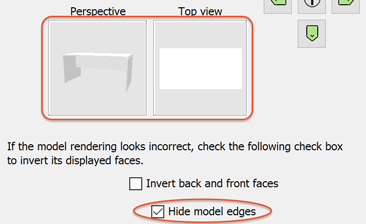
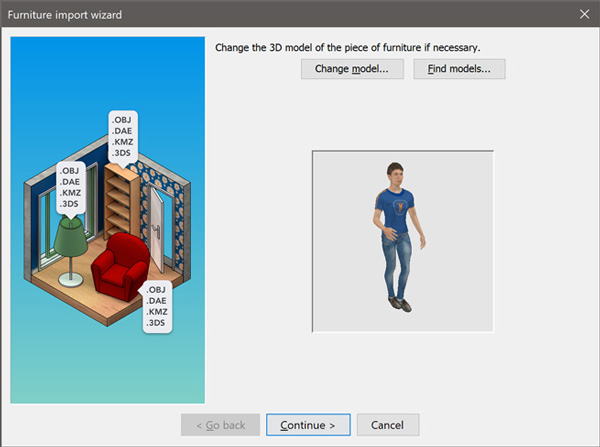
- The Hide model edges check box was added to the second step of the Furniture import wizard to hide easily edges of DAE files available at Trimble warehouse (this option is visible only for 3D models with material names starting with [font=courier new]edge_color[/font]). The following screenshots show the difference when this new option is actived or deactivated.

- The last step of the Furniture import wizard lets you now zoom and rotate the model around two axes to get a nicer icon of the imported model.
- It's now possible to select a material directly in the 3D preview in Material modification dialog box. If you want to select more materials just press the Crtl key (cmd key under macOS) while clicking in the 3D preview.
- A mirror of the background image is copied at the bottom of the horizon to avoid a dark line in rendered images.
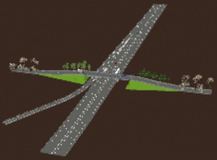
- The size of frustrum of the 3D view was again modified to set the front clip distance according to the point of view elevation and improve the rendering of very large scenes seen from a high point of view, like the 2 following screenshots comparing the 3D view of a highway scene displayed with version 6.6 and version 7.0.

- The size of dividers between the 4 Sweet Home 3D panes was increased under Windows to make their one touch size buttons more usable.
- The [font=courier new]com.eteks.sweethome3d.checkUpdates[/font] System property was added to the application. When set to false, this property removes from Sweet Home 3D the ability to check updates availability, and this is the case when [font=courier new]/checkUpdatesDisabled [/font] installer argument is added to the command line of Windows installer, as requested by Sand0411.
- Years after years, users keep reporting some issues about some weird triangles which appear in the 3D view (like in bugs #505 or #1095). As you may know, this issue comes from the fact that Sweet Home 3D tries to compute a sloping ceiling for rooms at the last level, as soon as they are surrounded with walls of different heights.
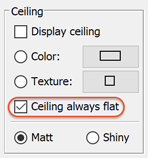
To avoid this behavior (which doesn't work so well anyway), the Ceiling always flat check box was added to the room modification dialog box to prevent Sweet Home 3D from trying to compute such slopping ceilings. By default, any new room will have this option checked, i.e. the elevation of their ceiling will be located at the highest wall at the last level. If you want to try the slopping ceiling, just uncheck it.
- New prefixes were added to 3D model shapes to specify the possible moves of shapes relative to other moving shapes.
Following the conventions added in version 6.0, naming sub shapes able to translate or rotate according to other moving shapes follows this rule:
Like in previous versions of Sweet Home 3D, the name of rail, hinge and ball shapes should be prefixed with [font=courier new]sweethome3d_rail_[/font], [font=courier new]sweethome3d_hinge_[/font] and [font=courier new]sweethome3d_ball_[/font] followed by an index number starting from 1 (and followed by whatever text your want).
If they are attached to another shape you should add the separator [font=courier new]_and_[/font] + the prefix used for moving shapes [font=courier new]sweethome3d_opening_on_rail_[/font], [font=courier new]sweethome3d_opening_on_hinge_[/font] or [font=courier new]sweethome3d_arm_on_ball_[/font] followed by the index number of that shape.
For example, [font=courier new]sweethome3d_ball_1_and_sweethome3d_opening_on_hinge_1[/font] or [font=courier new]sweethome3d_ball_1_description_and_sweethome3d_opening_on_hinge_1[/font] should be used to attach the ball numbered 1 to the hinge numbered 1.
The MultiAxesTest 3D model attached to this message demonstrates this new feature.

There's no limit in the depth of the shapes tree you may build with this rule. For example, you can build the model of a flexible hose with ten segments or more if you have the patience to design it.
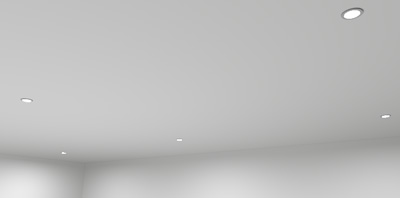
- The [font=courier new]lightSourceMaterialName#[/font] property was added to [font=courier new]PluginFurnitureCatalog.properties[/font] of SH3F furniture libraries to define the material(s) of shapes which should be used in a 3D model as light sources at the two best quality rendering levels, for example to define a light panel or a ceiling mini spot with a thin light surface.
The default power of such light sources depends on the brightness of their color and their surface. To be able to compare their power with existing light sources, the power of a 10 cm wide sphere used as a light source will be the same as a white light source which is initially set to 10 cm diameter in Sweet Home 3D default catalog.
As a shape used as a light source may have a very large surface, you may have to enter a small Power value in its furniture modification dialog box to make it usable, the reason why you may enter a decimal value in Power spinner now.
The color of this kind of light source will come from the default color of its material (for example, using [font=courier new]Kd[/font] parameter in a MTL file) or the color set by the user in Sweet Home 3D furniture or marterials dialog boxes. If this material is set as fully transparent (for example, using [font=courier new]d 0[/font] parameter in a MTL file), the shape(s) using this material will emit some light in the rendered scene but won't be visible in the rendering.
Note also that the shapes used as light sources are note double faced, and if you want the both sides of a shape to emit some light, its 3D model should define both faces (generally with vertices cited in reverse order for the opposite face).
To help you start with this new feature, I created the furniture library LightShapes.sh3f with 5 different kinds of light shapes: a double faced Light panel, a one faced Invisible light panel (but visible in the 3D view when selected), an Invisible light sphere equivalent to default catalog light source (but this one will emit the color you will choose in its modification dialog box), an Invisible inward light half sphere which may be used to light a scene with soft shadows, and a mini spot as seen in previous screenshot.
You may also experiment this feature on an existing SH3D file, by editing its [font=courier new]Home.xml[/font] file and adding [font=courier new]lightSourceMaterial[/font] child element(s) to [font=courier new]light[/font] elements to specify the material name(s) used as light source(s), for example:
Code: Select all
<light ...>
  <lightSourceMaterial name='fluorescent_tube'/>
</light>You may even transform a piece of furniture into a light by renaming its [font=courier new]pieceOfFurniture[/font] element as [font=courier new]light[/font] and adding a [font=courier new]lightSourceMaterial[/font] child element to it (don't forget the [font=courier new]</light>[/font] closing tag if necessary).
- Finally, this new version fixes also many bugs among which room floors and ceilings drawing order and too small fonts under Windows 11 HiDPI.
Thanks to Enkonyito for programming a first version of light panels in his plug-in. His use of mesh lights in SunFlow and YafaRay was helpful to start implementing this feature in Sweet Home 3D [:)]
Hope to read your feedback soon...
[Note from developer: Sweet Home 3D 7.0 was released on July 13, 2022]



 ]
]