Hello, community!
Can you tell me how to draw a semi-circular wall? I mean semicircular from above, that is, the top edge is curved upwards, not parallel to the bottom.
How to draw just a curved or round wall, I have seen many youtube videos. But I have not found a solution to my problem.
P.S. By the way, the second question would be how to make a semi-circular roof on this wall!
 how to draw curved upwards wall?
This topic has been viewed 3128 times and has 4 replies
-
Daniels118

- Posts: 503
- Joined: Wed Nov 17, 2021 9:04 pm
- Country: Italy
Re: how to draw curved upwards wall?
Do you mean something like this?
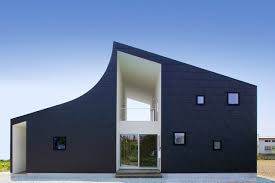

Re: how to draw curved upwards wall?
Or maybe like the roof in this thread?
Emmanuel Puybaret, Sweet Home 3D creator

Re: how to draw curved upwards wall?
Workaround:
- draw a straight wall (doesn't work with curved wall)
- import a cylinder and mark it as Door/Window
- insert the cylinder in the wall at the correct elevation and size
- make the cylinder invisible (cutout will remain)
image

Notes
- SH3D can make a curved/round/oval cut-out in a straight wall; in a curved wall the curved part will be circumscribed by a rectangular box
- most/many cylinders/circles are described as a set of straight lines; for a good result you need a cylinder that is composed of many small parts (or even a real circle); (see image for curve with angles)
H
- draw a straight wall (doesn't work with curved wall)
- import a cylinder and mark it as Door/Window
- insert the cylinder in the wall at the correct elevation and size
- make the cylinder invisible (cutout will remain)
image
Notes
- SH3D can make a curved/round/oval cut-out in a straight wall; in a curved wall the curved part will be circumscribed by a rectangular box
- most/many cylinders/circles are described as a set of straight lines; for a good result you need a cylinder that is composed of many small parts (or even a real circle); (see image for curve with angles)
H
-
Daniels118
- Posts: 503
- Joined: Wed Nov 17, 2021 9:04 pm
- Country: Italy
Re: how to draw curved upwards wall?
Hi Hans & Emmanuel,
I've found that when 2 windows bounding boxes overlap, only one window is taken into account to cut the wall within the intersection region. Is there any simple workaround for this? Or, are there plans to merge the cutout shapes when they overlaps?
Here the green shape is used to cut the wall with the roof shape, and the buggy window is in red:

The dimension lines are there just to line out the bounding box of the green shape.
I've found that when 2 windows bounding boxes overlap, only one window is taken into account to cut the wall within the intersection region. Is there any simple workaround for this? Or, are there plans to merge the cutout shapes when they overlaps?
Here the green shape is used to cut the wall with the roof shape, and the buggy window is in red:
The dimension lines are there just to line out the bounding box of the green shape.
Who is online
Users browsing this forum: No registered users and 1 guest