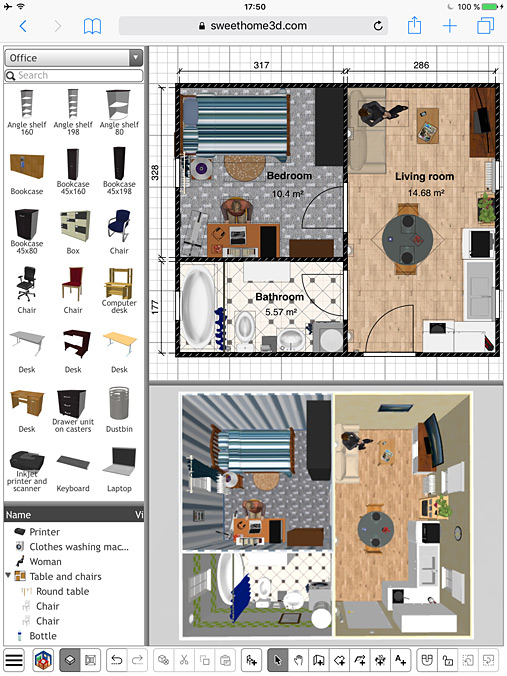
Here are the instructions you can use to add more furniture to the Online version.
First, gather the additional 3D models you want in a SH3F file with the
Furniture Library Editor. Let's say you called it
additionalLibrary.sh3f.
Then you should use the
PropertiesToJson tool included in
SweetHome3DJS source code to convert .properties files to their equivalent .json files and extract 3D model and icon files:
- Compile the [font=courier new]com.eteks.sweethome3d.json.PropertiesToJson[/font] class in
SweetHome3DJS root folder with the following command:
Code: Select all
javac -cp tools/json/lib/json-20190722.jar -d tools/json/src tools/json/src/com/eteks/sweethome3d/json/PropertiesToJson.java
- In the same folder, run
PropertiesToJson with the following command (in one line):
Code: Select all
java -cp tools/json/lib/json-20190722.jar:tools/json/src com.eteks.sweethome3d.json.PropertiesToJson
/path/to/the/folder/where/is/stored/additionalLibrary
additionalLibrary.sh3f
/path/to/apache-tomcat-folder/webapps/SweetHome3DJS-7.1/lib/resources
additionalLibrary
/path/to/apache-tomcat-folder/webapps/SweetHome3DJS-7.1/lib/resources/models/additionalLibrary
lib/resources/models/additionalLibrary
true
requires the 7 following arguments:
1. the folder where you stored [font=courier new]additionalLibrary.sh3f[/font]
2. [font=courier new]additionalLibrary.sh3f[/font], the furniture library file to convert
3. the output folder where the .json files will be saved (if you used Tomcat to test the war file, it should be the subfolder [font=courier new]webapps/SweetHome3DJS-7.1/lib/resources[/font] of Tomcat installation folder, but this could be also the subfolder [font=courier new]deploy/lib/resources[/font] of
SweetHome3DJS root folder).
4. [font=courier new]additionalLibrary[/font], the base name of the .json files
5. the folder where 3D models and icons will extracted (I recommend to use a subfolder to avoid conflicts with some other libraries stored in [font=courier new]models[/font])
6. the path of the 3D models and icons relative to [font=courier new]index.jsp[/font] (the folder where 3D models can be found from the [font=courier new]furnitureResourcesURLBase[/font] property added to [font=courier new]index.jsp[/font] in the following instructions)
7. true (it indicates that 3D models and icons should be extracted, using [font=courier new]false[/font] won't extract them)
For example, if you try with [font=courier new]BlendSwap-CC-0.sh3f[/font] available
here saved in SweetHome3DJS root folder and Tomcat installation folder in [font=courier new]/Applications/apache-tomcat-9.0.41[/font], you'll get the following command:
Code: Select all
java -cp tools/json/lib/json-20190722.jar:tools/json/src com.eteks.sweethome3d.json.PropertiesToJson . BlendSwap-CC-0.sh3f /Applications/apache-tomcat-9.0.41/webapps/SweetHome3DJS-7.1/lib/resources BlendSwap-CC-0 /Applications/apache-tomcat-9.0.41/webapps/SweetHome3DJS-7.1/lib/resources/models/BlendSwap-CC-0 lib/resources/models/BlendSwap-CC-0 true
Once, your .json, 3D models and icons files are ready, you'll have to tell the Online version to take them into account with the two following changes:
- around the end of [font=courier new]index.jsp[/font], add [font=courier new]furnitureCatalogURLs[/font] and [font=courier new]furnitureResourcesURLBase[/font] properties to JavaScript [font=courier new]application[/font] configuration, to specify the list of furniture catalogs and the base URL for their 3D models and icons.
For example, the beginning of [font=courier new]application[/font] declaration:
Code: Select all
var application = new SweetHome3DJSApplication(
    {readHomeURL: urlBase + "/readHome.jsp?home=%s",
should become:
Code: Select all
var application = new SweetHome3DJSApplication(
    {furnitureCatalogURLs: [urlBase + "/lib/resources/DefaultFurnitureCatalog.json",
                            urlBase + "/lib/resources/additionalLibrary.json"],
     furnitureResourcesURLBase: urlBase + "/",
     readHomeURL: urlBase + "/readHome.jsp?home=%s",
And if you try with BlendSwap-CC-0 library, it will become:
Code: Select all
var application = new SweetHome3DJSApplication(
    {furnitureCatalogURLs: [urlBase + "/lib/resources/DefaultFurnitureCatalog.json",
                            urlBase + "/lib/resources/BlendSwap-CC-0.json"],
     furnitureResourcesURLBase: urlBase + "/",
     readHomeURL: urlBase + "/readHome.jsp?home=%s",
(citing [font=courier new]DefaultFurnitureCatalog.json[/font] isn't mandatory if you don't want to keep the default library).
- The additional library managed by user preferences in [font=courier new]writeHomeEdits.jsp[/font] should be added in the declaration of [font=courier new]serverUserPreferences[/font] instance.
Therefore, the following declaration:
Code: Select all
serverUserPreferences = new ServerUserPreferences(
    new URL [] {new URL(serverBaseUrl, "lib/resources/DefaultFurnitureCatalog.json")}, serverBaseUrl,
    new URL [] {new URL(serverBaseUrl, "lib/resources/DefaultTexturesCatalog.json")}, serverBaseUrl);
should become:
Code: Select all
serverUserPreferences = new ServerUserPreferences(
    new URL [] {new URL(serverBaseUrl, "lib/resources/DefaultFurnitureCatalog.json"),
                new URL(serverBaseUrl, "lib/resources/additionalLibrary.json")}, serverBaseUrl,
    new URL [] {new URL(serverBaseUrl, "lib/resources/DefaultTexturesCatalog.json")}, serverBaseUrl);
And for BlendSwap-CC-0 library, it will become:
Code: Select all
serverUserPreferences = new ServerUserPreferences(
    new URL [] {new URL(serverBaseUrl, "lib/resources/DefaultFurnitureCatalog.json"),
                new URL(serverBaseUrl, "lib/resources/BlendSwap-CC-0.json")}, serverBaseUrl,
    new URL [] {new URL(serverBaseUrl, "lib/resources/DefaultTexturesCatalog.json")}, serverBaseUrl);
Hope you can handle it.
There are other way to generate .json files without a SH3F file, but it depends on your furniture library configuration.