Sweet Home 3D JS Online

This topic has been viewed 846923 times and has 51 replies
Thread status: Active
Test the features and bug fixes of future versions [img]http://www.sweethome3d.com/images/flags/en_small.gif[/img]
User avatar
Puybaret
Posts: 9440
Joined: Mon Nov 07, 2005 12:00 pm
Country: Paris, France
Contact:

Re: Sweet Home 3D JS Online

Post by Puybaret »

I forgot to mention textures libraries. Actually, it works more or less the same with SH3T files and the two additional [font=courier new]texturesCatalogURLs[/font] / [font=courier new]texturesResourcesURLBase[/font] to configure [font=courier new]application[/font] JavaScript variable in [font=courier new]index.jsp[/font].

For example, if you try with [font=courier new]Contributions.sh3t[/font] available here saved in SweetHome3DJS root folder and Tomcat installation folder in [font=courier new]/Applications/apache-tomcat-9.0.41[/font], the following PropertiesToJson command will extract .json and texture image files :

Code: Select all

java -cp tools/json/lib/json-20190722.jar:tools/json/src com.eteks.sweethome3d.json.PropertiesToJson . Contributions.sh3t /Applications/apache-tomcat-9.0.41/webapps/SweetHome3DJS-7.1/lib/resources Contributions /Applications/apache-tomcat-9.0.41/webapps/SweetHome3DJS-7.1/lib/resources/textures/Contributions lib/resources/textures/Contributions true
Comparing with the PropertiesToJson command previously used for furniture libraries, you just need to change file and folder names.

Then, adding the Contributions library to the configuration of JavaScript [font=courier new]application[/font] in [font=courier new]index.jsp[/font] will give:

Code: Select all

var application = new SweetHome3DJSApplication(
    {furnitureCatalogURLs: [urlBase + "/lib/resources/DefaultFurnitureCatalog.json", 
                            urlBase + "/lib/resources/BlendSwap-CC-0.json"],
     furnitureResourcesURLBase: urlBase + "/",
     texturesCatalogURLs: [urlBase + "/lib/resources/DefaultTexturesCatalog.json", 
                           urlBase + "/lib/resources/Contributions.json"],
     texturesResourcesURLBase: urlBase + "/",
     readHomeURL: urlBase + "/readHome.jsp?home=%s",
and adding it to the textures libraries managed by user preferences in [font=courier new]writeHomeEdits.jsp[/font] will lead to the following declaration:

Code: Select all

serverUserPreferences = new ServerUserPreferences(
    new URL [] {new URL(serverBaseUrl, "lib/resources/DefaultFurnitureCatalog.json"), 
                new URL(serverBaseUrl, "lib/resources/BlendSwap-CC-0.json")}, serverBaseUrl,
    new URL [] {new URL(serverBaseUrl, "lib/resources/DefaultTexturesCatalog.json"),
                new URL(serverBaseUrl, "lib/resources/Contributions.json")}, serverBaseUrl);
Good luck!
Emmanuel Puybaret, Sweet Home 3D creator
son87a
Posts: 12
Joined: Thu Oct 28, 2021 7:35 am

Re: Sweet Home 3D JS Online

Post by son87a »

I see the model file can be in zip format, I thought it is possible to add a password to zip the file to protect my proprietary model files? Do you have any suggestions?
User avatar
Puybaret
Posts: 9440
Joined: Mon Nov 07, 2005 12:00 pm
Country: Paris, France
Contact:

Re: Sweet Home 3D JS Online

Post by Puybaret »

You could grant the right to download 3D model zip files only to some identified people.
If needed, the URLs in furniture libraries can be more complex URLs which call a service on the server, similarly to the service specified by [font=courier new]readResourceURL[/font] property in [font=courier new]application[/font] configuration on the Online version of this server. It uses the JSP page [font=courier new]readResource.jsp?path=xxx[/font] to ensure that only a given user can access to the resources he imported.
Emmanuel Puybaret, Sweet Home 3D creator
User avatar
Puybaret
Posts: 9440
Joined: Mon Nov 07, 2005 12:00 pm
Country: Paris, France
Contact:

Re: Sweet Home 3D JS Online

Post by Puybaret »

And about protecting your model file with a password, this is not possible because JSZip doesn't support this feature yet, and even when it will be supported, Sweet Home 3D JS would need that password to decode the model files.
Therefore, the password would have to be available somewhere in the configuration of Sweet Home 3D JS, making it also available to anyone wanting to find it.
Emmanuel Puybaret, Sweet Home 3D creator
User avatar
Puybaret
Posts: 9440
Joined: Mon Nov 07, 2005 12:00 pm
Country: Paris, France
Contact:

Re: Sweet Home 3D JS Online

Post by Puybaret »

Hello,

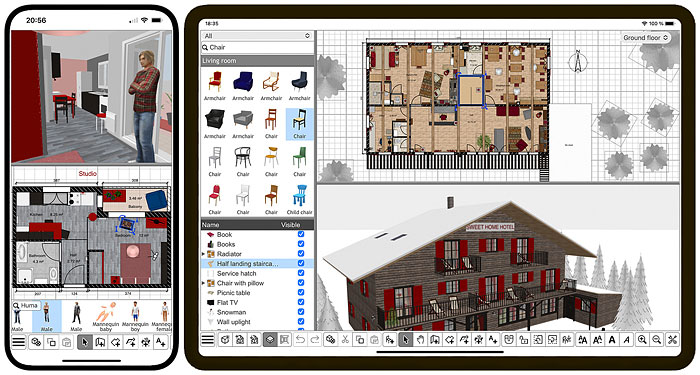
I’m happy to announce that I just released two new apps based on Sweet Home 3D JS, one for iOS and the other for Android.
As explained in this article, these apps don’t require a connection to Internet to work and are able to import and export SH3D / SH3X files to share your designs on another smartphone, tablet or computer where Sweet Home 3D is installed or within a browser running Sweet Home 3D Online.

Image

These apps are not free but remain based on the free version of Sweet Home 3D JS that I improved with the following features:
- A new About dialog box was added and replaces the status bar in the Online version.
- Sweet Home 3D JS now includes some new APIs to store home data using IndexedDB storage with auto recovery management.
- Drag and drop support was added to images import process of the Online version.
- Panes in Online version under tablets are now arranged the same way as in desktop version.
- Application "sandwich" menu of the Online version is displayed in a separate div to ensure it's always visible in the toolbar.
- Sort and Display column menus were added on tablets.
- Combo boxes closing was fixed.
- The last touched point is now used as the final point when wall, room, polyline and dimension creation tools are used and the user clicks on another tool.
- Keeping the finger on a button of the 3D navigation panel on touch device now repeats rotation or zoom.

All these changes were released in Sweet Home 3D JS 7.1.2, still based on Sweet Home 3D 7.1 and can be tested in Sweet Home 3D Online which was updated too.

Hope you'll like this new version [:)]
Emmanuel Puybaret, Sweet Home 3D creator
JonnyD
Posts: 36
Joined: Sat Jun 01, 2019 2:58 pm

Re: Sweet Home 3D JS Online

Post by JonnyD »

I’ve just bought it 😁
User avatar
Puybaret
Posts: 9440
Joined: Mon Nov 07, 2005 12:00 pm
Country: Paris, France
Contact:

Re: Sweet Home 3D JS Online

Post by Puybaret »

Thanks JonnyD. Hope you’ll like it and find it useful!
Emmanuel Puybaret, Sweet Home 3D creator
Paul6552
Posts: 2
Joined: Wed Nov 02, 2022 10:25 am
Country: Österreich

Re: Sweet Home 3D JS Online

Post by Paul6552 »

This is wonderful software. Thanks for that. Although I dont need the app, I'm going to buy the app today to give you some support!

Why are you actually developing two programs? Once as an installation and once on the web?

Isn't it incredibly time-consuming to maintain/develop two things?

Is the project somewhere on Github? I'm a Javascript / React developer myself and maybe I can contribute something.
User avatar
Puybaret
Posts: 9440
Joined: Mon Nov 07, 2005 12:00 pm
Country: Paris, France
Contact:

Re: Sweet Home 3D JS Online

Post by Puybaret »

Thank you Paul.

The two JS solutions don't provide the same way to save files: the Online version saves your design on sweethome3d.com server, whereas the App stores applications save them in local files (IndexedDB or plain files) without the need of a connection to Internet and registration.

This takes some time to develop these solutions, but this was interesting to develop and the App stores sales bring some revenues which help me to spend more time on improving and maintaining Sweet Home 3D.

The project isn't on GitHub, but on SourceForge.
Emmanuel Puybaret, Sweet Home 3D creator
TwistedLincoln
Posts: 29
Joined: Tue Jan 18, 2011 3:11 pm
Contact:

Re: Sweet Home 3D JS Online

Post by TwistedLincoln »

Recently after a server reboot, the JS applet no longer saves changes to the home. Instead every time it's loaded it reverts to the state it was before the reboot. Everything else on the Tomcat server works fine. I checked the file permissions on the .sh3d file and they are correct.

Any idea what might be going on or where I should start looking? This hasn't happened before in the many months I've had this install running, so I'm not sure what could have changed.
Post Reply New Topic

Who is online

Users browsing this forum: No registered users and 1 guest