Currently, one can choose between displaying measurements as feet, or inches, but not at the same time. It would be very handy to have the ability to also show both, such as: 12'5" (149").
That would allow working easily with both large items (such as drawing walls) and resizing furniture (which usually requires inch-level precision) without having to switch back and forth in the preferences menu.
Option to show multiple units of measurement at the same time
This topic has been viewed 16840 times and has 11 replies
-
TwistedLincoln
- Posts: 29
- Joined: Tue Jan 18, 2011 3:11 pm
- Contact:

Re: Option to show multiple units of measurement at the same time
From the point of view of a guy born under the metric system, it feels like you want the decimal system but can't get rid of Imperial system habits! [;)]
The preferences already propose two Imperial system notations. I think you should choose Inch/Decimals unit.
The preferences already propose two Imperial system notations. I think you should choose Inch/Decimals unit.
Emmanuel Puybaret, Sweet Home 3D creator
-
TwistedLincoln
- Posts: 29
- Joined: Tue Jan 18, 2011 3:11 pm
- Contact:
Re: Option to show multiple units of measurement at the same time
You are absolutely correct -- and as you suggest the Inch/Decimals unit is mostly what I've been using. Unfortunately, the Imperial system requires more than just moving the decimal point to convert between units, and dividing large numbers by 12 isn't something I can do quickly in my head. [;)]
-
TwistedLincoln
- Posts: 29
- Joined: Tue Jan 18, 2011 3:11 pm
- Contact:
Re: Option to show multiple units of measurement at the same time
Just wondering if you may be willing to reconsider adding this option. In the nearly 8 years since my post I've found myself switching between units countless times...
Re: Option to show multiple units of measurement at the same time
This would be great, for some dimensions I appreciate the specificity of inches but for others, I would rather see feet. Thanks!

Re: Option to show multiple units of measurement at the same time
I leave in a metric world converted from imperial system.
Mostly with an unacceptable large tolerance.
Especially on architecture, buildings supplies or furniture.
Sometimes it's easier (even for me) to set some lengths in inches then switch to metric.
Some examples:
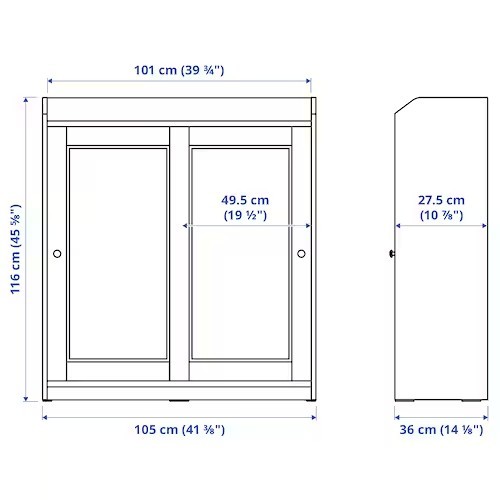
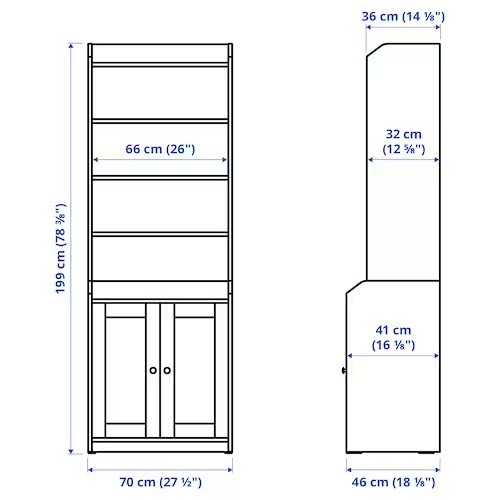
As you can see the approximations it is very large compared with reality.
36 cm (14 1/8") in reality is 35.8775 cm or at least 35.9 cm
70 cm (27 1/2") in reality is 69.85 cm and so on.
Considering this my suggestion (wish) is:
1. In Preferences to have the option to set a secondary measurement unit.
So, to have a primary and a secondary measurement.
2. Option to show in plan only the primary or both.
I think this more general approach could satisfy more users around the world.
Mostly with an unacceptable large tolerance.
Especially on architecture, buildings supplies or furniture.
Sometimes it's easier (even for me) to set some lengths in inches then switch to metric.
Some examples:
As you can see the approximations it is very large compared with reality.
36 cm (14 1/8") in reality is 35.8775 cm or at least 35.9 cm
70 cm (27 1/2") in reality is 69.85 cm and so on.
Considering this my suggestion (wish) is:
1. In Preferences to have the option to set a secondary measurement unit.
So, to have a primary and a secondary measurement.
2. Option to show in plan only the primary or both.
I think this more general approach could satisfy more users around the world.
A computer program does what you tell it to do, not what you want it to do. Murphy's Law
When all else fails, read the instructions. Murphy's Law
If you don't like "AS IS", DIY. Dorin's law
When all else fails, read the instructions. Murphy's Law
If you don't like "AS IS", DIY. Dorin's law

Re: Option to show multiple units of measurement at the same time
And that's why you shouldn't mix the two systems. They simply are not compatible and conversion from one to the other will always remain an approximation. An approximation that's rough in Sweet Home 3D because it's smallest unit unfortunately is 1mm where you really need at least three digits after the decimal point to stay somewhat accurate.As you can see the approximations it is very large compared with reality.
36 cm (14 1/8") in reality is 35.8775 cm or at least 35.9 cm
70 cm (27 1/2") in reality is 69.85 cm and so on.
Starting with a new project it should be no problem to choose one of the systems. If you need to create a model with the other system do that in a separate project and export it. Then import it in your main project. Problem solved.
Dodecagon.nl
1300+ 3D models, manuals, and projects
1300+ 3D models, manuals, and projects
Re: Option to show multiple units of measurement at the same time
I don't think so!Problem solved.
The SH3D accuracy (0.1 cm visually 0.01 cm on computations) it is more than enough for build something.
Example: When I need to set a bricks wall length, high and thickness and to have the correct (approximately) numbers of needed bricks it is not so simple in metric system wile the bricks are (and it is) made in imperials.
I've encountered this problem especially when I've need to reproduce old buildings.
Also the furniture parts and the furniture it self are made under imperial system. I checked with the roulette and the caliper.
To made a home entirely in an unit system which it is not familiar to me and then change the unit measurement it is not an option.
Not all the objects in the plan are made in imperials.
If I could have both on my eyes I could be more productive.
A computer program does what you tell it to do, not what you want it to do. Murphy's Law
When all else fails, read the instructions. Murphy's Law
If you don't like "AS IS", DIY. Dorin's law
When all else fails, read the instructions. Murphy's Law
If you don't like "AS IS", DIY. Dorin's law
Re: Option to show multiple units of measurement at the same time
The main problem is that Sweet Home 3D (and any other application) can only work with one system at a time. So for your Old Building project set imperial in the preferences before you start/open the project. The models created in the metric system still work but it's measurements are displayed in imperial.
Since you started the project for the Old Building in imperial, do you still need some models to be presented in metric? Why?
By-the-way: objects are ALWAYS exported to an .obj file in metric. You can check that by exporting the same object once with the imperial and once with the metric system.
Since you started the project for the Old Building in imperial, do you still need some models to be presented in metric? Why?
By-the-way: objects are ALWAYS exported to an .obj file in metric. You can check that by exporting the same object once with the imperial and once with the metric system.
Dodecagon.nl
1300+ 3D models, manuals, and projects
1300+ 3D models, manuals, and projects
Re: Option to show multiple units of measurement at the same time
was build in and with imperials.Old Building
Now I have to measure and redraw all in meters.
I have to improvise and understand how my ancestors do this.
Because the new plans made by me have to be in metric system.do you still need some models to be presented in metric? Why?
Not all around me know what mean 1" or 2 3/8".
The plans has to be populated with the exiting furniture.
I have to represent it in metric system even if them are build under imperials (like I K E A furniture in the pictures).
Of course but I talk about the REAL objects not the virtual ones which have to be represented in plan.objects are ALWAYS exported to an .obj file in metric
SH3D work always ONLY in cm.Sweet Home 3D (and any other application) can only work with one system at a time
What we see in plan are transformations of cm in different measurement unit.
I think it is not a problem to see two (in bracket) in place of one.
A computer program does what you tell it to do, not what you want it to do. Murphy's Law
When all else fails, read the instructions. Murphy's Law
If you don't like "AS IS", DIY. Dorin's law
When all else fails, read the instructions. Murphy's Law
If you don't like "AS IS", DIY. Dorin's law
Who is online
Users browsing this forum: No registered users and 1 guest