was the virtual visitor long description showing because a semicolon had been missed, separating the code description from the code?
It's just a misplaced end of line delimiter in
the resource file that gives the menu names displayed in English.
One thing that may put people off testing the new version, this warning always shows (unless the 'Always trust...' box is ticked) with both the web start version and the DirectX version on Windows 7.
This security dialog is displayed for any Java Web Start version of Sweet Home 3D and for the
online version too.
In a way, it's not normal that the installer versions under Windows and Linux don't display such a dialog, because the user should always be warned about the risks of launching a program able to write on the disk, run DLLs...
The only improvement I can do in this dialog is about the "cannot be verified" text: if I buy a Java Code Signing Certificate, it will say "has been verified", but this certificate
costs at least 200 $/year! Not sure it's worth it for a free program... [:(]
What are yours and others thoughts on moving a couple of things?
The Preferences from the File menu to the Edit menu. (Since changing preferences is editing something, plus most other programs have preferences found on the edit menu. Will help new users if preferences are where they are used to finding it, regular users will soon adapt to the change)
My stupid answer would be "use Mac OS X"! [;)]
Under Mac OS X, they solved this problem by proposing the
Preferences item in the application menu displayed for each program. Here's the French application menu for Sweet Home 3D:
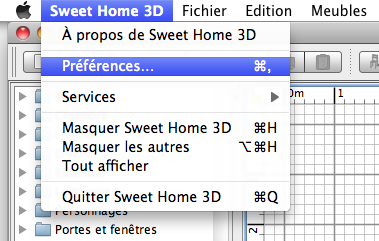
On other systems, I miserably didn't see any common rule;
Preferences are sometimes in a
Tool menu, sometimes in the
File menu, sometimes in the
Edit menu or elsewhere, and often it's named
Options and not
Preferences!
So sorry I won't move it.
Moving the Export to OBJ format... from the 3D view menu to the File menu since clicking on Export to OBJ format... always saves the full model and not just what is visible in the 3D view.
This remark is applicable to the
Export to SVG format... menu item too, and any
Export to ... format that will appear in the future. [:(]
Even if these menu items handle files, I chose to put these items in the
Plan and
3D view menus to suggest to beginners what kind of information would be exported.
Do you know about the growing Furniture catalog view: bug, causing all other windows to shrink?
I'm not aware of this problem.
Do you mean that the Furniture catalog view grows without doing anything like in the video??? When does it stop growing?