@Puybaret
As I am working on an overhaul of the public version of the PhotoVideoRendering plug-in (back to the roots of Sweet Home 3D), I am returning to a problem that dates back several years.
After changing the language in the preferences, the title of the dialog boxes is only taken into account after closing them, the menu title and the name of the plug-in actions are only taken into account after restarting the software.
Coming across this topic, I would like to know what to do for dynamic translation.
Dynamic translation of a plug-in
This topic has been viewed 8962 times and has 17 replies
Dynamic translation of a plug-in
EnkoNyito
-
Daniels118

- Posts: 503
- Joined: Wed Nov 17, 2021 9:04 pm
- Country: Italy
Re: Dynamic translation of a plug-in
Maybe Emmanuel will give a more comprehensive response, however here is mine.
Code: Select all
getUserPreferences().addPropertyChangeListener(UserPreferences.Property.LANGUAGE, new PropertyChangeListener() {
    public void propertyChange(PropertyChangeEvent evt) {
        ResourceBundle resource = ResourceBundle.getBundle("your.package.properties_file_without_extension", Locale.getDefault(), getClass().getClassLoader());
        uiElement1.setText(resource.getString("elem1_property_name"));
        uiElement2.setText(resource.getString("elem2_property_name"));
        etc. etc.
    }
})
Re: Dynamic translation of a plug-in
Yes, that's the idea, but you should rather use a separate static class for the listener to ensure the garbage collector can work correctly when you close a home (see LanguageChangeListener in PhotoRender and many other classes). The preferences instance exists during the whole life of Sweet Home 3D application, so binding to it a home object for example through an anonymous listener created in a plug-in could prevent the home object from being garbage collected.
Emmanuel Puybaret, Sweet Home 3D creator
Re: Dynamic translation of a plug-in
Thanks to both of you for the information, it works for the photo creation panel (title, components).
Based on the ResourceAction class, dynamic translation works for plug-in actions, but the menu remains unchanged despite the new value.
I could have put the plug-in actions in the existing [font=courier new]3D View[/font] menu, but I prefer to avoid doing so so that there is no confusion with the default actions of Sweet Home 3D.
Based on the ResourceAction class, dynamic translation works for plug-in actions, but the menu remains unchanged despite the new value.
Code: Select all
  public SimplePhotoRenderingAction(PhotoVideoRendering photoVideoRendering) {
    // modification start PVR-2.7
    ResourceBundle resource = ResourceBundle.getBundle("sh3dPlugin.ApplicationPlugin", Locale.getDefault(), getClass().getClassLoader());
    putPropertyValue(Property.NAME, photoVideoRendering.getUserPreferences().getLocalizedString(HomePane.class, "CREATE_PHOTO.Name")
        + " (PVR-" + photoVideoRendering.getVersion() + ")");
    putPropertyValue(Property.SHORT_DESCRIPTION, photoVideoRendering.getUserPreferences().getLocalizedString(HomePane.class, "CREATE_PHOTO.ShortDescription"));
    putPropertyValue(Property.MENU, resource.getString("SimplePhotoRenderingAction.MENU"));
    setEnabled(true);

    SimplePhotoRenderingAction.photoVideoRenderingPlugin = photoVideoRendering;

    photoVideoRendering.getUserPreferences().addPropertyChangeListener(UserPreferences.Property.LANGUAGE, new LanguageChangeListener(this));
    // modification end PVR-2.7
  }
Code: Select all
  // addition start PVR-2.7
  // Based on https://sourceforge.net/p/sweethome3d/code/8462/tree/trunk/SweetHome3D/src/com/eteks/sweethome3d/swing/ResourceAction.java#l89 (SH3D-7.1)
  /**
   * Preferences property listener bound to this action with a weak reference to avoid
   * strong link between preferences and this action.
   */
  private static class LanguageChangeListener implements PropertyChangeListener {
    private final WeakReference<SimplePhotoRenderingAction> pluginAction;
    public LanguageChangeListener(SimplePhotoRenderingAction pluginAction) {
      this.pluginAction = new WeakReference<SimplePhotoRenderingAction>(pluginAction);
    }

    public void propertyChange(PropertyChangeEvent ev) {
      // If action was garbage collected, remove this listener from preferences
      SimplePhotoRenderingAction pluginAction = this.pluginAction.get();
      if (pluginAction == null) {
         ((UserPreferences)ev.getSource()).removePropertyChangeListener(
             UserPreferences.Property.LANGUAGE, this);
      } else {
        ResourceBundle resource = ResourceBundle.getBundle("sh3dPlugin.ApplicationPlugin", Locale.getDefault(), getClass().getClassLoader());
        pluginAction.putPropertyValue(Property.NAME, ((UserPreferences)ev.getSource()).getLocalizedString(HomePane.class, "CREATE_PHOTO.Name")
            + " (PVR-" + SimplePhotoRenderingAction.photoVideoRenderingPlugin.getVersion() + ")");
        pluginAction.putPropertyValue(Property.SHORT_DESCRIPTION, ((UserPreferences)ev.getSource()).getLocalizedString(HomePane.class, "CREATE_PHOTO.ShortDescription"));
        pluginAction.putPropertyValue(Property.MENU, resource.getString("SimplePhotoRenderingAction.MENU"));
      }
    }
  }
// addition end PVR-2.7EnkoNyito
Re: Dynamic translation of a plug-in
Translation of plug-in menu items is not handled in HomePane class, they won’t change in the user interface.
Emmanuel Puybaret, Sweet Home 3D creator
-
Daniels118
- Posts: 503
- Joined: Wed Nov 17, 2021 9:04 pm
- Country: Italy
Re: Dynamic translation of a plug-in
It would be nice if the plugin wouldn't need to deal with the translation of the main menu entry, at least if one means to put it in one of the default menus.
For example, for some plugins I put entries in the Help menu, so I have to code tenths of lines such these:
Help.MENU=Help
Help.MENU=Aide
etc...
It would be nice if the program could check if the menu name matches one of the predefined menu names in English language, and, if so, put the new entry in the proper main menu regardless of the current language.
If there is no match, it must behave like now.
This behavior would be backward compatible with existing plugins, and plugin programmers shouldn't worry about finding the exact translation of the main menus in SH3D's properties files.
The program could also define additional main menu entries for common cases that would be added on demand, such as "Tools". Right now, if a user installs 2 plugins, one of which has just the English entry "Tools", and the other has both English "Tools" and French "Outils", as long the user uses SH3D in English there is no problem, but if he uses French, then the 2 plugins would generate 2 different main menus, which is very ugly. Having optional entries for common cases would solve this problem too. Moreover, being default entries, they would be translated instantly when the user changes the language, which solves the problem raised by EncoNyito, at least for common cases.
For example, for some plugins I put entries in the Help menu, so I have to code tenths of lines such these:
Help.MENU=Help
Help.MENU=Aide
etc...
It would be nice if the program could check if the menu name matches one of the predefined menu names in English language, and, if so, put the new entry in the proper main menu regardless of the current language.
If there is no match, it must behave like now.
This behavior would be backward compatible with existing plugins, and plugin programmers shouldn't worry about finding the exact translation of the main menus in SH3D's properties files.
The program could also define additional main menu entries for common cases that would be added on demand, such as "Tools". Right now, if a user installs 2 plugins, one of which has just the English entry "Tools", and the other has both English "Tools" and French "Outils", as long the user uses SH3D in English there is no problem, but if he uses French, then the 2 plugins would generate 2 different main menus, which is very ugly. Having optional entries for common cases would solve this problem too. Moreover, being default entries, they would be translated instantly when the user changes the language, which solves the problem raised by EncoNyito, at least for common cases.
Re: Dynamic translation of a plug-in
Thanks for the suggestions. I had some similar ideas to get a better presentation of menu items.
Emmanuel Puybaret, Sweet Home 3D creator
Re: Dynamic translation of a plug-in
Would this ever be possible?Translation of plug-in menu items is not handled in HomePane class, they won’t change in the user interface.
EnkoNyito
Re: Dynamic translation of a plug-in
Not sure it’s worth the effort, who changes preferences language once he chose the translation he wants?
On the other hand, adapting menu items to existing menus in the user interface would avoid this ugly languages mix in the menu bar.
Note that these requests are very recent and as far as I remember, no user ever complained of this behavior until now.
On the other hand, adapting menu items to existing menus in the user interface would avoid this ugly languages mix in the menu bar.
Note that these requests are very recent and as far as I remember, no user ever complained of this behavior until now.
Emmanuel Puybaret, Sweet Home 3D creator
-
Waldemar.Hersacher
- Posts: 61
- Joined: Sat Jan 06, 2024 8:39 am
- Country: Germany
Re: Dynamic translation of a plug-in
I noticed that also when I made German translations.
Emmanuel you are right that a normal user is not affected because he sets his language once.
Developers, translators and those who change the language for screenshots for help in the forum are affected. As enkonyito wrote it would avoid to exit SH3D each time we change the language.
BTW: Multiple instances will not help. Changing the language in one instance will also change in the other instance (only tested with Linux).
In the category view the German texts of the standard libraries will also not be removed when changing to English. With imported libraries this will happen.
German:
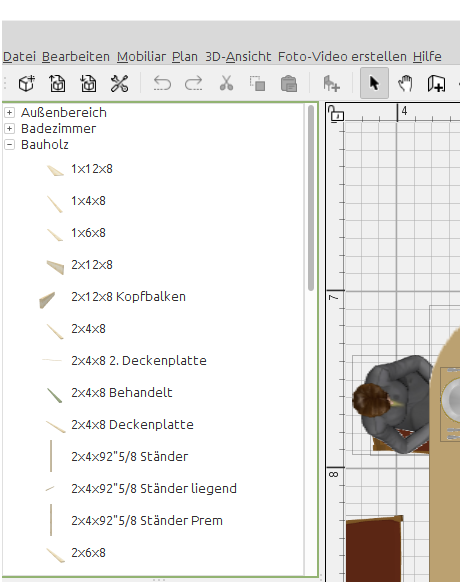
After changing to English:
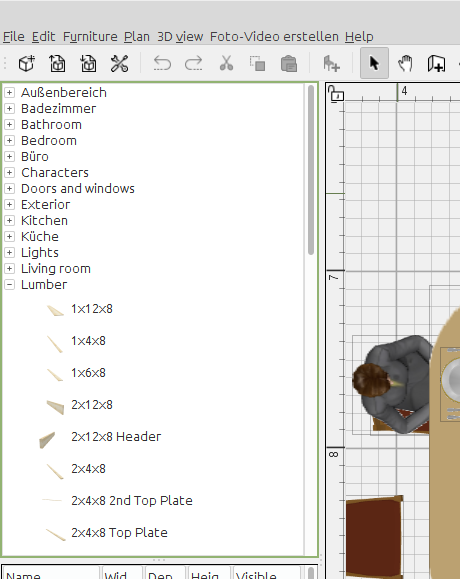
Emmanuel you are right that a normal user is not affected because he sets his language once.
Developers, translators and those who change the language for screenshots for help in the forum are affected. As enkonyito wrote it would avoid to exit SH3D each time we change the language.
BTW: Multiple instances will not help. Changing the language in one instance will also change in the other instance (only tested with Linux).
In the category view the German texts of the standard libraries will also not be removed when changing to English. With imported libraries this will happen.
German:
After changing to English:
MSI GP60, Linux Mint 21.3 Virginia base: Ubuntu 22.04 jammy, SH3D 7.5 with Photo-video rendering 2.8
Who is online
Users browsing this forum: No registered users and 1 guest