Maybe it is my windows setup, but from the list of levels in the top pane it is hard to see which one is currently in view. I would even say it is impossible to see as all tabs in it seem have the same color.
Is it possible to better highlight the active level?
Also when right clicking on the levels pane I would expect to just get the popup menu window, but it also causes to make the level the cursor happens to be on active (i.e. the drawing pane changes to that level).
(I saw/see this on version 7.2 and 7.3)
Thanks
levels list pane
This topic has been viewed 15874 times and has 1 replies

Re: levels list pane
You're right, the difference between the selected level tab and the other tabs is actually less visible under Windows 11 (right in the following image) than under Windows 10 (left). I note this and will try to improve it in a future version.
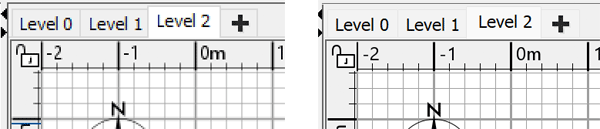
This right click behaves quite weirdly. Sometimes it selects a tab, sometimes not. I will try to fix that too.when right clicking on the levels pane I would expect to just get the popup menu window, but it also causes to make the level the cursor happens to be on active
Emmanuel Puybaret, Sweet Home 3D creator
Who is online
Users browsing this forum: No registered users and 1 guest