When I conducted my original tests, I did try enlarging the interface without using the maximize button, to see if the window positions stayed constant, which they do, the only problem is, it is very easy to forget when switching applications, if instead of minimizing Sweet Home, I just move the interface window slightly off screen (so some of the desktop is available) then on returning to use Sweet Home, without thinking double click anywhere the title bar which is my preferred method to maximize an application.
I can understand you not wanting to get too technical, so keeping it simple, which is prefect for me! [:)] With the windows positions creeping (or changing) I'm guessing their current horizontal and vertical positions aren't defined by a percentage calculation when the interface is maximized? As that figure would never change no mater what the users screen resolution or aspect ratio.
Thank you for your reply and offering a workaround.
db4tech
 Sweet Home 3D 2.4
This topic has been viewed 279951 times and has 36 replies
Re: Sweet Home 3D 2.4
Hi Emmanuel and Hans,Emmanuel:
Maybe I'm too quick with this post of my test with v2.4.
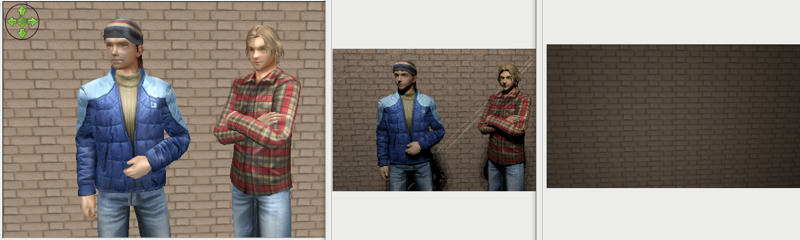
From left to right:
- The standard render in the 3D pane
- The "old" photo render
- The new Phong render (all 3 plug-ins have this problem)
The gentlemen are zip-files from the Google Sketchup library in the Collada file format.
Nevertheless, you've done a terrific job once again!
Hans
I just discovered a different type of rendering bug with shiny parts on some Google Sketchup models.
Here's how the models appear in the 3D quick view.

This is the inbuilt photo render.

Advanced photo render

Uber photo render.

Apart from no colours Uber came the closest rendering the helmet but that could simply be because there are no colours?
It is a shame all Google Sketchup human figures are very low poly, I don't have time to try this at the moment but I guess the only way around that would be to export them as .obj files, smooth them then import them again? Don't want to cause any problems with the model designers though.
PS: I didn't do a render for Phong, after discovering Phong's limitations with my floor tests I uninstalled and stopped using it.
db4tech

Re: Sweet Home 3D 2.4
I've seen this problem on a (human) model too, but didn't find how to fix it yet.
As it appears only in SunFlow, it's either a bug in the code I wrote that transforms Java3D shapes to SunFlow shapes, or a bug in SunFlow.
As it appears only in SunFlow, it's either a bug in the code I wrote that transforms Java3D shapes to SunFlow shapes, or a bug in SunFlow.
At least these models exist, and Sweet Home 3D users can use them even if Google 3D Warehouse models are not distributed under a free license. Personally, I found them quite nice, and I appreciate that many models in Google 3D Warehouse use a medium resolution. Most Sweet Home 3D users don't need 3D models with too much details.It is a shame all Google Sketchup human figures are very low poly
I tested it and it didn't change anything. [:(]I don't have time to try this at the moment but I guess the only way around that would be to export them as .obj files, smooth them then import them again? Don't want to cause any problems with the model designers though.
Emmanuel Puybaret, Sweet Home 3D creator
Re: Sweet Home 3D 2.4
You are a very clever programmer, it is just a matter of time. [:)]I've seen this problem on a (human) model too, but didn't find how to fix it yet.
As it appears only in SunFlow, it's either a bug in the code I wrote that transforms Java3D shapes to SunFlow shapes, or a bug in SunFlow.
Here are my first tests, I did mess up the textures (textures have fractured) and don't know enough about (or have time at the moment to learn about) UV texture mapping to fix them but I'm sure you can see how much smoother the model surface mesh looks, hair, face and (her) left arm. [:)]I tested it and it didn't change anything. [:(]I don't have time to try this at the moment but I guess the only way around that would be to export them as .obj files, smooth them then import them again? Don't want to cause any problems with the model designers though.
3D quick view, looking smooth

Same scene Advanced photo render

Exported, smoothed then imported model. Once the UV textures are corrected should look good?

Location photo shoot [:)]

Right off to bed, very busy day tomorrow, Oops! I mean today! [:D]
db4tech
Re: Sweet Home 3D 2.4
db4tech, I found a way to fix the problem you mentioned above.
Please update to plug-in version 1.4.
Please update to plug-in version 1.4.
Emmanuel Puybaret, Sweet Home 3D creator
Re: Sweet Home 3D 2.4
You sir are a genius! [:)] [:)]db4tech, I found a way to fix the problem you mentioned above.
Please update to plug-in version 1.4.
So users can see the difference with the Google Sketchup models. Here is the exact same scene rendered with the two different shader versions
Old: advanced photo render 1.3

New: advanced photo render 1.4 Wow! [:)]

She said she is feeling much better now, so both Her & I would like to thank you. [:D]
db4tech
Edit: Updated the pictures, I attached a colour profile to the original ones by mistake, so they looked a bit pale in comparison.
Who is online
Users browsing this forum: No registered users and 1 guest