
db6tech:
Due to inflation..... hehehe
Sorry, I didn't sleep enough, I guess. Off course it's a furniture file. I'll try to remember to read the question before answering it.
Sorry Melonfrog!
Hans
Advanced rendering plug-in
This topic has been viewed 280759 times and has 76 replies

Re: Simulate sun position and lights/shadows
SH3F fles may be installed with Furniture > Import furniture library... menu item too.
Emmanuel Puybaret, Sweet Home 3D creator
Re: Simulate sun position and lights/shadows
Thanks everyone.
Still learning on how to position the lights to create the proper effect.
One question, will it take a long time to render using this plugin?
I have problem with it stopping during rendering too.
Still learning on how to position the lights to create the proper effect.
One question, will it take a long time to render using this plugin?
I have problem with it stopping during rendering too.
Re: Simulate sun position and lights/shadows
Melonfrog:
Rendering can take a very long time, depending on:
- the speed of your computer
- the size of your model
- the number of lights you are using (try the same model with 2 and 20 lights)
- the size of the photo you make
- the quality settings of your photo render.
Because rendering uses a lot of memory you may choose to increase the maximum memory settings that SH3D can use. Read this thread for an explanation.
Hans
Rendering can take a very long time, depending on:
- the speed of your computer
- the size of your model
- the number of lights you are using (try the same model with 2 and 20 lights)
- the size of the photo you make
- the quality settings of your photo render.
Because rendering uses a lot of memory you may choose to increase the maximum memory settings that SH3D can use. Read this thread for an explanation.
Hans
Re: Simulate sun position and lights/shadows
Here are new releases of the Advanced Rendering plug-ins:
http://www.sweethome3d.com/plugins/Adva ... g-1.4.sh3p
http://www.sweethome3d.com/plugins/Adva ... r-1.4.sh3p
It brings corrections for two annoying bugs:
- The wrong rendering that happened with some double-sided 3D models like many DAE/Collada ones is fixed (but not the other problem seen on very few 3D models where triangles appear at rendering),
- The memory leak some of you tested is not completely fixed, but rendering the same home again and again with Advanced Rendering plug-ins won't consume more memory anymore. The memory leak comes from a static textures cache I wasn't aware of, and it will completely be fixed in next Sweet Home 3D release with a new SunFlow library.
Thank you for reporting problems. [:)]
http://www.sweethome3d.com/plugins/Adva ... g-1.4.sh3p
http://www.sweethome3d.com/plugins/Adva ... r-1.4.sh3p
It brings corrections for two annoying bugs:
- The wrong rendering that happened with some double-sided 3D models like many DAE/Collada ones is fixed (but not the other problem seen on very few 3D models where triangles appear at rendering),
- The memory leak some of you tested is not completely fixed, but rendering the same home again and again with Advanced Rendering plug-ins won't consume more memory anymore. The memory leak comes from a static textures cache I wasn't aware of, and it will completely be fixed in next Sweet Home 3D release with a new SunFlow library.
Thank you for reporting problems. [:)]
Emmanuel Puybaret, Sweet Home 3D creator
Re: Simulate sun position and lights/shadows
Wow fantastic thank you! [:)]
Do you know that the Uber shader window is displaying Create Advanced photo Phong shader Uber shader?
db4tech
Do you know that the Uber shader window is displaying Create Advanced photo Phong shader Uber shader?
db4tech
Re: Simulate sun position and lights/shadows
Emmanuel Puybaret, Sweet Home 3D creator
Re: Simulate sun position and lights/shadows
Users wanting to download BasicPlusExtraLights.sh3f please note, there is now an updated version 1.2I have created some extra (coloured) lights for use when using Emanuel's new Advanced rendering plug-in.
There are 8 new lights in total (also notice the fireglow) [:)]

The original basiclights.sh3f will need uninstalling or duplicate names will show, this pack also contains the original lights. All lights including originals have been renamed, so when used in a model they will all stay together on a furniture list, making finding them and editing easier.
These have been cleared with Emmanuel.
Have fun!
db4tech
Here is a link and information about the latest version. [:)]
>>> Click Here <<<
db4tech
Re: Simulate sun position and lights/shadows
People!
Please stop downloading version 1.1 of the BasicPlusExtraLights. [:D]
BasciPlusExtraLights version 1.2 is so much nicer! [:)]
Version 1.2 BasicPlusExtraLights.sh3f Preview

>>> Here is the link <<<
db4tech
Please stop downloading version 1.1 of the BasicPlusExtraLights. [:D]
BasciPlusExtraLights version 1.2 is so much nicer! [:)]
Version 1.2 BasicPlusExtraLights.sh3f Preview
>>> Here is the link <<<
db4tech
Re: Simulate sun position and lights/shadows
I'm pleased to announce the release of the version 1.6 of the Advanced rendering plug-in.
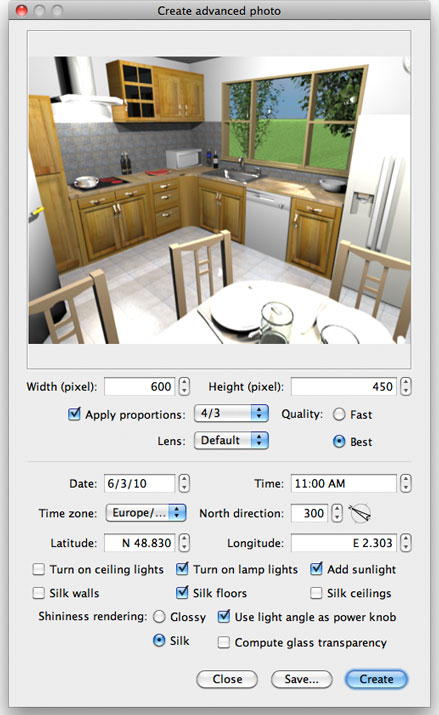
As described in Sweet Home 3D blog, it brings these new features:
- Uber shader can be chosen by selecting the Silk radio button. This will render walls, floors, ceilings as silk if you selected also the matching check boxes, and 3D objects will appear as matte, silk or shiny depending on their shininess.
- If you select the Use light bulb angle as power knob check box, the power emitted by the light bulbs coming from the updated basicLights.sh3f or the BasicPlusExtraLights.sh3f will depend on their angle in the plan.
- Finally, it's now possible to let light go through furniture glass panes by selecting Compute glass transparency. Miserably, this last feature doesn't work when a sunlight is added.
I hope you'll appreciate these new features and am looking forward the images you'll create with them. Again a big thank to db4tech for all the time he spent to help me.
[Edit: Fixed the bad link to the plug-in. Thank you HectiGonzalez for reporting this problem]
As described in Sweet Home 3D blog, it brings these new features:
- Uber shader can be chosen by selecting the Silk radio button. This will render walls, floors, ceilings as silk if you selected also the matching check boxes, and 3D objects will appear as matte, silk or shiny depending on their shininess.
- If you select the Use light bulb angle as power knob check box, the power emitted by the light bulbs coming from the updated basicLights.sh3f or the BasicPlusExtraLights.sh3f will depend on their angle in the plan.
- Finally, it's now possible to let light go through furniture glass panes by selecting Compute glass transparency. Miserably, this last feature doesn't work when a sunlight is added.
I hope you'll appreciate these new features and am looking forward the images you'll create with them. Again a big thank to db4tech for all the time he spent to help me.
[Edit: Fixed the bad link to the plug-in. Thank you HectiGonzalez for reporting this problem]
Emmanuel Puybaret, Sweet Home 3D creator
Who is online
Users browsing this forum: No registered users and 1 guest